WCAG 2.4.12 Focus Not Obscured (Enhanced) Explained in Plain English
WCAG 2.4.12 Focus Not Obscured (Enhanced) explained simply: how it differs from 2.4.11, who it helps, CSS scroll-padding fixes and how to test for it.
Table of contents
2.4.12 Focus Not Obscured (Enhanced) is the WCAG rule that keeps the element you are on fully in view while you move through a page with a keyboard. When a link, button or form field receives keyboard focus, no part of it may be hidden by content the site added, such as a sticky header, a cookie banner, a chat widget or a promotional bar. This guide explains 2.4.12 Focus Not Obscured (Enhanced) in plain English, how it differs from the Level AA version, who it helps, how to fix it with CSS and how to test it.
The official wording: “When a user interface component receives keyboard focus, no part of the component is hidden by author-created content.” (W3C, WCAG 2.2). See also the W3C’s Understanding 2.4.12.
What Is 2.4.12 Focus Not Obscured (Enhanced)?
2.4.12 Focus Not Obscured (Enhanced) is a Level AAA success criterion added in WCAG 2.2. It sits under the Operable principle, in the guideline about helping people navigate.
When someone presses Tab, focus moves to the next link, button or field, and the browser scrolls it into view. But sites often have content fixed to the screen, such as a header that stays at the top or a bar pinned to the bottom. The browser does not know about those, so it can scroll the focused element right underneath them. 2.4.12 says the focused element must be completely visible, every time.
2.4.12 Focus Not Obscured (Enhanced) vs 2.4.11 Focus Not Obscured (Minimum)
WCAG 2.2 has two versions of this rule:
- 2.4.11 Focus Not Obscured (Minimum), Level AA: the focused element must not be entirely hidden. Partly covered is allowed.
- 2.4.12 Focus Not Obscured (Enhanced), Level AAA: no part of the focused element may be hidden.
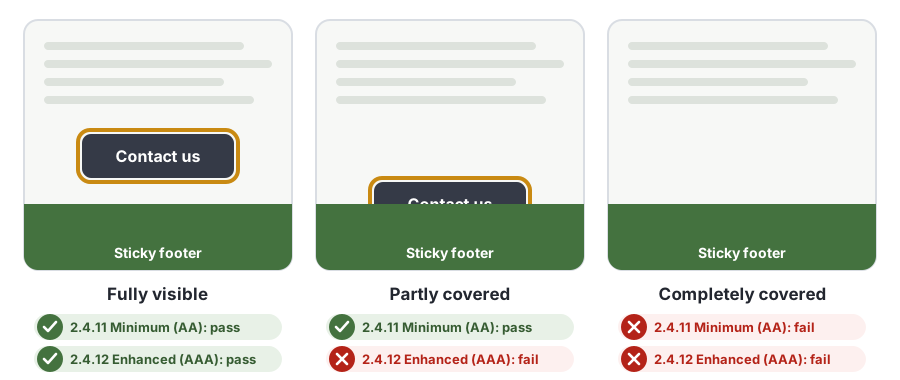
If you meet 2.4.12, you automatically meet 2.4.11. Most accessibility laws ask for Level AA, so 2.4.12 is usually a goal rather than a legal requirement, but it is the better experience and often costs little extra once you have fixed 2.4.11.
Why 2.4.12 Focus Not Obscured (Enhanced) Matters
Sighted keyboard users rely on the focus indicator to know where they are. If the focused element is hidden, even partly, they may:
- Not know which link or button they are on, and activate the wrong one
- Think the page has stopped responding when focus disappears under a banner
- Miss a form field and submit an incomplete form
- Lose their place and have to start again from the top
A partly covered element is still a problem. If a sticky footer hides the lower half of a button, the focus outline may be hidden too, or the label may be cut off and impossible to read.
Who Is Affected by 2.4.12 Focus Not Obscured (Enhanced)
- People who use a keyboard instead of a mouse, including many people with motor disabilities, tremors or repetitive strain injuries.
- People who use switch devices, sip-and-puff controls or voice control, which move focus like a keyboard does.
- People with low vision who zoom in. At 200% zoom or more, sticky headers and footers take up a much larger share of the screen, so they cover focused elements more often.
- People with cognitive or attention-related disabilities, who benefit from always seeing clearly where they are on the page.
How to Meet 2.4.12 Focus Not Obscured (Enhanced)
Reserve space for sticky headers and footers with scroll-padding
The simplest fix is the CSS scroll-padding property. It tells the browser how much of the viewport is covered, so when it scrolls a focused element into view it keeps it clear of your fixed content. The W3C documents this as technique C43: Using CSS scroll-padding to un-obscure content.
/* Match these to the height of your sticky header and footer */
html {
  scroll-padding-top: 88px;
  scroll-padding-bottom: 64px;
}
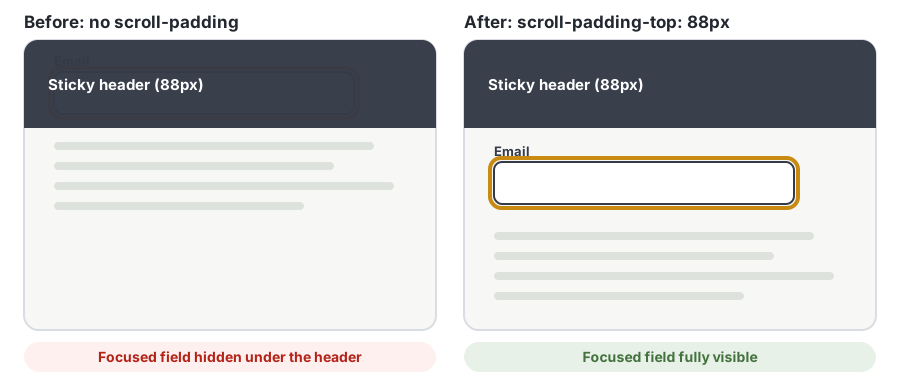
If the header changes height, for example on small screens, set the value with a CSS custom property, or use scroll-margin on individual elements. Test at your main breakpoints and at 200% and 400% zoom.
Keep banners and popups from covering the page
Cookie banners, chat launchers, promotional bars and newsletter popups are the most common causes of 2.4.12 failures. Choose one of these patterns:
- Make it a true modal dialog. Move focus into it, keep focus inside it until it is closed and return focus afterwards. Nothing behind a modal can receive focus, so nothing is obscured.
- Reserve space for it. Push the page content up or down so the banner never overlaps anything focusable.
- Make it small and out of the way, such as a chat button in a corner with enough scroll padding that nothing focused ends up underneath it.
Watch out for transparent overlays
A semi-transparent popup or gradient over content still gets in the way. It can make the focused element hard to see and can lower the contrast of the focus indicator, which brings in 1.4.11 Non-text Contrast and 2.4.13 Focus Appearance. The safest approach is to make sure nothing overlaps a focused element at all.
Use JavaScript only where CSS cannot help
Modern browsers handle most cases once scroll-padding is set. For custom scrolling containers or components that appear and disappear, you can check the focused element on focusin and scroll it into view:
document.addEventListener('focusin', (event) => {
  const el = event.target;
  const header = document.querySelector('.site-header');
  const top = el.getBoundingClientRect().top;
  if (header && top < header.getBoundingClientRect().bottom) {
    el.scrollIntoView({ block: 'center' });
  }
});
Keep this as a fallback. CSS is simpler, more reliable and does not fight the browser’s own scrolling.
How to Test for 2.4.12 Focus Not Obscured (Enhanced)
Automated tools cannot reliably test 2.4.12 Focus Not Obscured (Enhanced), because the result depends on the scroll position and window size at the moment focus moves. Test it by hand:
- Open the page and press Tab repeatedly through every link, button and field. Then go backwards with Shift + Tab.
- At every stop, check that the whole focused element and its focus indicator are visible, with nothing on top of it.
- Repeat with any cookie banner, chat widget or popup open, since these are the usual culprits.
- Repeat at a narrow window width and at 200% zoom, where sticky content covers more of the screen.
- Pay special attention to the top and bottom of the window, where sticky headers and footers sit.
Our keyboard accessibility testing guide walks through a full keyboard test. AccessBell runs the automated WCAG 2.2 checks on every page of your site, and its WCAG coverage table shows which criteria, like this one, need a person to check. Run a free scan to see where your site stands, and use WCAG 2.2 Level AAA as your target in AccessBell if you want to track the enhanced criteria too.
Related Success Criteria
- 2.4.11 Focus Not Obscured (Minimum): the Level AA version, where the focused element must not be entirely hidden.
- 2.4.7 Focus Visible: the focused element must have a visible focus indicator.
- 2.4.13 Focus Appearance: the focus indicator must be large enough and have enough contrast, at Level AAA.
- 2.4.3 Focus Order: focus moves through the page in an order that makes sense.
- 2.1.1 Keyboard: everything can be used with a keyboard.
- 1.4.10 Reflow: content works at 400% zoom without scrolling in two directions.
For the rest of the new WCAG 2.2 requirements, see what you should know about WCAG 2.2 and 2.5.8 Target Size (Minimum).
Frequently Asked Questions
What level is WCAG 2.4.12 Focus Not Obscured (Enhanced)?
Level AAA. It is new in WCAG 2.2 and is not part of WCAG 2.0 or 2.1. Most laws and policies ask for Level AA, so 2.4.12 is usually a best practice rather than a legal requirement, but meeting it also guarantees you meet 2.4.11 at Level AA.
What is the difference between 2.4.11 and 2.4.12?
2.4.11 Focus Not Obscured (Minimum), Level AA, fails only when the focused element is entirely hidden. 2.4.12 Focus Not Obscured (Enhanced), Level AAA, fails when any part of the focused element is hidden. A button half-covered by a sticky footer passes 2.4.11 but fails 2.4.12.
Does a cookie banner fail 2.4.12 Focus Not Obscured (Enhanced)?
It can. If keyboard users can tab to links or buttons behind the banner and any part of them is covered, that fails 2.4.12. Fix it by moving focus into the banner until it is dismissed, by making it a true modal dialog, or by reserving space for it so it never overlaps the page.
Can automated tools test 2.4.12?
Not reliably. Whether a focused element is covered depends on scrolling, the viewport size and which elements are sticky or fixed at that moment. Test it by hand by tabbing through each page at different window sizes and zoom levels.
Does content that the user can move count?
The W3C notes that where content in a configurable interface can be repositioned by the user, only the initial positions of user-movable content are considered when testing. If a user drags a toolbar over a link, that is not an author failure.
How we reviewed this article
- Current version
First published. Checked against the W3C WCAG 2.2 Recommendation, the Understanding document for 2.4.12 Focus Not Obscured (Enhanced) and W3C technique C43.