WCAG 2.4.3 Focus Order Explained in Plain English
WCAG 2.4.3 Focus Order explained simply: why keyboard focus must follow a logical order, the tabindex and dialog mistakes that break it and how to test.
Table of contents
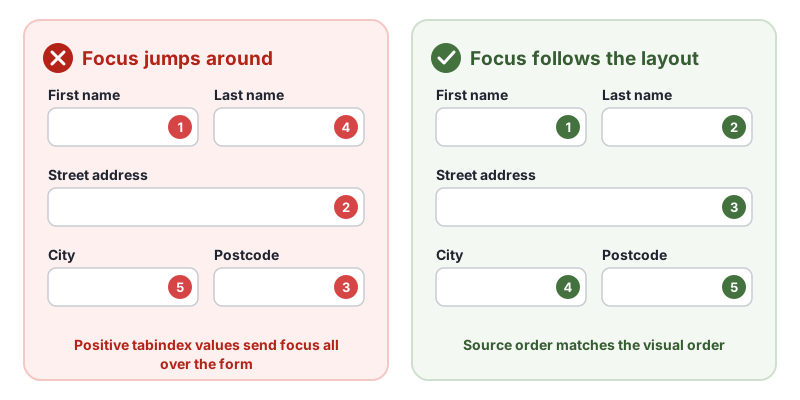
2.4.3 Focus Order is the WCAG success criterion that says when people move through a page with the keyboard, focus must go in an order that makes sense. Tabbing through a form should go from first name to last name to address, not jump to the postcode and back. Opening a dialog should move focus into it. This guide explains WCAG 2.4.3 Focus Order in plain English, the mistakes that break it and how to test your pages.
The official wording: “If a Web page can be navigated sequentially and the navigation sequences affect meaning or operation, focusable components receive focus in an order that preserves meaning and operability.” (W3C, WCAG 2.2)
What Is 2.4.3 Focus Order?
2.4.3 Focus Order is a Level A requirement under the Operable principle, in the guideline “Navigable”. “Navigated sequentially” means moving from one control to the next, usually with Tab and Shift + Tab. The order matters whenever skipping around would change the meaning or make a task harder, which is true for almost every form, menu and dialog.
Why 2.4.3 Focus Order Matters
Sighted keyboard users expect focus to move the way they read. When it jumps unexpectedly they lose their place, skip fields or think the page is broken. Screen reader users build their understanding of the page from the order they meet things in, so a strange order can change the meaning: a “Delete” button reached before the item it deletes, or an error message reached after the field it describes.
Who Is Affected by 2.4.3 Focus Order
- People who use a keyboard or switch device instead of a mouse
- Screen reader users, who experience the page in focus and reading order
- People using screen magnification, who follow focus around a zoomed page
- People with cognitive or attention-related disabilities
How to Meet 2.4.3 Focus Order
Put the HTML in a logical order
Focus follows the order of elements in the source code. Write the HTML in the order people should use it, then lay it out with CSS. This is the W3C technique G59, placing interactive elements in an order that follows sequences and relationships within the content, and C27, making the DOM order match the visual order.
Be careful with CSS that changes the visual order without changing the source, such as order in flexbox, grid-area placement, flex-direction: row-reverse and absolute positioning.
Avoid positive tabindex
<!-- Avoid: overrides the natural order -->
<input id="postcode" tabindex="2">

<!-- Fine -->
<div role="button" tabindex="0">…</div>  <!-- makes a custom control focusable -->
<main id="main" tabindex="-1">…</main>  <!-- lets a script move focus here -->
Using tabindex values that create an order that does not match the meaning is failure F44.
Move focus into dialogs and back again
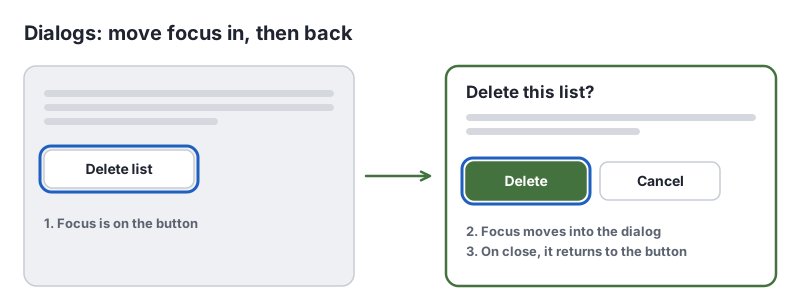
When a dialog, menu or panel opens, move focus into it. When it closes, return focus to the control that opened it. Dialogs added at the end of the page, so keyboard users have to Tab through everything to reach them, are failure F85. The native HTML dialog element opened with showModal() handles much of this for you.
Manage focus when content changes
After deleting an item from a list, move focus to the next item or a sensible heading, not back to the top of the page. After loading more results, keep focus where people were. In single-page apps, move focus to the new page’s heading after a route change.
How to Test for 2.4.3 Focus Order
- Press Tab through the whole page, then Shift + Tab back. Does focus follow the reading order?
- Watch for jumps to the footer, back to the top or between columns.
- Open every dialog, menu and disclosure. Focus should move into it and return when it closes.
- Trigger dynamic changes, such as removing an item or loading more, and check where focus lands.
- Search the code for positive tabindex and for CSS that reorders content.
Our keyboard accessibility testing guide covers focus order alongside the other keyboard checks.
Related Success Criteria
- 1.3.2 Meaningful Sequence: the reading order in the code makes sense.
- 2.1.1 Keyboard: everything works with a keyboard.
- 2.4.7 Focus Visible: you can see where focus is.
- 2.4.11 Focus Not Obscured (Minimum): focus is not hidden behind other content.
Run a free WCAG scan to flag positive tabindex values, then Tab through every task to confirm the order.
Testing WCAG 2.4.3 With AccessBell
This criterion depends on meaning or context, so it needs a person to judge. AccessBell's report lists it for manual review rather than marking it pass or fail automatically, so it is not missed.
Run a free scan to spot issues on your own pages.
Frequently Asked Questions
What level is WCAG 2.4.3 Focus Order?
Level A. It has been in WCAG since version 2.0.
Should I use tabindex to fix focus order?
Only tabindex="0", to make a custom control focusable, and tabindex="-1", to let scripts move focus somewhere that is not normally focusable. Avoid positive values such as tabindex="3": they override the natural order and are a common cause of 2.4.3 Focus Order failures. Fix the order of the HTML instead.
Does focus order have to go strictly left to right?
No. It has to preserve meaning and operability. Different orders can make sense, such as down one column then the next. What fails is an order that confuses people or breaks a task.
Can automated tools test 2.4.3 Focus Order?
Only partly. Tools can flag positive tabindex values, which are a warning sign. Whether the order makes sense needs a person to Tab through the page.
Can AccessBell test WCAG 2.4.3 automatically?
Not fully. This criterion needs a person to judge, so AccessBell's report lists it for manual review rather than marking it pass or fail on its own.
Sources
- W3C: Understanding 2.4.3 Focus Order (opens in a new tab)
- W3C: Web Content Accessibility Guidelines (WCAG) 2.2 (opens in a new tab)
This page explains a technical standard and is not legal advice. See our disclaimer.
How we reviewed this page
- Current version
First published. Checked against the W3C WCAG 2.2 Recommendation, the Understanding document for 2.4.3 Focus Order and the W3C techniques it lists.