WCAG 1.2.9 Audio-only (Live) Explained in Plain English
WCAG 1.2.9 Audio-only (Live) explained simply: what counts as live audio, who it helps, how to add real-time captions or transcripts, and how to test it.
Table of contents
1.2.9 Audio-only (Live) is the WCAG success criterion for live audio. If you stream audio in real time, such as a live radio show, a podcast recorded in front of a live audience or an audio-only press briefing, people who cannot hear it need a text version at the same time. This guide explains WCAG 1.2.9 Audio-only (Live) in plain English, with the options for providing live text and how to check your streams.
The official wording: “Alternative for time-based media that presents equivalent information for live audio-only content is provided.” (W3C, WCAG 2.2)
What Is 1.2.9 Audio-only (Live)?
1.2.9 Audio-only (Live) is a Level AAA requirement under the Perceivable principle, in the guideline on time-based media. It applies to content that is:
- Live: broadcast as it happens, not recorded and published later
- Audio-only: there is sound but no video, like a radio stream or an audio-only event
For that content, you provide a text alternative with equivalent information, while the audio is live. That usually means real-time captions or, when the speaker reads from a script, a transcript of that script. A good text alternative includes who is speaking and meaningful sounds, such as [applause] or [music].
![A live audio player for Trail Talk Radio with a waveform and pause button. Beside it, a live captions panel shows the conversation as text with speaker labels, Host Sam and Guest Ana, and the sound cue [laughter].](/blog/wcag-1-2-9-audio-only-live/live-captions.svg)
Why 1.2.9 Audio-only (Live) Matters
Without a text alternative, live audio is completely closed to anyone who cannot hear it. They cannot wait for a recording, because the point of a live event is to take part while it happens: to follow breaking news, ask a question in a live Q&A or react with everyone else.
Real-time text also helps:
- People with auditory processing disorders, who find it easier to follow fast or overlapping speech when they can read it
- People listening in a second language
- Anyone in a noisy place or a place where they cannot play sound
Who Is Affected by 1.2.9 Audio-only (Live)
- People who are deaf or hard of hearing
- People who are deafblind, who can read live text on a braille display
- People with auditory processing disorders
- People who speak the language as a second language
- Anyone who cannot use sound at that moment
How to Meet 1.2.9 Audio-only (Live)
Use real-time captioning for unscripted audio
For interviews, call-in shows, panels and Q&As, use a real-time captioning service, often called CART (Communication Access Realtime Translation). A trained captioner listens and types what is said within seconds, including speaker changes and important sounds. This is the W3C technique G157, incorporating a live audio captioning service into a web page.
Automatic captions are improving and are better than nothing, but they often miss names, specialist terms and who is speaking. For important events, use a human captioner, or have someone watch and correct the automatic captions live.
Show the captions where people can find them
- Put a live caption panel next to the audio player, or show captions inside the player itself.
- Label it clearly, such as “Live captions”, and make sure it works with screen readers and at 200% zoom.
- Let the text scroll without jumping, so people can read at their own pace.
Link a transcript when the audio follows a script
If the live audio is a prepared statement read word for word, a transcript of that script can be the text alternative. This is the W3C technique G151, providing a link to a text transcript of a prepared statement or script.
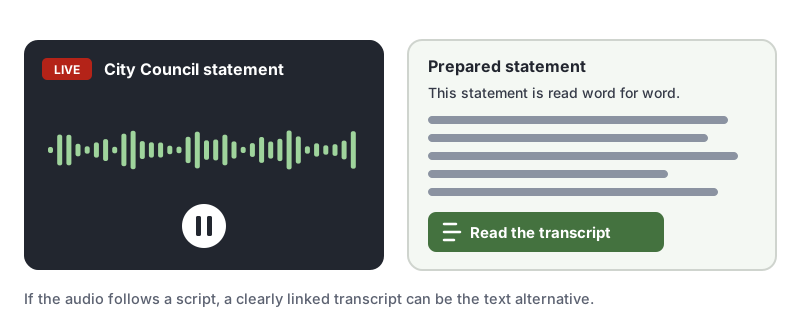
Make the link easy to find, right next to the player, and keep it accurate. If the speaker goes off-script, the transcript no longer matches, so add live captions for anything unscripted.
How to Test for 1.2.9 Audio-only (Live)
Automated checkers cannot tell whether a live stream has an equivalent text alternative, so test live content by hand:
- List every live audio stream on your site: radio streams, live podcasts, audio briefings and audio-only calls.
- During a live session, check that captions or a transcript are available at the same time as the audio.
- Compare a few minutes of captions to what is said. Check names, numbers, speaker labels and sounds.
- Confirm people can find and read the text with a keyboard, a screen reader and at 200% zoom.
For a quick reference, see our 1.2.9 Audio-only (Live) page in the WCAG library.
Related Success Criteria
- 1.2.1 Audio-only and Video-only (Prerecorded): recorded audio needs a transcript.
- 1.2.4 Captions (Live): live video with audio needs captions, at Level AA.
- 1.2.2 Captions (Prerecorded): recorded video needs captions.
Want to find the accessibility issues software can catch around your media, such as unlabeled players and controls? Run a free WCAG scan.
Frequently Asked Questions
What level is WCAG 1.2.9 Audio-only (Live)?
Level AAA. It has been part of WCAG since version 2.0. Most laws ask for Level AA, so it is rarely a legal requirement, but live text alternatives make audio events open to people who are deaf or hard of hearing.
What is the difference between 1.2.9 and 1.2.4 Captions (Live)?
1.2.4 Captions (Live) is Level AA and covers live media with video and audio, such as a livestream or webinar with video. 1.2.9 Audio-only (Live) is Level AAA and covers live content with audio but no video, such as a live radio stream, podcast recording or audio-only call.
Are automatic captions enough for 1.2.9 Audio-only (Live)?
The text alternative has to present equivalent information. Automatic speech recognition has improved, but it still often gets names, jargon and speaker changes wrong. For important events, human real-time captioning (CART) is the most reliable option, or have someone monitor and correct automatic captions.
Does 1.2.9 apply to recorded podcasts?
No. Recorded audio is covered by 1.2.1 Audio-only and Video-only (Prerecorded), which asks for a transcript. 1.2.9 only applies while the audio is being broadcast live.
How we reviewed this article
- Current version
First published. Checked against the W3C WCAG 2.2 Recommendation and the Understanding document for 1.2.9 Audio-only (Live).