WCAG 2.5.8 Target Size (Minimum) Explained in Plain English
WCAG 2.5.8 Target Size (Minimum) explained simply: the 24 by 24 pixel rule, the spacing test, the five exceptions, CSS fixes and how to check your site.
Table of contents
2.5.8 Target Size (Minimum) is the WCAG rule that makes buttons and links big enough to hit. Every clickable or tappable target should be at least 24 by 24 CSS pixels, or have enough space around it that a slightly-off tap does not land on something else. This guide explains 2.5.8 Target Size (Minimum) in plain English, with the spacing test, the exceptions, CSS fixes and how to check your own site.
The official wording: “The size of the target for pointer inputs is at least 24 by 24 CSS pixels”, with exceptions for spacing, equivalent controls, inline targets, user agent controls and essential presentations. (W3C, WCAG 2.2)
What Is 2.5.8 Target Size (Minimum)?
2.5.8 Target Size (Minimum) is a Level AA success criterion that was added in WCAG 2.2. It sits under the Operable principle, in the guideline on input modalities.
A target is the area that responds to a pointer: a mouse click, a tap or a stylus. The rule is about that area, not the visible icon. A small icon can pass if its button has enough padding.
There are two ways to pass:
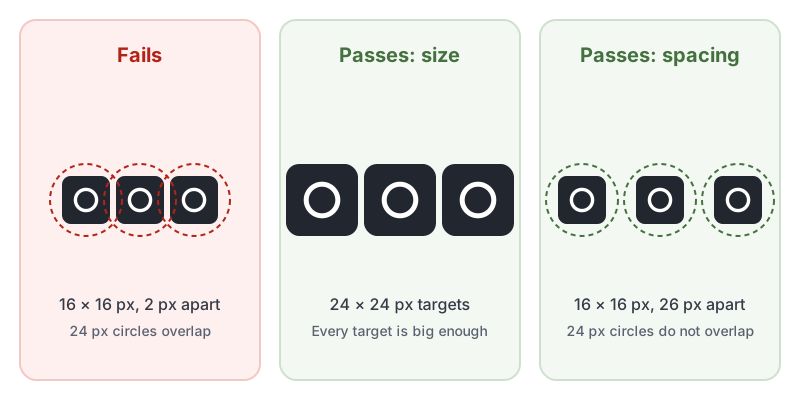
- Size: the target is at least 24 by 24 CSS pixels.
- Spacing: if a target is smaller, imagine a circle 24 pixels across centered on it. If that circle does not overlap any other target, or the circle around another small target, it passes.
Why 2.5.8 Target Size (Minimum) Matters
Tiny, tightly packed controls cause mis-taps for everyone. For some people they make a site unusable:
- People with hand tremors, arthritis or limited dexterity cannot always place a pointer precisely. A 16 pixel close button right next to a “Delete” button is a real risk.
- People using a phone one-handed, on a moving bus or with a larger finger pad hit neighboring targets by accident.
- People using head pointers, eye tracking or a mouth stick move less precisely than a mouse, so small targets take several attempts.
Who Is Affected by 2.5.8 Target Size (Minimum)
- People with motor disabilities, including tremors and limited fine motor control
- Older adults, whose dexterity and vision may be declining
- People using touchscreens, especially on small phones
- People using alternative pointing devices such as head, eye or mouth pointers
- Anyone in an unsteady situation, such as walking or on public transport
How to Meet 2.5.8 Target Size (Minimum)
Give small controls a bigger hit area
The easiest fix is a minimum size on anything clickable. Keep the icon the same size and let padding do the work:
/* Every icon button and icon link is at least 24 by 24 CSS pixels */
.icon-button,
.icon-link {
  display: inline-flex;
  align-items: center;
  justify-content: center;
  min-width: 24px;
  min-height: 24px;
}

/* A 16 px icon with 4 px of padding on every side = a 24 px target */
.icon-button svg {
  width: 16px;
  height: 16px;
}
Going further helps more people. Many teams use 44 by 44 pixels on touch screens, which also meets the stricter Level AAA criterion, 2.5.5 Target Size (Enhanced).
Or space small targets apart
If a design really needs small controls, such as a row of social icons, space them so each one’s 24 pixel circle stays clear of the others. In practice that means centers at least 24 pixels apart, with nothing else clickable inside the circle.
Know the five exceptions
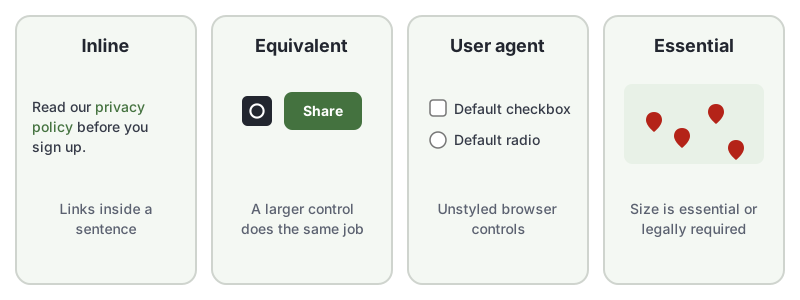
2.5.8 Target Size (Minimum) does not apply when:
- Spacing: the small target passes the 24 pixel circle test described above.
- Equivalent: the same function is available through another control on the page that meets the size requirement.
- Inline: the target is in a sentence, or its size is limited by the line height of the text around it, like a link in a paragraph.
- User agent control: the browser decides the size and you have not changed it, such as a default checkbox.
- Essential: the size or position is essential or legally required, such as pins on a map.
How to Test for 2.5.8 Target Size (Minimum)
Automated testing can check this criterion, but only if the rule is switched on. In our test of 10 accessibility checker tools, only 3 of the 10, including AccessBell, caught a row of 16 pixel social icons. axe-core, the engine behind many popular checkers, ships with its target-size rule turned off by default. AccessBell turns it on for every WCAG 2.2 scan.
To test by hand:
- Open your browser’s developer tools and inspect small controls: icon buttons, close buttons, pagination links, carousel dots and social icons.
- Check the rendered width and height of the clickable element, not just the icon inside it.
- For anything under 24 by 24 pixels, check the spacing: is there another target within 12 pixels of its center?
- Check whether an exception applies before marking it as a failure.
Then run a free WCAG 2.2 scan to find undersized targets across the page automatically. For a quick reference, see our 2.5.8 Target Size (Minimum) page in the WCAG library.
Related Success Criteria
- 2.5.5 Target Size (Enhanced): the Level AAA version, at 44 by 44 CSS pixels.
- 2.5.1 Pointer Gestures: complex gestures need a simple single-pointer alternative.
- 2.5.2 Pointer Cancellation: people can back out of an accidental press.
- 2.5.7 Dragging Movements: dragging needs a single-pointer alternative, also new in WCAG 2.2.
Frequently Asked Questions
What level is WCAG 2.5.8 Target Size (Minimum)?
Level AA. It is new in WCAG 2.2, so it applies to any site that targets WCAG 2.2 Level AA. It is not part of WCAG 2.0 or 2.1.
Does the icon itself have to be 24 by 24 pixels?
No. 2.5.8 Target Size (Minimum) measures the target, meaning the area that responds to a click or tap. A 16 pixel icon inside a button with 4 pixels of padding on each side has a 24 by 24 pixel target and passes.
What is the difference between 2.5.8 and 2.5.5?
2.5.8 Target Size (Minimum) is Level AA and asks for 24 by 24 CSS pixels, with several exceptions. 2.5.5 Target Size (Enhanced) is Level AAA and asks for 44 by 44 CSS pixels.
Do links in a paragraph have to be 24 pixels tall?
No. Targets inside a sentence, or whose size is limited by the line height of the surrounding text, are exempt under the inline exception.
How we reviewed this article
- Current version
First published. Checked against the W3C WCAG 2.2 Recommendation and the Understanding document for 2.5.8 Target Size (Minimum).