WCAG 4.1.1 Parsing Explained in Plain English
WCAG 4.1.1 Parsing explained simply: what it required, why WCAG 2.2 removed it, and the markup habits that still matter, with examples and how to test.
Table of contents
4.1.1 Parsing is the WCAG success criterion that asked web pages to be written with valid, well-formed markup. It is also the only criterion that WCAG 2.2 removed. If you are searching for it, the short answer is that you no longer need to test for it, but the habits behind it still prevent real bugs. This guide explains WCAG 4.1.1 Parsing in plain English: what it required, why the W3C dropped it, and what to check instead.
What it said (WCAG 2.1): “In content implemented using markup languages, elements have complete start and end tags, elements are nested according to their specifications, elements do not contain duplicate attributes, and any IDs are unique, except where the specifications allow these features.” (W3C, WCAG 2.1)
What Was 4.1.1 Parsing?
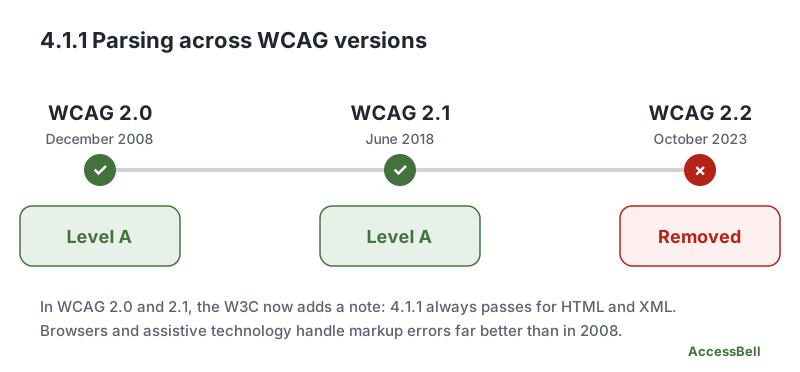
4.1.1 Parsing was a Level A requirement under the Robust principle, present in WCAG 2.0 and WCAG 2.1. The idea was simple: if your code is malformed, assistive technology might read it wrongly, so the code should follow the rules of its markup language.
It asked for four things:
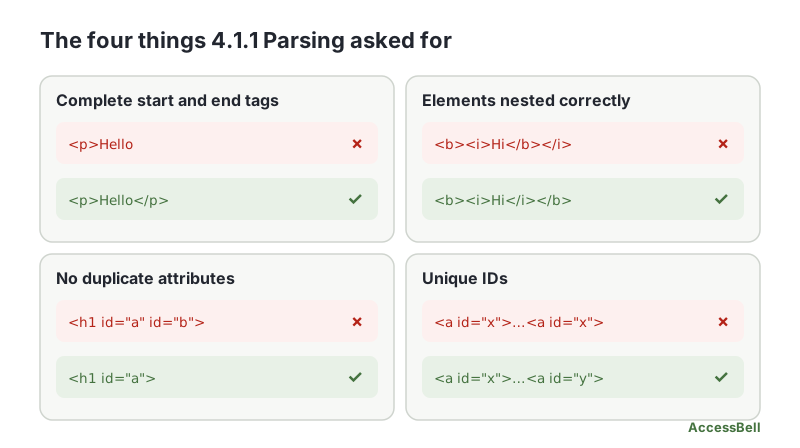
- Complete start and end tags for elements that need them
- Correct nesting, so elements close in the reverse order they opened
- No duplicate attributes on a single element
- Unique IDs across the page
Why WCAG 2.2 Removed 4.1.1 Parsing
The W3C removed the criterion because the problem it solved no longer exists in practice. When WCAG 2.0 was published in 2008, browsers and assistive technology handled bad markup unpredictably. Today:
- HTML defines exactly how browsers must recover from errors, so every modern browser builds the same page from the same broken code.
- Assistive technology reads the browser’s accessibility tree, not the raw HTML, so it is shielded from most parsing errors.
For WCAG 2.0 and 2.1, the W3C added a note saying that 4.1.1 should be treated as always satisfied for content using HTML or XML. The W3C lists the removal on its page What’s New in WCAG 2.2, and our overview of what you should know about WCAG 2.2 covers the other changes. Our WCAG 2.2 AA checklist leaves it out for the same reason.
The takeaway for site owners: do not fail a page on 4.1.1 Parsing alone, and do not report it as a WCAG 2.2 failure.
Who Was Affected by 4.1.1 Parsing?
The original concern was for people who use assistive technology, such as screen readers, magnifiers and speech recognition, because those tools depended on the code being interpreted correctly. Today the risk sits mostly with specific bugs, not with the general idea of “invalid HTML”.
Markup Problems That Still Matter
Dropping the criterion did not make every markup error harmless. A few still break accessibility, and they are covered by other criteria.
Duplicate IDs that are referenced
IDs are how the code connects one element to another. A label finds its field through for. aria-labelledby, aria-describedby and aria-controls find their targets by ID. If two elements share an ID, the connection can land on the wrong one:
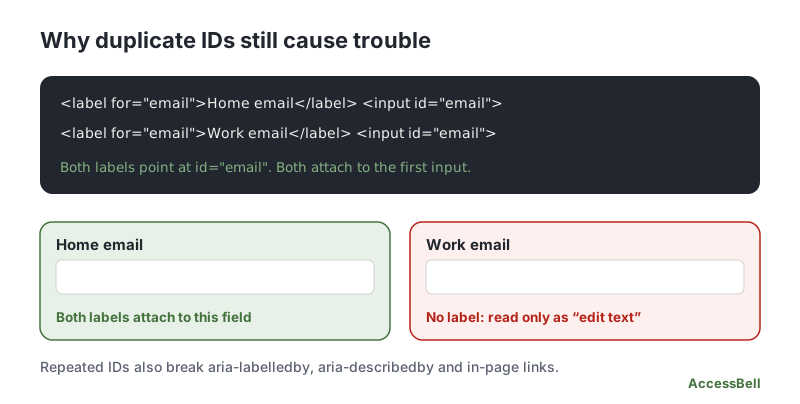
<!-- Fails: both inputs share id="email" -->
<label for="email">Home email</label> <input id="email">
<label for="email">Work email</label> <input id="email">

<!-- Passes -->
<label for="home-email">Home email</label> <input id="home-email">
<label for="work-email">Work email</label> <input id="work-email">
This is a failure of 1.3.1 Info and Relationships or 4.1.2 Name, Role, Value, and of 3.3.2 Labels or Instructions, depending on what breaks.
Broken nesting that changes structure
Browsers repair bad nesting, but not always the way you meant. A <div> inside a <p> closes the paragraph early, and a stray </div> can pull content out of a landmark or a list. The page looks fine, and the structure a screen reader user hears is different from what you intended.
Invalid ARIA and duplicate attributes
Unknown roles, misspelled aria- attributes and missing required attributes are real accessibility errors, and are checked under 4.1.2 Name, Role, Value.
How to Test Your Markup Today
You do not need a 4.1.1 test, but a few quick checks catch the bugs above:
- Run an automated scan. An automated checker reports duplicate IDs that break labels or ARIA references, invalid roles and other structural problems, each with the failing HTML. A free accessibility scan shows how many a page has, and AccessBell Pro lists each one.
- Validate as a debugging aid. The W3C’s Nu HTML Checker finds unclosed elements and duplicate attributes. Treat the results as hints, not as WCAG failures, and fix those that affect structure.
- Search the page for repeated IDs used by labels and ARIA attributes, especially in components that render more than once, such as cards, tabs and repeated forms.
- Check the accessibility tree. In your browser’s developer tools, confirm that key fields still show the right name and role.
Related Success Criteria
- 1.3.1 Info and Relationships: structure and relationships are available in the code.
- 4.1.2 Name, Role, Value: controls expose a name, role and state.
- 4.1.3 Status Messages: updates are announced without moving focus.
Want to find the structural problems that still matter? Run a free WCAG scan of any page, or start a 3-day free trial to monitor up to 500 URLs per domain every day.
Frequently Asked Questions
What level is WCAG 4.1.1 Parsing?
Level A in WCAG 2.0 and 2.1. It was removed from WCAG 2.2, so it no longer appears there at all.
Do I still need to meet 4.1.1 Parsing?
If you follow WCAG 2.2, no, because the criterion no longer exists. If a law or contract still points to WCAG 2.0 or 2.1, the W3C has added a note to those versions saying 4.1.1 always passes for content written in HTML or XML. Either way, clean markup is still good practice.
Why was 4.1.1 Parsing removed?
When WCAG 2.0 was published in 2008, browsers and assistive technology handled broken markup badly. Since then, HTML has defined how browsers recover from errors, and assistive technology reads the browser's own interpretation of the page instead of parsing the code itself. Most parsing errors stopped causing real barriers.
Are duplicate IDs still a problem?
Yes, when the ID is referenced. Labels that use for, and attributes such as aria-labelledby, aria-describedby and aria-controls, look up an element by its ID. If two elements share an ID, the reference can point at the wrong one. That is a failure of criteria such as 1.3.1 Info and Relationships or 4.1.2 Name, Role, Value, not of 4.1.1.
Does a failed HTML validator mean my site fails WCAG?
No. Validators report many things that do not affect accessibility. Use validation as a debugging aid, and fix the errors that change how the page is read, such as duplicate IDs, broken nesting and invalid ARIA.
How we reviewed this article
- Current version
First published. Checked against the W3C WCAG 2.1 and 2.2 Recommendations, the WCAG 2.0 and 2.1 note on 4.1.1 and the W3C "What's New in WCAG 2.2" page.