WCAG 2.2.3 No Timing Explained in Plain English
WCAG 2.2.3 No Timing explained simply: why time limits exclude people, the two exceptions, how it differs from 2.2.1, and how to remove timers from your site.
Table of contents
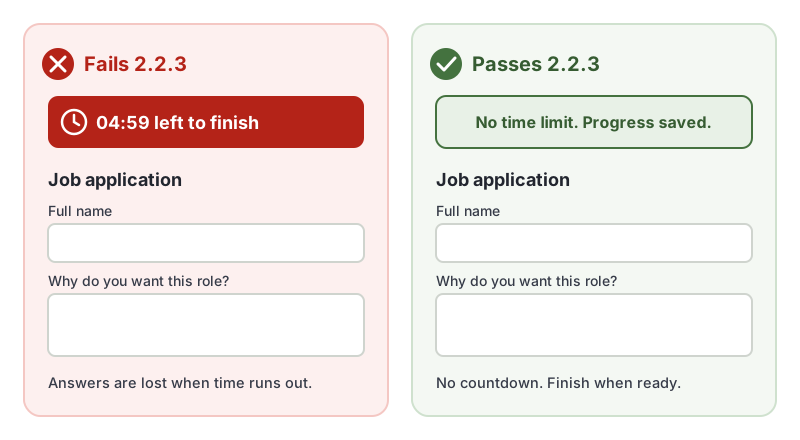
2.2.3 No Timing is the WCAG success criterion that removes time pressure. It says people should be able to read, fill in forms and complete tasks at their own pace, with no time limit at all, except for live events and media that simply plays. This guide explains WCAG 2.2.3 No Timing in plain English, how it differs from the more familiar 2.2.1 Timing Adjustable, and how to remove timers from your site.
The official wording: “Timing is not an essential part of the event or activity presented by the content, except for non-interactive synchronized media and real-time events.” (W3C, WCAG 2.2)
What Is 2.2.3 No Timing?
2.2.3 No Timing is a Level AAA requirement under the Operable principle, in the guideline “Enough Time”. If a task does not truly depend on time, it should not have a time limit.
That covers things like:
- Forms and applications with a countdown
- Checkouts that clear your details after a few minutes
- Quizzes and assessments with a timer, where speed is not what is being assessed
- Messages or pop-ups that disappear before everyone can read them
- Sessions that time out and throw away unsaved work
Why 2.2.3 No Timing Matters
Everyone works at a different speed, and disability often affects that speed:
- A screen reader user hears a form one element at a time, which takes longer than scanning it visually.
- Someone with a motor disability may type slowly, or use switch access or voice control, where every field takes effort.
- A person with a cognitive or learning disability, or anxiety, may need time to read, understand and check answers. A ticking clock makes that harder.
- Someone reading in their second language, including many Deaf people whose first language is a sign language, may need longer to read written text.
A time limit that feels generous to a designer can be impossible for these users. Losing a half-finished application because a timer ran out is one of the most frustrating experiences on the web.
Who Is Affected by 2.2.3 No Timing
- People who are blind or have low vision and use screen readers or magnification
- People with motor disabilities who type slowly or use alternative input
- People with cognitive, learning or attention-related disabilities
- People who read in a second language
- Anyone who gets interrupted partway through a task
How to Meet 2.2.3 No Timing
Remove timers that are not essential
The simplest approach is the W3C technique G5, allowing users to complete an activity without any time limit. Ask whether each countdown actually serves the person. Most do not: they exist because of a default setting, a sales tactic or a server convenience.
Save progress automatically
If people leave and come back, their work should still be there. For a simple form, saving a draft in the browser is a start:
// Save a draft of the application as the person types, and restore it later.
const form = document.querySelector('#application');
const KEY = 'application-draft';

form.addEventListener('input', () => {
  const draft = Object.fromEntries(new FormData(form));
  localStorage.setItem(KEY, JSON.stringify(draft));
});

const saved = JSON.parse(localStorage.getItem(KEY) || '{}');
for (const [name, value] of Object.entries(saved)) {
  if (form.elements[name]) form.elements[name].value = value;
}
Do not store passwords or payment details this way. For anything sensitive, save drafts on your server against the signed-in account instead.
Keep security timeouts from destroying work
Sessions sometimes have to expire. When they do, keep the person’s data so they can pick up where they left off after signing in again, and tell them about the timeout. Those two requirements are 2.2.5 Re-authenticating and 2.2.6 Timeouts.
Know the two exceptions
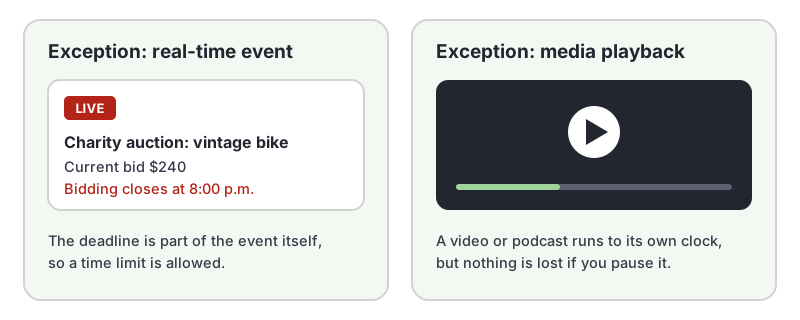
2.2.3 No Timing does not apply to:
- Real-time events, where time is part of the event itself, such as a live auction or a live game against other people.
- Non-interactive synchronized media, such as a video or podcast that plays on its own and does not ask you to do anything by a deadline.
How to Test for 2.2.3 No Timing
Time limits are hidden in scripts, server settings and business rules, so automated checkers cannot reliably find them. Automated tests also struggle with behavior over time in general: in our test of 10 accessibility checker tools, every tool missed an auto-advancing carousel. Test by hand:
- Look for countdowns, “expires in” messages and timed steps in forms, checkouts and quizzes.
- Start a task, then leave the page idle for 30 minutes or more. Come back and see whether your work survived.
- Check that pop-ups, alerts and notifications stay until you dismiss them.
- For each time limit you find, ask whether it is a real-time event or non-interactive media. If not, it fails 2.2.3 No Timing.
For a quick reference, see our 2.2.3 No Timing page in the WCAG library.
Is 2.2.3 No Timing Required?
Because it is Level AAA, 2.2.3 No Timing is rarely required by law. The W3C itself does not recommend requiring every Level AAA criterion across a whole site, because some content cannot meet them all. It is still one of the most practical AAA criteria to adopt: removing an unnecessary timer usually costs little and helps everyone.
Related Success Criteria
- 2.2.1 Timing Adjustable: the Level A rule that time limits must be adjustable.
- 2.2.2 Pause, Stop, Hide: moving and auto-updating content can be paused.
- 2.2.5 Re-authenticating: no data loss when a session expires.
- 2.2.6 Timeouts: warn people about inactivity timeouts that could lose data.
Want to find the issues software can catch while you check timing by hand? Run a free WCAG scan of any page.
Frequently Asked Questions
What level is WCAG 2.2.3 No Timing?
Level AAA, the highest level of WCAG. It has been part of WCAG since version 2.0. Most laws and policies ask for Level AA, so 2.2.3 No Timing is usually a goal rather than a legal requirement, but meeting it makes forms and tasks far easier for many people.
What is the difference between 2.2.1 Timing Adjustable and 2.2.3 No Timing?
2.2.1 Timing Adjustable (Level A) allows time limits as long as people can turn them off, adjust them or extend them. 2.2.3 No Timing (Level AAA) goes further: there should be no time limit at all, unless the content is a real-time event or non-interactive media.
Are session timeouts allowed under 2.2.3 No Timing?
A timeout that forces someone to finish a task in a set time conflicts with 2.2.3. If sessions must expire for security, save the person's work so nothing is lost when they sign back in, and warn them about the timeout, as covered by 2.2.5 Re-authenticating and 2.2.6 Timeouts.
Can an automated checker test 2.2.3 No Timing?
Not reliably. Time limits live in scripts, server settings and business rules, so you need to look for countdowns, leave pages idle and check what happens.
How we reviewed this article
- Current version
First published. Checked against the W3C WCAG 2.2 Recommendation and the Understanding document for 2.2.3 No Timing.