WCAG 1.3.2 Meaningful Sequence Explained in Plain English
WCAG 1.3.2 Meaningful Sequence explained simply: why reading order matters, how CSS and layout tables break it, how to fix it and how to test your pages.
Table of contents
1.3.2 Meaningful Sequence is the WCAG success criterion about reading order. When the order of content changes its meaning, such as numbered steps, a sentence or a form, the order in the code has to match the order people are meant to read it in. Screen readers, reader modes and browsers without your CSS all follow the code order, not the layout you see. This guide explains WCAG 1.3.2 Meaningful Sequence in plain English, with the common mistakes, how to fix them and how to test your pages.
The official wording: “When the sequence in which content is presented affects its meaning, a correct reading sequence can be programmatically determined.” (W3C, WCAG 2.2)
What Is 1.3.2 Meaningful Sequence?
1.3.2 Meaningful Sequence is a Level A requirement under the Perceivable principle, in the guideline “Adaptable”. It asks for two things:
- Where order matters, there is a correct order. Steps in a process, the words in a sentence, a question and its answer options.
- That order is in the code. “Programmatically determined” means software can work it out from the HTML, so assistive technology can present it in the right sequence.
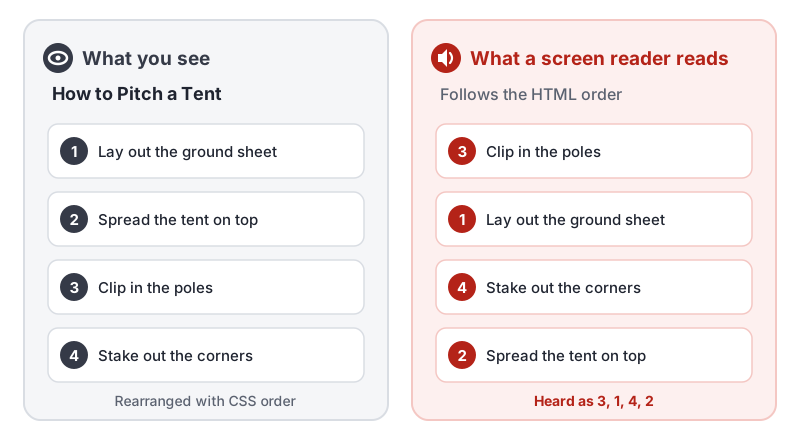
Visual design and code order can differ. With CSS, a designer can put any element anywhere on the screen. Someone who looks at the page sees the layout. Someone using a screen reader hears the HTML order. If the two tell different stories, the page fails 1.3.2 Meaningful Sequence.
Why 1.3.2 Meaningful Sequence Matters
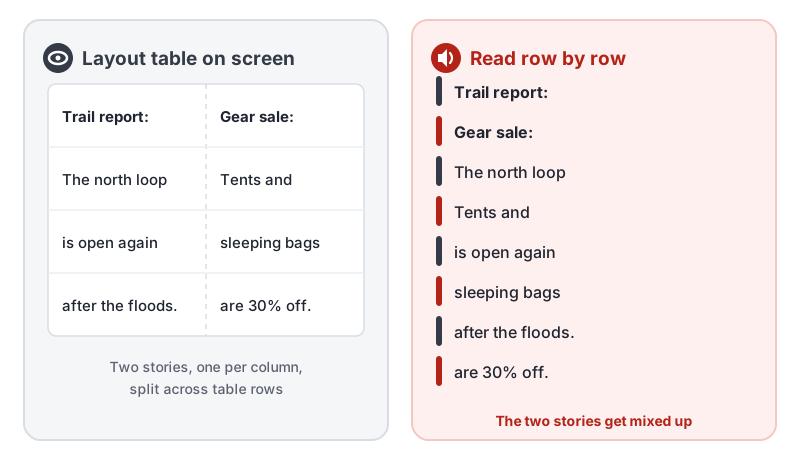
The meaning of a lot of content depends on its order. Read a recipe’s steps out of order and the dish fails. Read the halves of two newspaper columns interleaved and neither story makes sense.
People who do not see the visual layout rely completely on the code order:
- Screen reader users hear content one piece at a time, from the top of the HTML to the bottom.
- Braille display users read the same linear stream of text.
- People who change how pages look, with reader modes, custom style sheets or text-only browsers, get the content in its code order.
- People using high zoom often see a single-column layout, where a mismatched order becomes obvious.
Who Is Affected by 1.3.2 Meaningful Sequence
- People who are blind or have low vision and use screen readers or braille displays
- People who use reader modes or override page styles to read more easily
- People with cognitive or learning disabilities who use text-to-speech tools
- Keyboard users, when the same order problem also scrambles the focus order
When Does Order Affect Meaning?
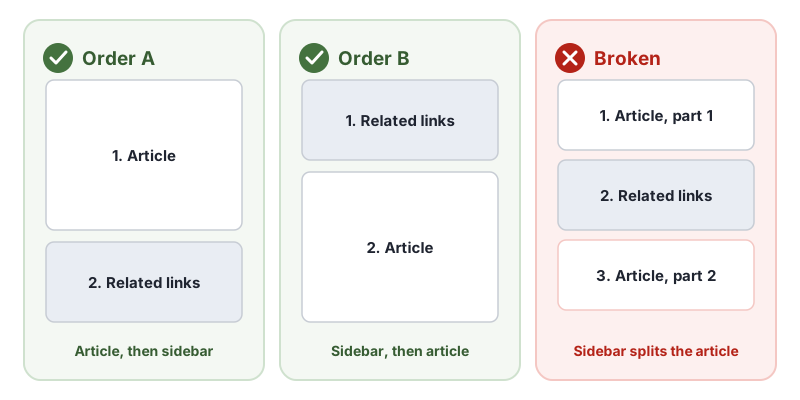
1.3.2 Meaningful Sequence only applies where the sequence changes the meaning. Many parts of a page can come in more than one sensible order. A sidebar of related links can be read before or after the main article, and both make sense. What cannot happen is the sidebar landing in the middle of the article.
Content where order usually matters:
- Numbered steps, instructions and tutorials
- Sentences and paragraphs of running text
- Form fields and their labels, hints and error messages
- Questions and their answer options
- Multi-column text, where each column continues a story
Content where order usually does not matter:
- Independent sections of a page, such as a header, a sidebar and a footer
- A grid of unrelated product cards
- Separate widgets that each make sense on their own
Common Failures of 1.3.2 Meaningful Sequence
CSS that reorders content visually
Flexbox order, flex-direction: row-reverse, CSS grid placement, floats and absolute positioning all move content on screen without moving it in the HTML. The W3C lists this as failure F1, changing the meaning of content by positioning information with CSS. The CSS Flexbox specification itself warns that authors must use order only for visual, not logical, reordering.
Layout tables that do not make sense row by row
Screen readers read tables across each row, left to right, then move to the next row. If a table is used to lay out two columns of text, the columns get woven together. This is failure F49, using an HTML layout table that does not make sense when linearized.
Spaces inside words
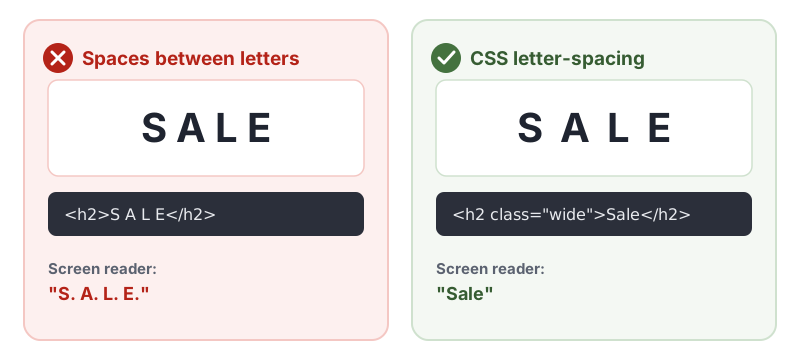
Typing spaces between letters to space out a heading, such as S A L E, turns one word into four letters. Many screen readers read it letter by letter. The W3C lists this as failure F32, using white space characters to control spacing within a word. The same problem appears when spaces or tabs are used to line up columns in plain text.
How to Meet 1.3.2 Meaningful Sequence
Put content in the right order in the HTML
The most reliable approach is the W3C technique G57, ordering the content in a meaningful sequence. Write the HTML in the order people should read it, then use CSS for layout. If a design needs the image above the heading on mobile and beside it on desktop, check that both layouts still make sense in the code order.
<!-- Steps in the HTML in the order they happen -->
<ol class="steps">
  <li>Lay out the ground sheet</li>
  <li>Spread the tent on top</li>
  <li>Clip in the poles</li>
  <li>Stake out the corners</li>
</ol>
Make the visual order follow the code order
This is the W3C technique C27, making the DOM order match the visual order. Use flexbox and grid to lay out content, but avoid reordering content where the order carries meaning:
/* Lay the steps out in a row without changing their order */
.steps {
  display: flex;
  flex-wrap: wrap;
  gap: 1rem;
}

/* Avoid on content where order matters:
   .steps li:first-child { order: 3; }
   .steps { flex-direction: row-reverse; } */
Use CSS, not spaces, for visual spacing
Space out letters with the W3C technique C8, using CSS letter-spacing to control spacing within a word:
.wide {
  letter-spacing: 0.5em;
  text-transform: uppercase;
}
Use CSS for layout, not tables
Build columns with CSS grid or flexbox, and keep each column’s content together in the HTML. Save <table> for real data, and check that a data table reads sensibly row by row.
How to Test for 1.3.2 Meaningful Sequence
Automated tools cannot judge whether an order makes sense, so testing 1.3.2 Meaningful Sequence is manual. Choose pages with steps, forms, multi-column layouts and anything rearranged for mobile, then:
- Turn off CSS, or open the browser’s reader view, and read the page from top to bottom. Does it still make sense?
- Listen with a screen reader. Use NVDA or JAWS on Windows or VoiceOver on a Mac, and read the page with the arrow keys. Compare what you hear with what you see.
- Press Tab through the page. If focus jumps around the screen, the code order and visual order probably differ. That also breaks 2.4.3 Focus Order. Our keyboard accessibility testing guide covers this step in detail.
- Search your CSS for
order:,row-reverse,column-reverseand grid placement, and check each place they are used. - Look for spaces between letters in headings, logos and buttons, and for tables used for layout.
For a quick reference, see our 1.3.2 Meaningful Sequence page in the WCAG library. The W3C’s Understanding 1.3.2 Meaningful Sequence has more examples.
Related Success Criteria
- 1.3.1 Info and Relationships: structure such as headings, lists and tables is in the code, not just in the styling.
- 1.3.3 Sensory Characteristics: instructions do not rely on position, such as “the box on the right”.
- 2.4.3 Focus Order: keyboard focus moves in an order that keeps meaning and operation.
Want to find the issues software can catch while you check reading order by hand? Run a free WCAG scan of any page.
Frequently Asked Questions
What level is WCAG 1.3.2 Meaningful Sequence?
Level A, the most basic level of WCAG. It has been part of WCAG since version 2.0, so it applies to every site that aims for WCAG 2.0, 2.1 or 2.2 at Level A or AA.
What is the difference between 1.3.2 Meaningful Sequence and 2.4.3 Focus Order?
1.3.2 Meaningful Sequence is about the order in which all content is read, for example by a screen reader. 2.4.3 Focus Order is about the order in which interactive elements such as links and buttons receive keyboard focus. The same cause, a mismatch between the visual order and the HTML order, often breaks both.
Is it a failure to use CSS flexbox order or grid placement?
Not on its own. Rearranging content visually is fine when the reading order still makes sense. It fails 1.3.2 Meaningful Sequence only when the visual change creates a meaning that the HTML order does not have, such as numbered steps that read out of order.
Can an automated checker test 1.3.2 Meaningful Sequence?
Not reliably. Software cannot tell whether an order makes sense, so this criterion needs a person to read the page in its underlying order. AccessBell lists 1.3.2 in every report for manual review rather than marking it pass or fail.
How we reviewed this article
- Current version
First published. Checked against the W3C WCAG 2.2 Recommendation and the Understanding document for 1.3.2 Meaningful Sequence.