

Website Accessibility Checker Find Out if Your Website Is Accessible and Compliant

Paste a URL and get a WCAG 2.2 audit in seconds, free and with no signup. Every failure comes with the offending HTML, the success criterion it breaks and the fix, so developers, QA and content teams can act on it straight away.

Checks for compliance with:

Checks aligned with global accessibility standards

Reduce legal risk

Most accessibility claims start with barriers a scan can find in seconds: missing alt text, unlabeled form fields and buttons with no name. AccessBell surfaces them first, ranked by impact.

  • Every issue mapped to its WCAG 2.2 success criterion
  • Severity ranking so you fix what blocks users first
  • The failing HTML for every issue, ready to paste into a ticket
Scan your site now
Thorough by design

Web Accessibility Evaluation Tool

AccessBell is a thorough web accessibility evaluation tool, not a quick surface check. Every page loads in a real Chrome browser and is tested with the open-source axe-core rules after your JavaScript has run, so the results reflect what visitors actually get. Each failure is mapped to the exact WCAG 2.2 success criterion it breaks, with the failing HTML and a fix.

Where automation cannot decide, such as whether alt text is meaningful, AccessBell flags the item for manual review instead of guessing. That follows the W3C's guidance in Evaluating Web Accessibility: tools find many issues fast, and people confirm the rest. See exactly how we test.

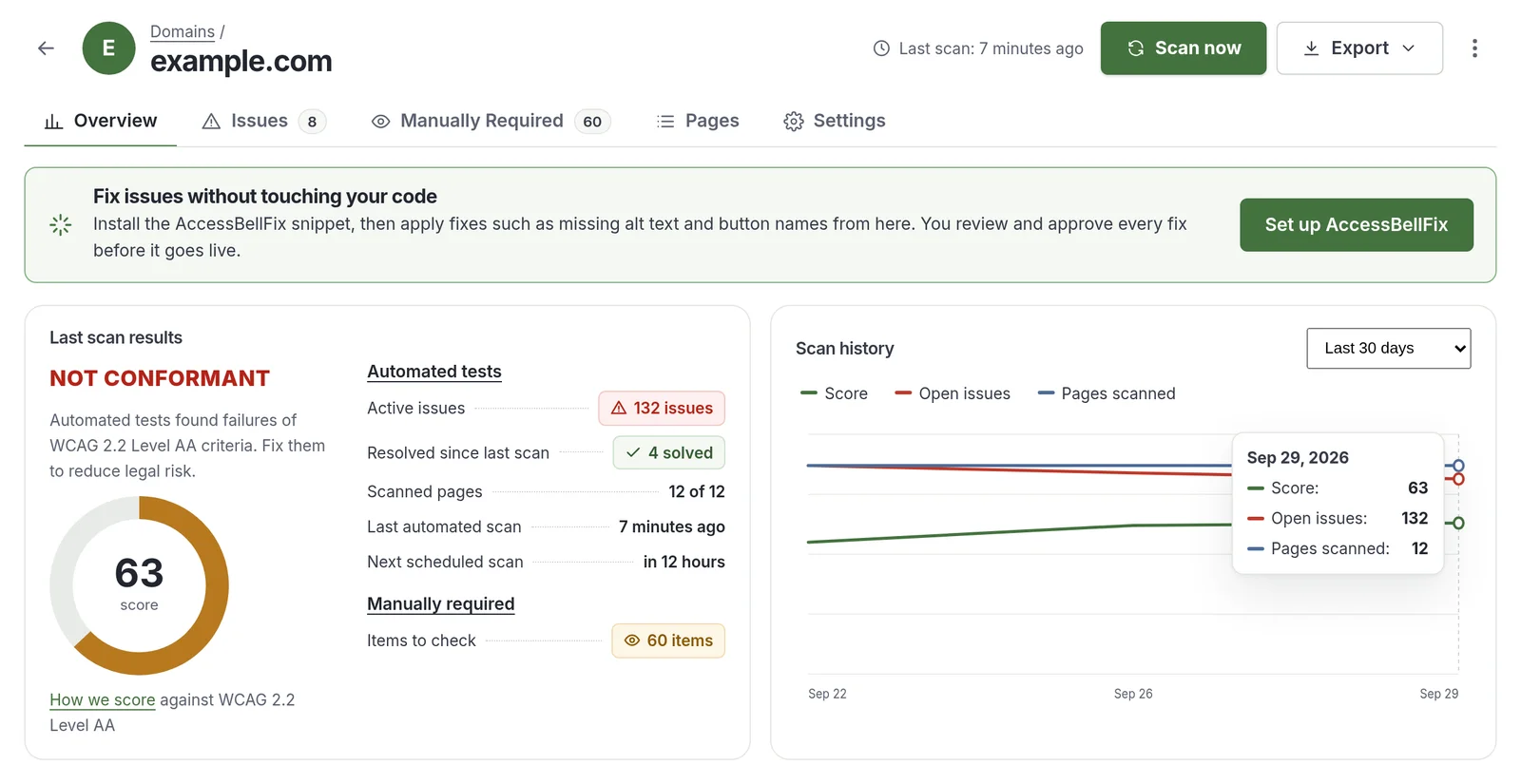
The AccessBell domain report for example.com. It shows a score of 63 out of 100 and the status Not conformant against WCAG 2.2 Level AA, 132 active issues, 4 issues solved since the last scan, 12 of 12 pages scanned and 60 items for manual review, next to a scan history chart of score, open issues and pages scanned.
The domain report in the AccessBell dashboard, shown with sample data.
One scan, every standard

Re-Audit Your Domains Against Every Accessibility Standard, Worldwide

WCAG is the technical foundation of accessibility law around the world. AccessBell checks against it once and reports in the language each regulation uses.

  • WCAG 2.2 W3C Recommendation, Levels A and AA
  • ADA Titles II and III, United States
  • Section 508 U.S. federal ICT
  • EN 301 549 European Union harmonized standard
  • AODA Ontario, Canada
  • EAA European Accessibility Act
Beyond a single score

What a WCAG Check Actually Tests

WCAG 2.2 organizes its success criteria under four principles: Perceivable, Operable, Understandable and Robust (POUR). A real WCAG check reports against each one, and is clear about what a person still needs to test. A generic accessibility score is not. See our full testing methodology for the engine and rules behind every scan.

  • Perceivable

    Can people see, hear or otherwise take in the content?

    Automated check flags

    • Images without alternative text (1.1.1)
    • Text with too little contrast (1.4.3)
    • Pinch zoom turned off (1.4.4)

    Needs a person

    • Whether alt text is meaningful (1.1.1)
    • Accurate video captions (1.2.2)
    • Meaning shown by color alone (1.4.1)
  • Operable

    Can people use the page with a keyboard, a screen reader or a touch screen?

    Automated check flags

    • Links with no name (2.4.4)
    • No way to skip repeated content (2.4.1)
    • Tap targets under 24px, new in WCAG 2.2 (2.5.8)

    Needs a person

    • Keyboard traps (2.1.2)
    • Visible focus indicator (2.4.7)
    • Logical focus order (2.4.3)
  • Understandable

    Is the page predictable and the content clear?

    Automated check flags

    • Missing page language (3.1.1)
    • Invalid language codes (3.1.1)
    • Foreign-language passages marked with invalid codes (3.1.2)

    Needs a person

    • Unexpected changes on focus (3.2.1)
    • Helpful error messages (3.3.3)
    • Help in the same place on every page (3.2.6)
  • Robust

    Will it work with assistive technology, today and tomorrow?

    Automated check flags

    • Form fields without labels (4.1.2)
    • Buttons with no name (4.1.2)
    • Invalid or misused ARIA (4.1.2)

    Needs a person

    • Status messages that are announced (4.1.3)
    • Custom widgets that behave as expected (4.1.2)

Every issue in an AccessBell report links to the exact success criterion it fails, its conformance level (A, AA or AAA) and a severity rank. Items only a person can judge are listed separately for manual review.

Built for your role

One Report, Three Ways to Use It

Accessibility is a team sport. AccessBell gives each person the detail they need, in the language they work in.

For Web Developers

Failing markup, not vague warnings. Pages render in headless Chromium and run through axe-core, so what you see is the real DOM after your JavaScript runs.

  • The offending HTML snippet for every failing element
  • Correct-markup examples you can copy
  • Component grouping: fix the shared template once
  • Scan staging behind auth with custom HTTP headers

How to read an issue

For QA Testers

Repeatable accessibility tests you can sign off. Pin each domain to a WCAG version and level, and every run is tested the same way.

  • Pass and fail by success criterion, with a coverage table
  • Desktop and mobile viewports in the same run
  • Daily regression scans with alerts on new serious issues
  • CSV export for your test tracker, plus a manual checklist
Get the WCAG 2 AA checklist

For Content Creators

Publish without breaking accessibility. Rescan a page after every update and catch the problems content edits introduce most.

  • Images published without alt text
  • Empty headings and links with no text
  • Text colors with too little contrast
  • Plain-language fixes, no code knowledge needed
Fix the most common errors
Which version applies

WCAG 2.0 vs 2.1 vs 2.2

Most US accessibility lawsuits and settlements cite WCAG 2.1 AA today. The UK public sector already monitors against WCAG 2.2, and it is the version the next rules are expected to adopt. AccessBell checks WCAG 2.2 AA by default and lets you switch to 2.1 or 2.0 for legacy reports.

Comparison of WCAG 2.0, 2.1 and 2.2: release dates, criteria counts, what each added and where each is required
WCAG 2.0 WCAG 2.1 WCAG 2.2Current
Published December 2008June 2018October 2023
Success criteria 6178 (17 new)86 (9 new, 4.1.1 Parsing removed)
Level A and AA criteria 385055
What it added The foundation: four principles (perceivable, operable, understandable, robust) and three conformance levelsMobile, low vision and cognitive needs: reflow, orientation, text spacing, non-text contrast and status messagesFocus not obscured, dragging alternatives, 24px minimum targets, consistent help, redundant entry and accessible sign-in
United States Section 508 standard for federal agencies and vendorsDOJ Title II rule for state and local government; the usual benchmark in ADA Title III casesNot required yet; the safest target because it also covers 2.1 and 2.0
European Union (EAA) Not enough on its ownRequired through EN 301 549Expected in the next EN 301 549 revision
United Kingdom public sector Not enough on its ownPrevious benchmarkMonitored against since October 2024
Ontario, Canada (AODA) Required for public websitesExceeds the requirementExceeds the requirement
In AccessBell AvailableAvailable, plus ADA and EN 301 549 presetsDefault (Level AA)

Each version includes everything in the one before it, except 4.1.1 Parsing, which WCAG 2.2 retired. Content that meets WCAG 2.2 AA also meets 2.1 AA and 2.0 AA. Test a page with our free WCAG 2.2 AA checker or WCAG 2.1 AA checker, or work through the WCAG 2 AA checklist.

Legislation tracker

Latest Updates on Global Accessibility Legislation and Standards

Key requirements and dates for the regions where most of our customers operate.

ADA and Section 508

The Department of Justice final rule under ADA Title II sets WCAG 2.1 Level AA as the technical standard for state and local government websites and mobile apps.

For private businesses under Title III, courts and settlements consistently reference WCAG 2.1 AA, and increasingly WCAG 2.2 AA. Federal agencies and their vendors follow Section 508, which incorporates WCAG 2.0 AA.

Read the ADA compliance guide

Key Dates

April 24, 2026
Title II compliance date for public entities serving 50,000 or more people
April 26, 2027
Title II compliance date for smaller entities and special districts
January 18, 2018
Revised Section 508 standards take effect
From the blog

Guidance on Digital Accessibility and Compliance

Practical articles on WCAG, the ADA and building accessible websites that stay that way.

Top 5 accessiBe Alternatives (2026 Updated)

Comparing the top 5 accessiBe alternatives in 2026 by engine, pricing and real code fixes, so you can pick the right tool instead of another overlay.

Keyboard Accessibility Testing

A practical guide to keyboard accessibility testing: what to check, the exact keys to use, and a component-by-component reference table mapped to WCAG.

Why AccessBell

Built for Teams Who Want Accessibility Done Right

No overlays and no shortcuts. Real issues, found in your code, fixed at the source.

A website owner working on a laptop at an office desk

Accessibility for the Whole Domain

Crawl every page on a schedule, not just the homepage. New pages are picked up automatically.

  • Automatic domain crawl
  • Sitemap scanning
  • Multi-device testing

Expert-Grade Fix Guidance

Each issue includes the failing element, the WCAG criterion and a clear explanation of the fix.

  • Element-level code snippets
  • AI-assisted fix suggestions
  • Component grouping

Proof of Progress

Track your score over time and export reports that show auditors and leadership what has changed.

  • Audit-ready PDF reports
  • Auto-updating accessibility statements
  • Email notifications
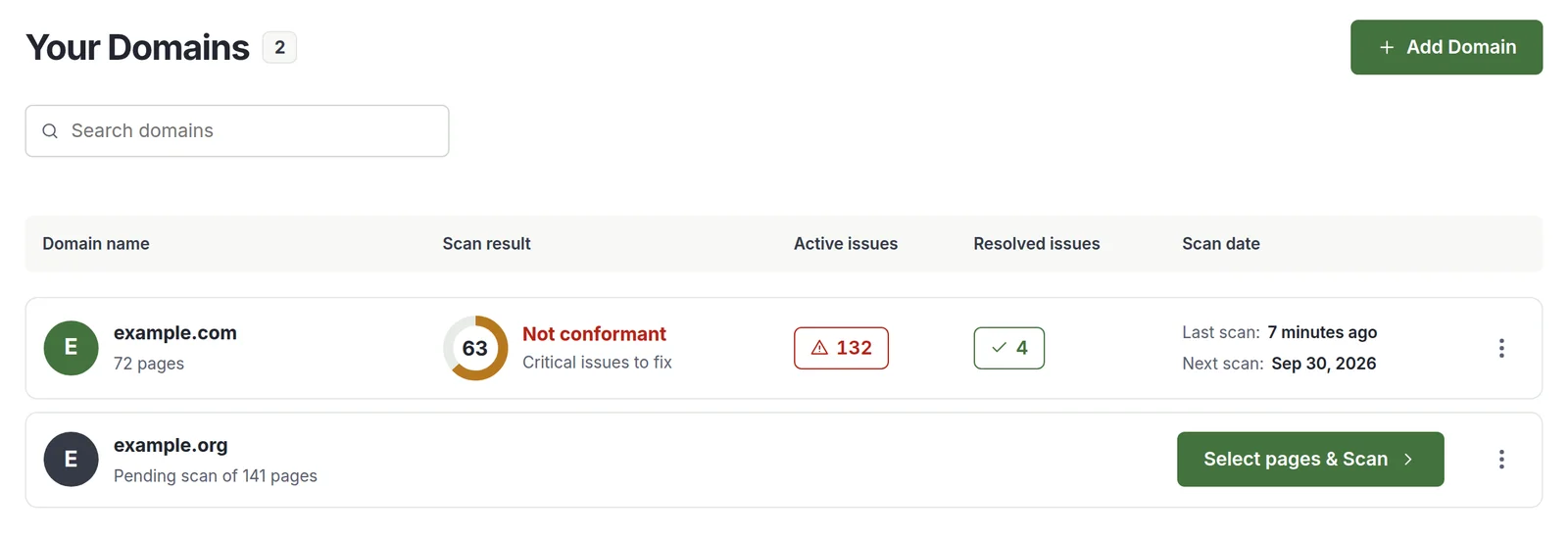
The Your Domains page of the AccessBell dashboard. example.com has a score of 63, Not conformant with critical issues to fix, 132 active issues, 4 resolved issues, its last scan 7 minutes ago and its next scan on Sep 30, 2026. example.org is pending a scan of 141 pages, with a Select pages and Scan button.
Every domain in one list, shown with sample data.
Scales with you

Monitoring for Every Domain You Run

Start with a free scan of a single page. When you are ready, monitor every domain you manage from one dashboard, with continuous monitoring, alerts and team permissions.

  • $29 per domain per month
  • Up to 500 URLs per domain, unlimited rescans
  • Role-based permissions for your team
See pricing
FAQ

Website Accessibility Checker Questions

Still deciding? Read customer reviews or learn about our approach.

What is a website accessibility checker?

A website accessibility checker is a tool that scans the code of a web page and flags barriers for people with disabilities, such as missing alt text, unlabeled form fields and missing page language. AccessBell maps every finding to the relevant WCAG success criterion and explains how to fix it.

Is the AccessBell accessibility checker free?

Yes. You can scan any public page for free with no account. The Pro plan, $29 per domain per month, adds domain crawling, continuous monitoring, AI-assisted fixes, reports and team features.

Which accessibility standards does AccessBell check?

Scans are based on WCAG 2.2 success criteria at Levels A and AA. Because WCAG is the technical benchmark behind the ADA, Section 508, EN 301 549, AODA and the European Accessibility Act, results are relevant to each of them.

Can an automated checker make my website fully compliant?

No automated tool can guarantee compliance. Automated rules reliably catch objective, code-level failures, but some requirements, such as whether alt text is meaningful or focus order is logical, need human review. Read our guide to automated vs manual accessibility testing.

Does AccessBell use an accessibility overlay?

No. AccessBell does not inject a widget into your site. It finds issues in your source code and helps your team fix them properly, so the improvements are permanent.

How does AccessBell fit into a development and QA workflow?

Use the free scanner to check any public page on demand. With AccessBell Pro, scan staging before release, using custom HTTP headers to get past authentication, and production after each deploy. Each issue includes the failing HTML and the WCAG criterion, so it can go straight into a ticket, and the CSV export drops into your test tracker. Monitored pages are rescanned daily, and owners and admins are emailed when a new critical or serious issue appears.

How often should I scan my website for accessibility issues?

Scan at least weekly and after every major release. Websites change constantly, and new content is the most common source of regressions. The Pro plan monitors your pages continuously and includes unlimited rescans.

Find Out if Your Website Is Accessible

Start a 3-day free trial to monitor every page on your domain, or run a free one-page WCAG check right now with no sign-up.

  • Free, no account needed
  • Results in under 30 seconds
  • Mapped to WCAG success criteria

Want every page monitored? Start a 3-day free trial.