WCAG 2.5.1 Pointer Gestures Explained in Plain English
WCAG 2.5.1 Pointer Gestures explained simply: why pinch, swipe and multi-finger gestures need a single-tap alternative, with examples and how to test.
Table of contents
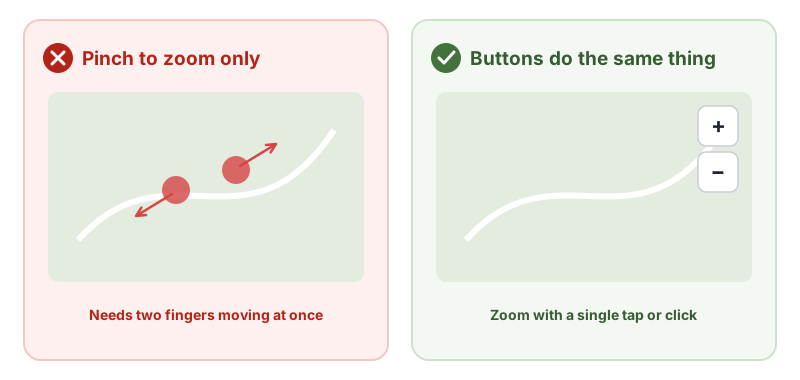
2.5.1 Pointer Gestures is the WCAG success criterion that says anything you can do with a complex gesture, such as a pinch, a swipe or a two-finger rotate, must also be possible with a single tap or click. A map that only zooms with a pinch, or a carousel that only moves with a swipe, leaves out people who cannot make those movements. This guide explains WCAG 2.5.1 Pointer Gestures in plain English, with fixes and how to test.
The official wording: “All functionality that uses multipoint or path-based gestures for operation can be operated with a single pointer without a path-based gesture, unless a multipoint or path-based gesture is essential.” (W3C, WCAG 2.2)
What Is 2.5.1 Pointer Gestures?
2.5.1 Pointer Gestures is a Level A requirement under the Operable principle, in the guideline “Input Modalities”, added in WCAG 2.1. It covers two kinds of gestures:
- Multipoint gestures: using two or more fingers at once, such as pinch to zoom or two-finger scroll.
- Path-based gestures: where the route matters, such as swiping, drawing a shape or sliding along a track.
Each needs an alternative that works with one pointer and a simple tap or click, such as a button. The exception is when the gesture is essential, like a signature pad.
Why 2.5.1 Pointer Gestures Matters
Complex gestures need fine motor control, two hands or two fingers working at once. Many people cannot do that:
- People with tremors, limited dexterity or paralysis
- People using a head pointer, mouth stick or eye-tracking, which act as a single pointer
- People who use a mouse or trackpad, which cannot pinch
- People holding a phone in one hand, or with an injury
Who Is Affected by 2.5.1 Pointer Gestures
- People with motor disabilities
- People who use alternative pointing devices
- People with cognitive disabilities who find complex gestures hard to learn
- Anyone using one hand
How to Meet 2.5.1 Pointer Gestures
Add buttons for gesture actions
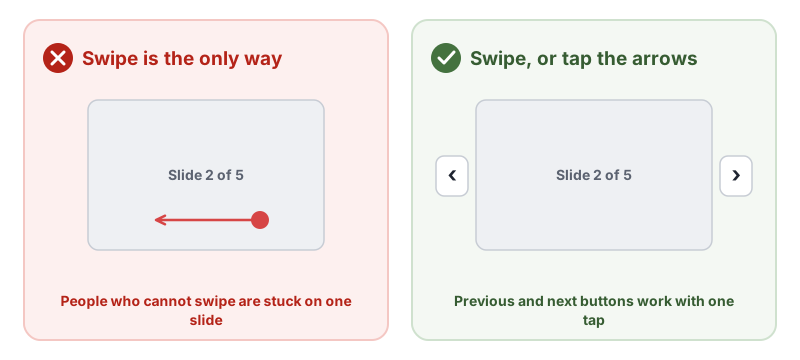
Give every gesture a single-pointer alternative (G215, providing controls to achieve the same result as path-based or multipoint gestures):
- Maps: zoom in and out buttons, and buttons or click-to-pan.
- Carousels and galleries: previous and next buttons.
- Swipe to delete or archive: a menu or button that does the same.
- Sliders: allow tapping a point on the track, or add plus and minus buttons (G216).
- Pull to refresh: a refresh button.
Providing a path-based gesture with no single-pointer alternative is failure F105.
Check map and chart libraries
Mapping, chart and image viewer libraries often support pinch and drag by default. Turn on their zoom controls, or add your own buttons.
Make the buttons accessible too
The alternatives need clear names, keyboard support and a reasonable size. See 2.5.8 Target Size (Minimum).
How to Test for 2.5.1 Pointer Gestures
- List gesture-driven features: maps, carousels, sliders, image viewers, swipeable lists and drawing tools.
- Use a mouse or a single finger only. Can you do everything with simple taps and clicks, without dragging along a path?
- Check the alternatives work with the keyboard and have clear names.
- Decide whether any gesture is truly essential, such as freehand signatures.
Related Success Criteria
- 2.5.2 Pointer Cancellation: accidental presses can be cancelled.
- 2.5.7 Dragging Movements: dragging has a single-pointer alternative, at Level AA.
- 2.5.8 Target Size (Minimum): controls are large enough to tap.
- 2.1.1 Keyboard: everything also works with a keyboard.
Run a free WCAG scan for the automated checks, then try every gesture-driven feature with one finger or a mouse.
Testing WCAG 2.5.1 With AccessBell
This criterion depends on meaning or context, so it needs a person to judge. AccessBell's report lists it for manual review rather than marking it pass or fail automatically, so it is not missed.
Run a free scan to spot issues on your own pages.
Frequently Asked Questions
What level is WCAG 2.5.1 Pointer Gestures?
Level A. It was added in WCAG 2.1.
What is a path-based gesture?
A gesture where the route of the movement matters, not just where it starts and ends, such as a swipe, a drawn shape or a slide-to-unlock motion. A multipoint gesture uses two or more fingers, such as pinch or two-finger rotate.
Is drag and drop covered by 2.5.1 Pointer Gestures?
Not usually. In a simple drag only the start and end points matter, so it is not a path-based gesture. Dragging is covered by 2.5.7 Dragging Movements in WCAG 2.2.
Do browser gestures like pinch-to-zoom count?
No. 2.5.1 Pointer Gestures covers gestures your content requires. Gestures the browser or operating system provides, such as pinch-zoom on a page, are not your content.
Can AccessBell test WCAG 2.5.1 automatically?
Not fully. This criterion needs a person to judge, so AccessBell's report lists it for manual review rather than marking it pass or fail on its own.
Sources
- W3C: Understanding 2.5.1 Pointer Gestures (opens in a new tab)
- W3C: Web Content Accessibility Guidelines (WCAG) 2.2 (opens in a new tab)
This page explains a technical standard and is not legal advice. See our disclaimer.
How we reviewed this page
- Current version
First published. Checked against the W3C WCAG 2.2 Recommendation, the Understanding document for 2.5.1 Pointer Gestures and the W3C techniques it lists.