WCAG 2.5.2 Pointer Cancellation Explained in Plain English
WCAG 2.5.2 Pointer Cancellation explained simply: why actions should happen on release, not on press, how people cancel accidental taps and how to test.
Table of contents
2.5.2 Pointer Cancellation is the WCAG success criterion that helps people recover from accidental taps and clicks. Actions should happen when people release the pointer, not the moment they press it, so they can slide off a button to cancel. If an action does run on the press, people must be able to undo it. This guide explains WCAG 2.5.2 Pointer Cancellation in plain English, with code examples and how to test.
The official wording (in short): For anything operated with a single pointer, at least one is true: the down-event is not used to run the function; the function completes on the up-event and can be aborted or undone; the up-event reverses the down-event; or acting on the down-event is essential. (W3C, WCAG 2.2)
What Is 2.5.2 Pointer Cancellation?
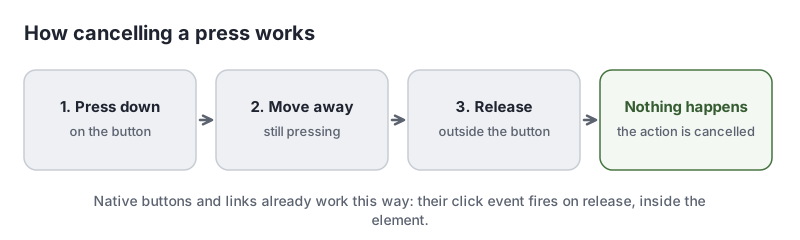
2.5.2 Pointer Cancellation is a Level A requirement under the Operable principle, in the guideline “Input Modalities”, added in WCAG 2.1. A pointer action has two moments: pressing down and releasing. If an action fires the moment the pointer goes down, there is no chance to change your mind. If it fires on release, you can move away first and nothing happens.
Why 2.5.2 Pointer Cancellation Matters
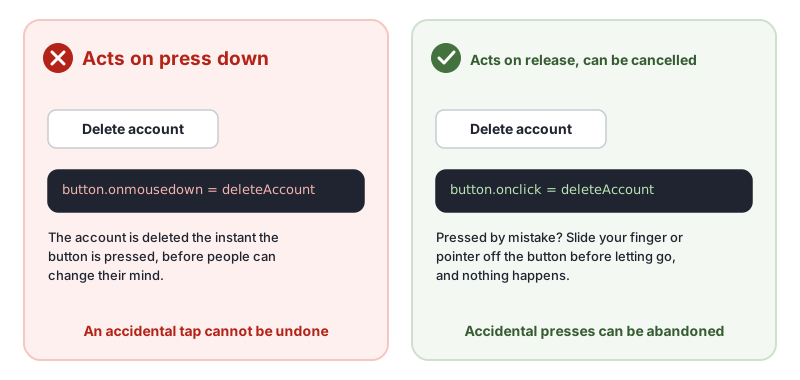
People with tremors, limited dexterity or low vision often touch the wrong thing. People using a head pointer or eye-tracking can activate controls by accident. If a destructive action, such as deleting, buying or sending, fires on the first touch, they have no way to stop it.
Who Is Affected by 2.5.2 Pointer Cancellation
- People with motor disabilities, such as tremors or spasms
- People with low vision who misjudge where controls are
- People with cognitive disabilities who may tap before they are sure
- Anyone using a touch screen on the move
How to Meet 2.5.2 Pointer Cancellation
Use standard click events
The simplest fix is to use the click event, which fires on release inside the element, and to use native buttons and links. This is the W3C technique G212, using native controls to ensure functionality is triggered on the up-event.
// Fails: acts the moment the pointer goes down
deleteButton.addEventListener('mousedown', deleteAccount);
deleteButton.addEventListener('touchstart', deleteAccount);

// Passes: acts on release, and only if released over the button
deleteButton.addEventListener('click', deleteAccount);
Activating a function on the down-event is failure F101.
Let people cancel drags
For drag and drop, let people drop an item back where it started, or press Escape, to cancel (G210, ensuring that drag-and-drop actions can be cancelled).
Offer undo for important actions
Even with up-event actions, an “Undo” option or a confirmation step for destructive actions gives extra protection.
Know the exceptions
Acting on the down-event is fine when releasing reverses it, such as press-and-hold to talk, or when it is essential, such as playing a note on an on-screen piano.
How to Test for 2.5.2 Pointer Cancellation
- Press down on each button and link, move the pointer or finger off it, and release. Nothing should happen.
- Pay special attention to custom controls, drag and drop, and anything that deletes, buys or sends.
- Check the code for
mousedown,pointerdownandtouchstarthandlers that trigger actions. - Check drags can be cancelled by dropping in the original place or pressing Escape.
Related Success Criteria
- 2.5.1 Pointer Gestures: complex gestures have single-pointer alternatives.
- 2.5.7 Dragging Movements: dragging has a single-pointer alternative, at Level AA.
- 2.5.8 Target Size (Minimum): targets are large enough to avoid accidental taps.
- 3.3.4 Error Prevention (Legal, Financial, Data): important actions can be checked or reversed.
Run a free WCAG scan for the automated checks, then press and slide off your buttons to test cancellation.
Testing WCAG 2.5.2 With AccessBell
This criterion depends on meaning or context, so it needs a person to judge. AccessBell's report lists it for manual review rather than marking it pass or fail automatically, so it is not missed.
Run a free scan to spot issues on your own pages.
Frequently Asked Questions
What level is WCAG 2.5.2 Pointer Cancellation?
Level A. It was added in WCAG 2.1.
What is the down-event and the up-event?
The down-event happens when you press a mouse button or touch the screen. The up-event happens when you let go. The standard click event fires on the up-event, inside the same element, which gives people a chance to cancel.
Is it ever fine to act on the down-event?
Yes, when it is essential or when releasing undoes it. A piano keyboard that plays a note when pressed, or a press-and-hold button that stops when you let go, both meet 2.5.2 Pointer Cancellation.
Can automated tools test 2.5.2 Pointer Cancellation?
No. Tools cannot tell what your event handlers do. Test by pressing a control, dragging off it and releasing, and check nothing happens.
Can AccessBell test WCAG 2.5.2 automatically?
Not fully. This criterion needs a person to judge, so AccessBell's report lists it for manual review rather than marking it pass or fail on its own.
Sources
- W3C: Understanding 2.5.2 Pointer Cancellation (opens in a new tab)
- W3C: Web Content Accessibility Guidelines (WCAG) 2.2 (opens in a new tab)
This page explains a technical standard and is not legal advice. See our disclaimer.
How we reviewed this page
- Current version
First published. Checked against the W3C WCAG 2.2 Recommendation, the Understanding document for 2.5.2 Pointer Cancellation and the W3C techniques it lists.