WCAG 1.2.2 Captions (Prerecorded) Explained in Plain English
WCAG 1.2.2 Captions (Prerecorded) explained simply: what good captions include, why auto-captions fall short, how to add a caption file and how to test.
Table of contents
1.2.2 Captions (Prerecorded) is the WCAG success criterion that says recorded video with sound needs captions. Captions show the spoken words, who is speaking and important sounds, in sync with the video, so people who cannot hear the audio can follow along. This guide explains WCAG 1.2.2 Captions (Prerecorded) in plain English, what good captions include, how to add them and how to test them.
The official wording: “Captions are provided for all prerecorded audio content in synchronized media, except when the media is a media alternative for text and is clearly labeled as such.” (W3C, WCAG 2.2)
What Is 1.2.2 Captions (Prerecorded)?
1.2.2 Captions (Prerecorded) is a Level A requirement under the Perceivable principle, in the guideline “Time-based Media”. “Synchronized media” means video with sound. If it is recorded, not live, it needs captions. That includes marketing videos, tutorials, webinar recordings, product demos and social clips embedded on your site.
The exception is narrow: a video that exists only as an alternative to text already on the page, and is clearly labeled that way.
Why 1.2.2 Captions (Prerecorded) Matters
Without captions, people who are deaf or hard of hearing miss everything said in a video. Captions also help:
- People watching with the sound off, which is common on phones and in public places
- People in noisy environments
- Non-native speakers, who often find reading easier than listening
- People with auditory processing differences or attention-related disabilities
Who Is Affected by 1.2.2 Captions (Prerecorded)
- People who are deaf or hard of hearing
- People with auditory processing disorders
- People learning the language of the video
- Anyone who cannot play sound at that moment
How to Meet 1.2.2 Captions (Prerecorded)
Include everything someone listening would get
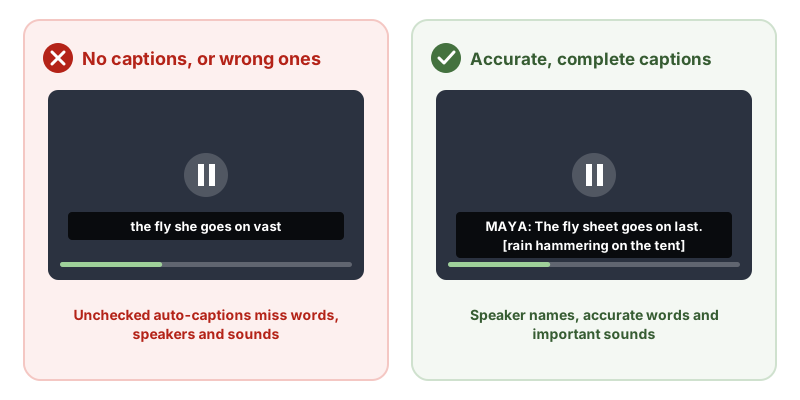
Good captions include:
- All spoken words, accurately, including names and technical terms
- Speaker identification when it is not obvious who is talking
- Meaningful sounds, such as [laughter], [phone rings] or [music becomes tense]
- Good timing, so captions appear with the speech and stay long enough to read
Captions that leave out dialogue or important sounds are failure F8.
Add closed captions to your player
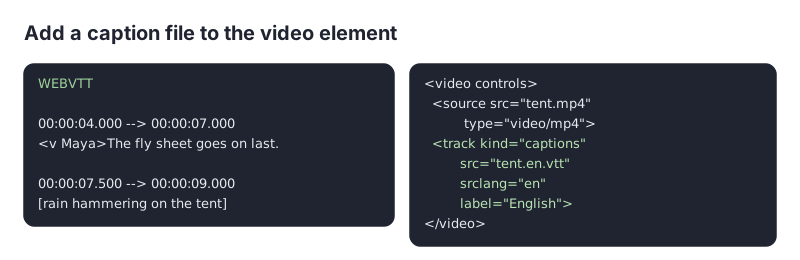
Closed captions, which viewers can turn on and off, are the W3C technique G87. Open captions, burned into the video, are G93. On your own site, add a WebVTT caption file with the track element:
On YouTube, Vimeo and most video platforms, upload a caption file or edit the automatic captions, then make sure the embedded player shows the captions button.
Fix auto-captions before publishing
Speech recognition is a fast way to start, but it makes mistakes, especially with names, accents and jargon, and it rarely includes sounds. Review every caption file against the video.
How to Test for 1.2.2 Captions (Prerecorded)
- Find every video with sound, including embeds.
- Turn captions on. Is there a captions button, and does it work in the embedded player?
- Watch a section with the sound off. Can you follow what is said and what is happening in the audio?
- Check accuracy of names, numbers and key terms, and that speaker changes and sounds are marked.
- Check timing. Captions should match the speech, not run ahead or lag behind.
Related Success Criteria
- 1.2.1 Audio-only and Video-only (Prerecorded): transcripts for audio-only media.
- 1.2.3 Audio Description or Media Alternative (Prerecorded): describing the visuals.
- 1.2.4 Captions (Live): captions for live video, at Level AA.
- 1.2.6 Sign Language (Prerecorded): sign language interpretation, at Level AAA.
Run a free WCAG scan to find videos on your pages, then check each one has accurate captions.
Testing WCAG 1.2.2 With AccessBell
AccessBell's scanner runs axe-core, which includes 1 rule that catch code-level failures of this criterion. Automated checks help you spot issues quickly; a person still needs to review what they cannot judge.
video-caption: Ensure <video> elements have captions (details (opens in a new tab))
This criterion is included in: WCAG 2.2 AA Checker, WCAG 2.1 AA Checker, ADA Compliance Checker, Section 508 Checker, EN 301 549 Checker.
Run a free scan to spot issues on your own pages.
Frequently Asked Questions
What level is WCAG 1.2.2 Captions (Prerecorded)?
Level A. It has been in WCAG since version 2.0.
What is the difference between captions and subtitles?
Subtitles usually translate dialogue for people who can hear but do not speak the language. Captions are for people who cannot hear, so they also include speaker names and important sounds, such as [doorbell rings] or [music stops].
Do YouTube auto-captions meet 1.2.2?
Not on their own. Automatic captions often get words, names and punctuation wrong and leave out sounds. Edit them for accuracy, or upload a corrected caption file, before relying on them.
Do open captions count?
Yes. Captions burned into the video meet 1.2.2 Captions (Prerecorded), as long as they are accurate and complete. Closed captions, which people can turn on and off, are usually more flexible because people can resize or restyle them in many players.
Can AccessBell test WCAG 1.2.2 automatically?
Yes. AccessBell runs 1 automated rule that can catch failures of this criterion, including in our WCAG 2.2 AA Checker, WCAG 2.1 AA Checker, ADA Compliance Checker, Section 508 Checker, EN 301 549 Checker. A person still needs to check what automation cannot judge.
Sources
- W3C: Understanding 1.2.2 Captions (Prerecorded) (opens in a new tab)
- W3C: Web Content Accessibility Guidelines (WCAG) 2.2 (opens in a new tab)
This page explains a technical standard and is not legal advice. See our disclaimer.
How we reviewed this page
- Current version
First published. Checked against the W3C WCAG 2.2 Recommendation, the Understanding document for 1.2.2 Captions (Prerecorded) and the W3C techniques it lists.