WCAG 1.2.1 Audio-only and Video-only (Prerecorded) Explained in Plain English
WCAG 1.2.1 Audio-only and Video-only (Prerecorded) explained simply: transcripts for podcasts, alternatives for silent video, and how to test your media.
Table of contents
1.2.1 Audio-only and Video-only (Prerecorded) is the WCAG success criterion for recorded media with only sound or only pictures. A podcast or recorded talk needs a transcript. A silent video, such as an animated product demo or screen recording, needs a text description or a narrated audio track. This guide explains WCAG 1.2.1 Audio-only and Video-only (Prerecorded) in plain English, what to provide and how to test it.
The official wording (summary of the two cases): For prerecorded audio-only media, “an alternative for time-based media is provided that presents equivalent information”. For prerecorded video-only media, “either an alternative for time-based media or an audio track is provided that presents equivalent information”. (W3C, WCAG 2.2)
What Is 1.2.1 Audio-only and Video-only (Prerecorded)?
1.2.1 Audio-only and Video-only (Prerecorded) is a Level A requirement under the Perceivable principle, in the guideline “Time-based Media”. It covers two kinds of recorded media:
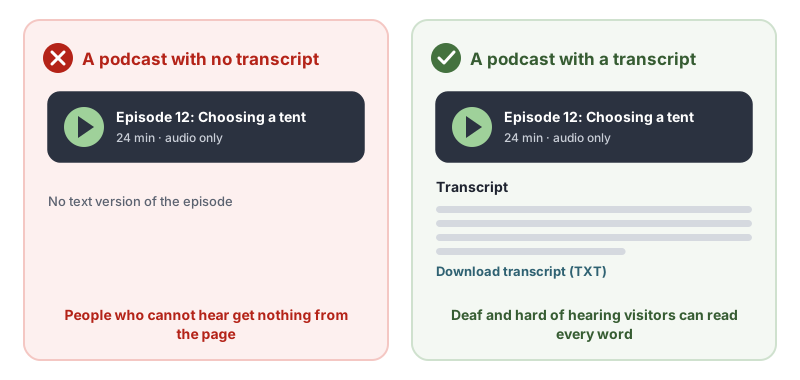
- Audio-only: sound with no picture, such as podcasts, recorded webinars without slides, audio tours and voice messages. Provide an equivalent in text, normally a transcript.
- Video-only: pictures with no sound, such as silent product demos, animations and screen recordings. Provide either a text alternative or an audio track that describes what happens.
There is one exception: media that is itself an alternative to text on the page, and clearly labeled as such, such as a video of a sign language interpreter reading out the page.
Why 1.2.1 Audio-only and Video-only (Prerecorded) Matters
Audio-only content is unusable for people who are deaf or hard of hearing unless there is text. Video-only content is unusable for people who are blind unless the visual information is described. Transcripts help far more people too: anyone in a noisy place, anyone who reads faster than they listen, and search engines, which can index the words.
Who Is Affected by 1.2.1 Audio-only and Video-only (Prerecorded)
- People who are deaf or hard of hearing (audio-only)
- People who are blind or have low vision (video-only)
- People who are deafblind and read transcripts on a braille display
- People with cognitive disabilities who prefer to read at their own pace
- Non-native speakers who find text easier than speech
How to Meet 1.2.1 Audio-only and Video-only (Prerecorded)
Publish a transcript for audio-only content
Provide a transcript of every word spoken, with speaker names and any important sounds, on the same page or one clear link away. This is the W3C technique G158, providing an alternative for time-based media for audio-only content.
<audio controls src="/podcast/episode-12.mp3"></audio>
<details>
  <summary>Transcript: Episode 12, Choosing a tent</summary>
  <p><strong>Maya:</strong> Welcome back. Today we are talking about tents…</p>
</details>
Describe silent video in text or narration
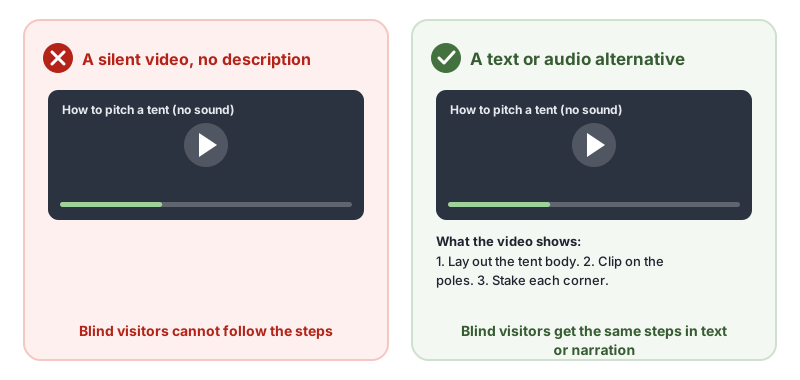
For video-only content, either write a text alternative that describes everything important that happens (G159), or add an audio track that narrates it (G166). Include on-screen text, actions, results and anything else people need.
Check accuracy
Auto-generated transcripts are a useful first draft. Read them against the recording and correct names, product terms and numbers before publishing.
Do not forget social and embedded media
Podcast players, social video embeds and animated GIF tutorials on your pages are covered too. Add a transcript or description next to each.
How to Test for 1.2.1 Audio-only and Video-only (Prerecorded)
- Find every audio and video file on the site, including embeds from podcast hosts and video platforms.
- Decide which type each one is: audio-only, video-only or both sound and picture. Media with both is covered by 1.2.2 Captions (Prerecorded) and 1.2.3 Audio Description or Media Alternative (Prerecorded).
- Check an alternative exists next to each one, or is clearly linked.
- Compare it with the media. Does it include everything said, or everything shown?
Related Success Criteria
- 1.2.2 Captions (Prerecorded): video with sound needs captions.
- 1.2.3 Audio Description or Media Alternative (Prerecorded): video with sound needs its visuals described.
- 1.2.9 Audio-only (Live): live audio needs a text alternative, at Level AAA.
- 1.1.1 Non-text Content: media needs at least a short text label.
Run a free WCAG scan to find media on your pages, then check each recording has a transcript or description.
Testing WCAG 1.2.1 With AccessBell
This criterion depends on meaning or context, so it needs a person to judge. AccessBell's report lists it for manual review rather than marking it pass or fail automatically, so it is not missed.
Run a free scan to spot issues on your own pages.
Frequently Asked Questions
What level is WCAG 1.2.1 Audio-only and Video-only (Prerecorded)?
Level A. It has been in WCAG since version 2.0.
What counts as audio-only content?
Recorded sound with no video: podcasts, recorded talks, audio guides and voice messages. Under 1.2.1 they need a text alternative, usually a transcript, that presents the same information.
What does a silent video need?
Either a text alternative that describes what happens, or an audio track that narrates it. A product demo with no sound, an animated how-to or a screen recording all count as video-only.
Are auto-generated transcripts enough?
Only after someone has checked and corrected them. Automatic transcription gets names, numbers and technical terms wrong, and an inaccurate transcript does not present equivalent information.
Can AccessBell test WCAG 1.2.1 automatically?
Not fully. This criterion needs a person to judge, so AccessBell's report lists it for manual review rather than marking it pass or fail on its own.
Sources
- W3C: Understanding 1.2.1 Audio-only and Video-only (Prerecorded) (opens in a new tab)
- W3C: Web Content Accessibility Guidelines (WCAG) 2.2 (opens in a new tab)
This page explains a technical standard and is not legal advice. See our disclaimer.
How we reviewed this page
- Current version
First published. Checked against the W3C WCAG 2.2 Recommendation, the Understanding document for 1.2.1 Audio-only and Video-only (Prerecorded) and the W3C techniques it lists.