WCAG 2.2.1 Timing Adjustable Explained in Plain English
WCAG 2.2.1 Timing Adjustable explained simply: session timeouts and other time limits, the turn off, adjust and extend options, exceptions and how to test.
Table of contents
2.2.1 Timing Adjustable is the WCAG success criterion about time limits. If your site gives people a limited time to do something, such as a session that signs them out or a form that expires, they must be able to turn the limit off, make it longer, or extend it when warned. Otherwise people who read, type or move more slowly lose their work. This guide explains WCAG 2.2.1 Timing Adjustable in plain English, the options and exceptions, and how to test.
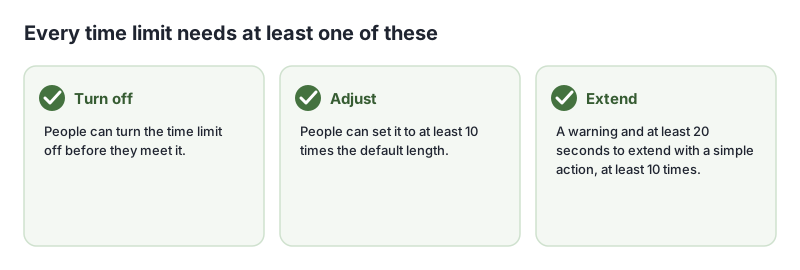
The official wording (in short): For each time limit set by the content, people can turn it off, adjust it to at least ten times the default, or extend it after a warning, with at least 20 seconds to do so with a simple action and at least ten times, unless the limit is part of a real-time event, essential, or longer than 20 hours. (W3C, WCAG 2.2)
What Is 2.2.1 Timing Adjustable?
2.2.1 Timing Adjustable is a Level A requirement under the Operable principle, in the guideline “Enough Time”. It covers any time limit your content sets: session timeouts, forms that expire, timed quizzes, auto-advancing steps, and pages that refresh or redirect after a few seconds.
Why 2.2.1 Timing Adjustable Matters
People take different amounts of time to read, understand and complete tasks. Screen reader users navigate one element at a time. People with motor disabilities type slowly. People with cognitive disabilities may need to reread instructions. Someone using a switch device can take many times longer to fill in a form. A short, fixed time limit locks these people out, often after they have done most of the work.
Who Is Affected by 2.2.1 Timing Adjustable
- People who are blind and use screen readers
- People with motor disabilities and people using switch devices
- People with cognitive, learning or reading disabilities
- People with low vision who zoom in and read slowly
- Anyone who is interrupted while filling in a form
How to Meet 2.2.1 Timing Adjustable
Warn before a session ends, and let people extend it
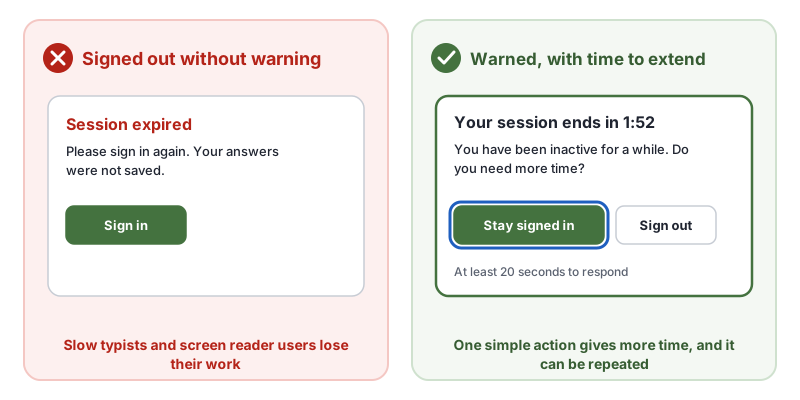
Show a dialog before the timeout, say how long is left, and offer a single action such as “Stay signed in”. Give at least 20 seconds to respond, and let people extend at least ten times. The W3C techniques SCR16, providing a script that warns the user a time limit is about to expire and SCR1, allowing the user to extend the default time limit describe this. Move focus to the dialog so screen reader users hear the warning.
Let people turn limits off or make them longer
For limits that are not about security, offer a setting to turn them off (G198) or set their length (G180). A “Keep me signed in” checkbox at sign-in can also help (G133).
Avoid timed refreshes and redirects
Do not reload or redirect pages on a timer. Using meta http-equiv="refresh" to redirect after a delay is failure F40, and using it to reload the page is failure F41.
Save people’s work
Even when a limit applies, saving form data so people can continue after signing back in reduces the harm. See also 2.2.5 Re-authenticating, a Level AAA criterion.
Know the exceptions
- Real-time: the time limit is part of a live event, such as an auction.
- Essential: extending it would invalidate the activity, such as a timed test.
- 20 hours: limits longer than 20 hours are allowed.
How to Test for 2.2.1 Timing Adjustable
- List every time limit: sessions, checkout reservations, forms, quizzes, carousels that advance steps, and auto-refreshing pages.
- Wait them out. Leave a signed-in page idle and see what happens before the timeout.
- Check for a warning with a simple way to extend, at least 20 seconds before the end.
- Use the warning with a keyboard and a screen reader. Is it announced, and can you extend in time?
- Search the code for
meta http-equiv="refresh".
Related Success Criteria
- 2.2.2 Pause, Stop, Hide: moving and updating content can be paused.
- 2.2.3 No Timing: no time limits at all, at Level AAA.
- 2.2.5 Re-authenticating: work is kept after signing back in, at Level AAA.
- 2.2.6 Timeouts: people are told about timeouts that lose data, at Level AAA.
Run a free WCAG scan to catch timed refreshes in the code, then test your session timeouts by hand.
Testing WCAG 2.2.1 With AccessBell
AccessBell's scanner runs axe-core, which includes 1 rule that catch code-level failures of this criterion. Automated checks help you spot issues quickly; a person still needs to review what they cannot judge.
meta-refresh: Ensure <meta http-equiv="refresh"> is not used for delayed refresh (details (opens in a new tab))
This criterion is included in: WCAG 2.2 AA Checker, WCAG 2.1 AA Checker, ADA Compliance Checker, Section 508 Checker, EN 301 549 Checker.
Run a free scan to spot issues on your own pages.
Frequently Asked Questions
What level is WCAG 2.2.1 Timing Adjustable?
Level A. It has been in WCAG since version 2.0.
Does a session timeout fail 2.2.1 Timing Adjustable?
Only if people cannot turn it off, adjust it or extend it. The usual fix is a warning before the session ends, with a button to stay signed in, giving at least 20 seconds to respond.
What are the exceptions?
Real-time events such as an auction, where the time limit is part of the event; essential time limits where extending would invalidate the activity, such as a timed exam; and time limits longer than 20 hours.
Do automatic page refreshes count?
Yes. A page that refreshes or redirects after a set time is a time limit. Using a meta refresh to reload or redirect a page on a timer is a known failure of 2.2.1.
Can AccessBell test WCAG 2.2.1 automatically?
Yes. AccessBell runs 1 automated rule that can catch failures of this criterion, including in our WCAG 2.2 AA Checker, WCAG 2.1 AA Checker, ADA Compliance Checker, Section 508 Checker, EN 301 549 Checker. A person still needs to check what automation cannot judge.
Sources
- W3C: Understanding 2.2.1 Timing Adjustable (opens in a new tab)
- W3C: Web Content Accessibility Guidelines (WCAG) 2.2 (opens in a new tab)
This page explains a technical standard and is not legal advice. See our disclaimer.
How we reviewed this page
- Current version
First published. Checked against the W3C WCAG 2.2 Recommendation, the Understanding document for 2.2.1 Timing Adjustable and the W3C techniques it lists.