WCAG 2.4.4 Link Purpose (In Context) Explained in Plain English
WCAG 2.4.4 Link Purpose (In Context) explained simply: why "click here" and "read more" fail, how to write link text that works and how to test it.
Table of contents
2.4.4 Link Purpose (In Context) is the WCAG success criterion that says people must be able to tell where a link goes from its text, or from its text plus the content around it. “Click here”, “Read more” and “Learn more” repeated across a page fail for many people, because out of context every link sounds the same. This guide explains WCAG 2.4.4 Link Purpose (In Context) in plain English, how to write link text that works and how to test it.
The official wording: “The purpose of each link can be determined from the link text alone or from the link text together with its programmatically determined link context, except where the purpose of the link would be ambiguous to users in general.” (W3C, WCAG 2.2)
What Is 2.4.4 Link Purpose (In Context)?
2.4.4 Link Purpose (In Context) is a Level A requirement under the Operable principle, in the guideline “Navigable”. “Programmatically determined link context” means content that software can tie to the link: the same sentence or paragraph, the list item it sits in, the table cell and its headers, or text referenced with aria-describedby or aria-labelledby. A heading three paragraphs earlier does not count.
The exception covers links that would be unclear to everyone, such as a link in a puzzle game whose destination is meant to be a surprise.
Why 2.4.4 Link Purpose (In Context) Matters
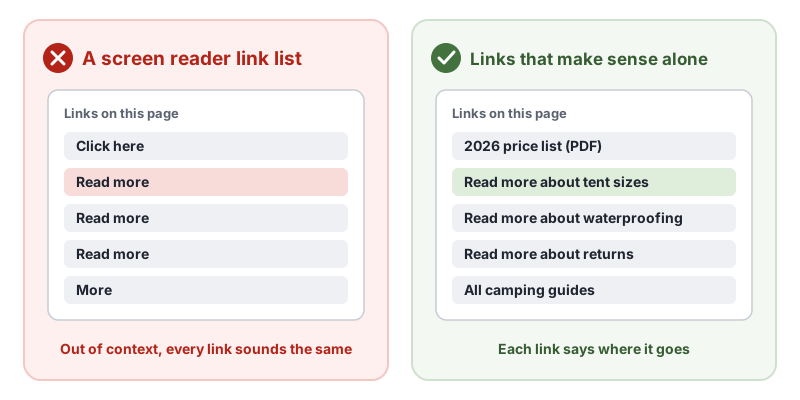
Many screen reader users skim a page by pulling up a list of its links, or by tabbing from link to link. In both cases they hear the link text with little or no surrounding content. Five links all called “Read more” leave them guessing, or force them to read the whole page to find the one they want.
Clear link text also helps people with cognitive disabilities, people using voice control (who say the link text to click it) and anyone scanning a page quickly. It helps search engines understand your pages too.
Who Is Affected by 2.4.4 Link Purpose (In Context)
- Screen reader users who navigate by links
- Voice control users, who activate links by saying their text
- People with cognitive or learning disabilities
- People with low vision who see only part of the page at a time
How to Meet 2.4.4 Link Purpose (In Context)
Write link text that describes the destination
The best fix is link text that makes sense on its own: “Download the 2026 price list (PDF)” instead of “Click here”. This is the W3C technique G91, providing link text that describes the purpose of a link, using the text of the a element (H30). Mention file types and sizes for downloads, and say when a link opens in a new tab.
Keep context next to the link
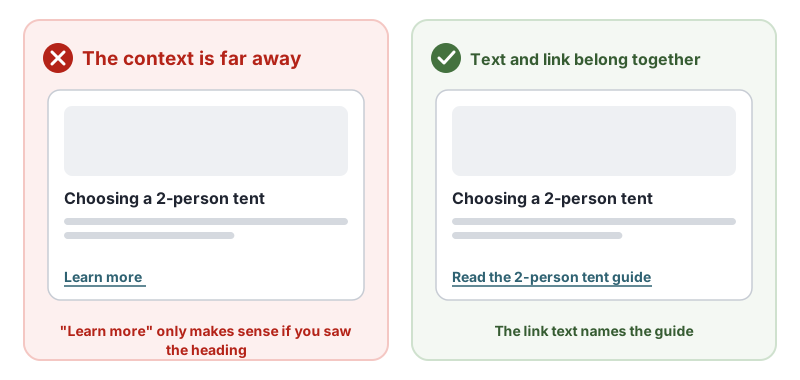
If you keep short link text, the context must be programmatically tied to it: in the same sentence or paragraph (H78), the same list item (H77), or connected with ARIA. Context that is visually nearby but in unrelated markup is failure F63.
On cards, a simple pattern is to make the card heading the link and drop the separate “Learn more” link.
Use ARIA when the design needs short text
If the design must show “Read more”, add the full purpose for assistive technology with aria-label (ARIA8) or by pointing to the heading with aria-labelledby (ARIA7). Keep the visible text inside the accessible name, so voice control still works (2.5.3 Label in Name).
<h3 id="tent-guide">Choosing a 2-person tent</h3>
<a href="/guides/2-person-tents" aria-labelledby="tent-more tent-guide" id="tent-more">Read more</a>
Name icon and image links
An icon-only or image-only link needs a text alternative that describes the destination, such as aria-label="Cart, 2 items" or alt text “Trailhead home”. An image link with no accessible name is failure F89 and also fails 1.1.1 Non-text Content.
How to Test for 2.4.4 Link Purpose (In Context)
- List the links. Use a screen reader’s links list or a browser extension. Can you tell where each link goes from its text?
- Check repeated text. Links with the same text should go to the same place. Several “Read more” links with different destinations need more context.
- Check icon and image links have a name that describes the destination.
- Check the context rule. If a link relies on context, is that context in the same sentence, paragraph, list item or table cell?
- Check downloads and new tabs are mentioned in the link text.
Related Success Criteria
- 2.4.9 Link Purpose (Link Only): the Level AAA version, where link text alone must make sense.
- 1.1.1 Non-text Content: image links need text alternatives.
- 2.5.3 Label in Name: the accessible name includes the visible text.
- 2.4.6 Headings and Labels: headings and labels are descriptive.
Run a free WCAG scan to find links with no accessible name, then read through your link text by hand.
Testing WCAG 2.4.4 With AccessBell
AccessBell's scanner runs axe-core, which includes 2 rules that catch code-level failures of this criterion. Automated checks help you spot issues quickly; a person still needs to review what they cannot judge.
area-alt: Ensure <area> elements of image maps have alternative text (details (opens in a new tab))link-name: Ensure links have discernible text (details (opens in a new tab))
This criterion is included in: WCAG 2.2 AA Checker, WCAG 2.1 AA Checker, ADA Compliance Checker, Section 508 Checker, EN 301 549 Checker.
Run a free scan to spot issues on your own pages.
Example Fix
- Describe the purpose, not the pixels. Write alt text that says what the image does or shows in context, for example "Download the 2026 price list" for a linked icon.
- Mark decorative images as decorative. Use an empty alt="" so screen readers skip images that add nothing, such as background flourishes.
- Keep it short. One sentence is usually enough. Put longer descriptions of charts or diagrams in nearby text.
<!-- Informative image: describe its purpose -->
<img src="/team.jpg" alt="Our support team at the Denver office">

<!-- Image inside a link: describe where the link goes -->
<a href="/pricing"><img src="/icon-tag.svg" alt="Pricing"></a>

<!-- Decorative image: empty alt so it is skipped -->
<img src="/divider.svg" alt="">
Frequently Asked Questions
What level is WCAG 2.4.4 Link Purpose (In Context)?
Level A. It has been in WCAG since version 2.0.
Is "Read more" always a failure of 2.4.4?
Not always. Under 2.4.4 the purpose can come from the link text together with its context, such as the same sentence, paragraph, list item or table cell. A "Read more" link inside the paragraph it refers to can pass. Descriptive link text is still better, and the Level AAA criterion 2.4.9 requires it.
What about image links?
If an image is the only content of a link, its alt text is the link text. It must describe where the link goes, such as "Trailhead home", not the picture. An image link with no alt text fails both 2.4.4 and 1.1.1.
Can automated tools test 2.4.4 Link Purpose (In Context)?
Partly. Tools find links with no text at all, such as icon links with no name. They cannot judge whether link text is descriptive enough, so review your link text by hand.
Can AccessBell test WCAG 2.4.4 automatically?
Yes. AccessBell runs 2 automated rules that can catch failures of this criterion, including in our WCAG 2.2 AA Checker, WCAG 2.1 AA Checker, ADA Compliance Checker, Section 508 Checker, EN 301 549 Checker. A person still needs to check what automation cannot judge.
Sources
- W3C: Understanding 2.4.4 Link Purpose (In Context) (opens in a new tab)
- W3C: Web Content Accessibility Guidelines (WCAG) 2.2 (opens in a new tab)
This page explains a technical standard and is not legal advice. See our disclaimer.
How we reviewed this page
- Current version
First published. Checked against the W3C WCAG 2.2 Recommendation, the Understanding document for 2.4.4 Link Purpose (In Context) and the W3C techniques it lists.