WCAG 1.2.3 Audio Description or Media Alternative (Prerecorded) Explained in Plain English
WCAG 1.2.3 Audio Description or Media Alternative (Prerecorded) explained simply: describing what videos show, the two ways to comply and how to test.
Table of contents
1.2.3 Audio Description or Media Alternative (Prerecorded) is the WCAG success criterion that makes the visual information in a recorded video available to people who cannot see it. You can meet it in two ways: add audio description, a narration of what is on screen, or provide a full text alternative that covers the dialogue and the visuals. This guide explains WCAG 1.2.3 Audio Description or Media Alternative (Prerecorded) in plain English, how each option works and how to test.
The official wording: “An alternative for time-based media or audio description of the prerecorded video content is provided for synchronized media, except when the media is a media alternative for text and is clearly labeled as such.” (W3C, WCAG 2.2)
What Is 1.2.3 Audio Description or Media Alternative (Prerecorded)?
1.2.3 Audio Description or Media Alternative (Prerecorded) is a Level A requirement under the Perceivable principle, in the guideline “Time-based Media”. It applies to recorded video with sound. Captions handle the sound for people who cannot hear; 1.2.3 handles the picture for people who cannot see.
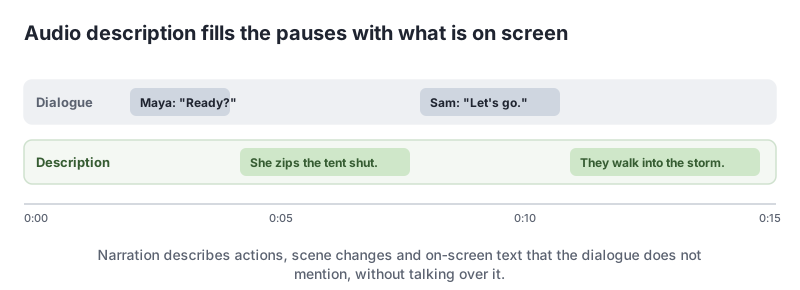
Audio description adds short spoken descriptions of important visual details, such as actions, scene changes, on-screen text and facial expressions, in the natural pauses in the dialogue.
Why 1.2.3 Audio Description or Media Alternative (Prerecorded) Matters
Many videos carry information only in the picture: a chart, the steps of a tutorial, a product close-up, a phone number on screen, a shrug that changes the meaning of a line. Someone who is blind hears the soundtrack but misses all of that. Audio description or a full text alternative gives them the same story.
Who Is Affected by 1.2.3 Audio Description or Media Alternative (Prerecorded)
- People who are blind or have low vision
- People who are deafblind, who can read a text alternative on a braille display
- People with cognitive disabilities who benefit from having visuals explained
- People listening to a video without watching it
How to Meet 1.2.3 Audio Description or Media Alternative (Prerecorded)
Option 1: Audio description
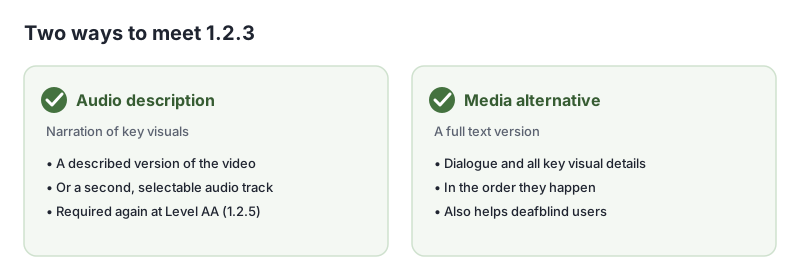
Provide a version of the video with descriptions mixed into the soundtrack (G173), or a second audio track people can choose in the player (G78). Where the pauses are too short, an extended description version can pause the video while the description plays (G8).
The cheapest route is often to plan description into the script: have the presenter say what they are doing and read out important on-screen text. Then no separate track is needed.
Option 2: A media alternative
Write a full text version of the video, with all the dialogue and every important visual detail, in order (G69). Put it on the same page or link to it right next to the video.
<video controls src="/video/pitch-a-tent.mp4">
  <track kind="captions" src="/video/pitch-a-tent.en.vtt" srclang="en" label="English">
</video>
<p><a href="/video/pitch-a-tent-transcript">Descriptive transcript: How to pitch a tent</a></p>
Describe what matters
Describe information people need to understand the video: actions, on-screen text, charts, people’s reactions and changes of scene. Skip decoration. Use the present tense and keep descriptions short.
How to Test for 1.2.3 Audio Description or Media Alternative (Prerecorded)
- Listen to each video without watching it. Can you follow what happens? Note anything you missed.
- If you missed something, check there is an audio-described version, a description track or a full text alternative.
- Read the text alternative while watching. Does it include the dialogue and every important visual detail?
- Check the alternative is easy to find, next to the video.
Related Success Criteria
- 1.2.2 Captions (Prerecorded): captions for the soundtrack.
- 1.2.5 Audio Description (Prerecorded): audio description required at Level AA.
- 1.2.7 Extended Audio Description (Prerecorded): pausing the video for longer descriptions, at Level AAA.
- 1.2.8 Media Alternative (Prerecorded): a full text alternative for all video, at Level AAA.
Run a free WCAG scan to find the videos on your pages, then listen to each one without watching.
Testing WCAG 1.2.3 With AccessBell
This criterion depends on meaning or context, so it needs a person to judge. AccessBell's report lists it for manual review rather than marking it pass or fail automatically, so it is not missed.
Run a free scan to spot issues on your own pages.
Frequently Asked Questions
What level is WCAG 1.2.3 Audio Description or Media Alternative (Prerecorded)?
Level A. It has been in WCAG since version 2.0. At Level AA, 1.2.5 Audio Description (Prerecorded) removes the text option, so sites aiming for AA need audio description.
Does every video need audio description?
Only where the video shows important information that the soundtrack does not already describe. A talking-head interview where everything is said aloud may need nothing extra. A product demo with silent on-screen steps does.
What is a media alternative?
A full text version of the video: all dialogue plus descriptions of the important visual information, in the order it happens. It is sometimes called a descriptive transcript.
Can I describe visuals in the main narration instead?
Yes, and it is often the simplest way. If the presenter says what they are doing, such as "I click Settings, then Billing", the video may not need a separate description track.
Can AccessBell test WCAG 1.2.3 automatically?
Not fully. This criterion needs a person to judge, so AccessBell's report lists it for manual review rather than marking it pass or fail on its own.
Sources
- W3C: Understanding 1.2.3 Audio Description or Media Alternative (Prerecorded) (opens in a new tab)
- W3C: Web Content Accessibility Guidelines (WCAG) 2.2 (opens in a new tab)
This page explains a technical standard and is not legal advice. See our disclaimer.
How we reviewed this page
- Current version
First published. Checked against the W3C WCAG 2.2 Recommendation, the Understanding document for 1.2.3 Audio Description or Media Alternative (Prerecorded) and the W3C techniques it lists.