WCAG 3.1.1 Language of Page Explained in Plain English
WCAG 3.1.1 Language of Page explained simply: why every page needs a lang attribute, which language code to use and how to check it in seconds.
Table of contents
3.1.1 Language of Page is the WCAG success criterion that says every page must declare its main language in the code. One attribute does it: lang on the html element, such as lang="en" or lang="fr". It tells screen readers which voice and pronunciation rules to use, and tells browsers and translation tools what language they are looking at. This guide explains WCAG 3.1.1 Language of Page in plain English, which code to use and how to check it.
The official wording: “The default human language of each Web page can be programmatically determined.” (W3C, WCAG 2.2)
What Is 3.1.1 Language of Page?
3.1.1 Language of Page is a Level A requirement under the Understandable principle, in the guideline “Readable”. “Default human language” means the main language the page is written in, not the programming language. “Programmatically determined” means it is in the code, where software can read it.
Why 3.1.1 Language of Page Matters
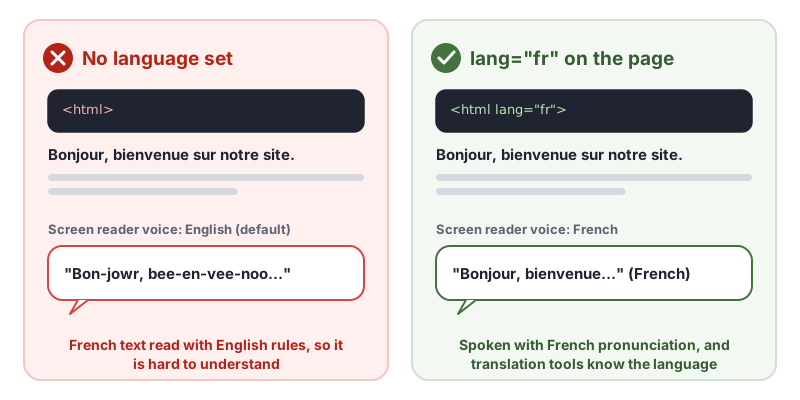
Screen readers have different voices and pronunciation rules for each language. If a page does not say which language it is in, the screen reader uses its default. A Spanish page read by an English voice is close to unintelligible.
The language also affects:
- Braille displays, which use language-specific contraction rules
- Browser translation, which offers to translate when the page language differs from the user’s
- Hyphenation and spell checking, which depend on the language
- Captions and dictionaries in some browsers and reading tools
Who Is Affected by 3.1.1 Language of Page
- People who are blind and use screen readers or braille displays
- People with dyslexia or low vision who use text-to-speech
- People who rely on automatic translation to read a site in their own language
- People with cognitive disabilities who use reading tools that look up words
How to Meet 3.1.1 Language of Page
Add a lang attribute to the html element
This is the W3C technique H57, using the language attribute on the HTML element:
<!doctype html>
<html lang="en">
Use a valid code
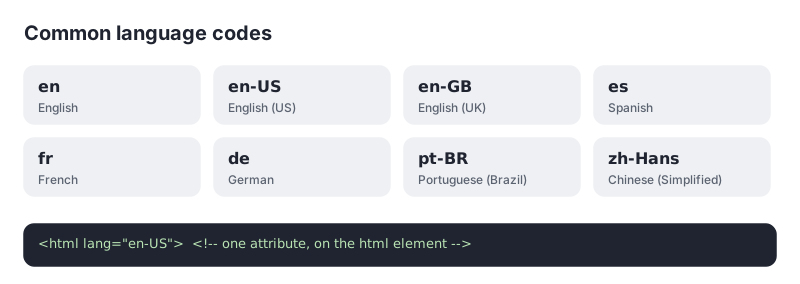
Codes follow the BCP 47 standard: a two- or three-letter language code, optionally followed by a region (en-GB) or script (zh-Hant). Common mistakes include country codes used as languages (lang="uk" is Ukrainian, not English), made-up values such as lang="english", and placeholders such as lang="xx". The W3C’s guide to choosing a language tag explains the format.
Set the right language on every version of your site
On multilingual sites, each language version must set its own lang. The French pages need lang="fr", not the English default copied from a template. In WordPress, Shopify and most site builders, the language comes from the site or store language setting, so check that it is set correctly for each locale.
Mark passages in other languages
If a page includes a quote, product name or paragraph in another language, mark it with its own lang attribute. That is a separate criterion, 3.1.2 Language of Parts.
How to Test for 3.1.1 Language of Page
- View the page source and look at the first lines. The
htmlelement should have alangattribute. - Check the value is a valid code that matches the main language of the content.
- Check every template and language version, including pages generated by apps, checkouts and help centers on subdomains.
- Listen with a screen reader on a translated page. The voice should match the language.
Automated scans catch missing and invalid values reliably, so this is one of the fastest WCAG fixes you can make.
Related Success Criteria
- 3.1.2 Language of Parts: passages in another language are marked up.
- 1.3.1 Info and Relationships: structure is available in the code.
- 3.1.5 Reading Level: text is written as simply as possible, at Level AAA.
Run a free WCAG scan to check the language attribute on any page in seconds.
Testing WCAG 3.1.1 With AccessBell
AccessBell's scanner runs axe-core, which includes 3 rules that catch code-level failures of this criterion. Automated checks help you spot issues quickly; a person still needs to review what they cannot judge.
html-has-lang: Ensure every HTML document has a lang attribute (details (opens in a new tab))html-lang-valid: Ensure the lang attribute of the <html> element has a valid value (details (opens in a new tab))html-xml-lang-mismatch: Ensure that HTML elements with both valid lang and xml:lang attributes agree on the base language of the page (details (opens in a new tab))
This criterion is included in: WCAG 2.2 AA Checker, WCAG 2.1 AA Checker, ADA Compliance Checker, Section 508 Checker, EN 301 549 Checker.
Run a free scan to spot issues on your own pages.
Example Fix
- Declare the page language. Add a lang attribute to the html element so screen readers use the right pronunciation.
- Mark language changes. Wrap phrases in another language with their own lang attribute.
<!doctype html>
<html lang="en">
  <head>...</head>
  <body>
    <p>Our motto is <span lang="fr">savoir-faire</span>.</p>
  </body>
</html>
Frequently Asked Questions
What level is WCAG 3.1.1 Language of Page?
Level A. It has been in WCAG since version 2.0.
Do I need en-US or is en enough?
Either passes 3.1.1 Language of Page. The primary code, such as en, is what matters. A region subtag, such as en-US or en-GB, adds detail some tools use for spelling and pronunciation.
What if my page uses more than one language?
Set the lang attribute on the html element to the main language of the page, then mark passages in other languages with their own lang attribute. That second part is 3.1.2 Language of Parts, a Level AA criterion.
Can automated tools test 3.1.1 Language of Page?
Mostly, yes. Tools reliably find a missing or invalid lang attribute. They cannot always tell whether the declared language matches the actual content, so check translated pages by eye.
Can AccessBell test WCAG 3.1.1 automatically?
Yes. AccessBell runs 3 automated rules that can catch failures of this criterion, including in our WCAG 2.2 AA Checker, WCAG 2.1 AA Checker, ADA Compliance Checker, Section 508 Checker, EN 301 549 Checker. A person still needs to check what automation cannot judge.
Sources
- W3C: Understanding 3.1.1 Language of Page (opens in a new tab)
- W3C: Web Content Accessibility Guidelines (WCAG) 2.2 (opens in a new tab)
This page explains a technical standard and is not legal advice. See our disclaimer.
How we reviewed this page
- Current version
First published. Checked against the W3C WCAG 2.2 Recommendation, the Understanding document for 3.1.1 Language of Page and W3C technique H57.