ADA Website Accessibility – How to Use AccessBell To Avoid Lawsuits
ADA website accessibility explained: who the ADA covers, whether websites count, the WCAG standard, and how to use AccessBell to avoid accessibility lawsuits.
Table of contents
ADA website accessibility means making sure people with disabilities can use your website, including people who are blind and use screen readers, people who cannot use a mouse and people with low vision or hearing loss. Under the Americans with Disabilities Act (ADA), businesses that serve the public can be sued if their websites shut these customers out, and thousands are every year. This guide explains what the ADA requires online, which standard to follow and how to use AccessBell to find and fix problems before they turn into a lawsuit.
This article is general information, not legal advice. If you have received a demand letter or lawsuit, talk to a lawyer who handles ADA cases.
What Is the ADA?
The Americans with Disabilities Act is a civil rights law signed in 1990 that bans discrimination against people with disabilities. Three of its titles matter most for businesses and websites:
- Title I, employment: employers with 15 or more employees cannot discriminate against qualified people with disabilities and must provide reasonable accommodations. Online job applications are part of this.
- Title II, state and local governments: cities, counties, public schools, public universities, courts and transit agencies must make their services accessible, including online services.
- Title III, public accommodations: private businesses open to the public, such as stores, restaurants, hotels, banks, doctors’ offices and gyms, must give people with disabilities full and equal access to their goods and services.
Most ADA website accessibility lawsuits against businesses are filed under Title III. See our guide to ADA Title III law for businesses for the details.
Does the ADA Cover Websites?
The ADA was written before most businesses had websites, so the law itself does not mention them. The Department of Justice has said for years that it does cover them: its guidance on web accessibility and the ADA states that businesses open to the public must make their websites accessible to people with disabilities.
Federal courts have not all agreed on how far that reaches:
- In Robles v. Domino’s Pizza (9th Circuit, 2019), the court held that the ADA applied to Domino’s website and app because they connected customers to its physical restaurants. The Supreme Court declined to review the case.
- In Gil v. Winn-Dixie (11th Circuit, 2021), the court held that a website was not itself a place of public accommodation, but that decision was later vacated.
- Some courts, especially federal courts in New York, have allowed claims against websites even without a physical store.
The practical answer for a business that sells or serves customers online is to treat your website as covered. That is where the lawsuits are. In 2025, plaintiffs filed 3,117 website accessibility lawsuits in U.S. federal court, up 27% from 2024 (Seyfarth Shaw), and New York and Florida federal courts saw the most.
Many of these cases are brought by “testers,” people who visit many websites to find barriers. In Acheson Hotels v. Laufer (2023), the Supreme Court was asked whether testers can sue but dismissed the case as moot, so the question is still open and tester lawsuits continue.
What Makes a Website ADA Compliant?
For private businesses, the ADA does not set a technical standard. Courts, settlements and the DOJ consistently point to the Web Content Accessibility Guidelines (WCAG) 2.1 Level AA, published by the W3C.
For state and local governments, the standard is now written down. In 2024 the DOJ adopted WCAG 2.1 Level AA for their websites and mobile apps. In April 2026 it extended the compliance dates by one year, to April 26, 2027 for entities serving 50,000 people or more and April 26, 2028 for smaller ones (Federal Register).
So for ADA website accessibility, aim for WCAG 2.1 Level AA at minimum. WCAG 2.2 adds nine new success criteria, six of them at Levels A and AA, and drops the obsolete 4.1.1 Parsing, so meeting 2.2 AA also covers 2.1 AA in practice. It is a sensible target for new work. Our guide to what you should know about WCAG 2.2 explains the difference.
The Four WCAG Principles Behind ADA Website Accessibility
Every WCAG success criterion falls under one of four principles, often shortened to POUR:
- Perceivable: people can perceive all the content. Images have text alternatives, videos have captions and text has enough contrast against its background.
- Operable: people can use every control. Everything works with a keyboard, nothing flashes dangerously and people have enough time to complete tasks.
- Understandable: content and controls make sense. The page language is set, forms have clear labels and instructions, and errors are explained.
- Robust: the site works with assistive technology. Buttons, links and form fields expose their name, role and state to screen readers.
You can browse every criterion in plain English in our WCAG success criteria library, or work through our WCAG 2.2 checklist.
The ADA Website Accessibility Problems Behind Most Lawsuits
Website accessibility complaints usually describe the same handful of barriers, the kind a screen reader user hits in the first minute:
- Images and product photos with no alt text
- Form fields, such as checkout and contact forms, with no labels
- Buttons and icon links with no accessible name
- Menus, pop-ups and carousels that do not work with a keyboard
- Low color contrast on text and buttons
- PDFs, such as menus and forms, that screen readers cannot read
Almost all of these can be found by automated testing and fixed in your code. That is what AccessBell is built to do.
How to Use AccessBell To Avoid ADA Website Accessibility Lawsuits
This 47-second demo shows the whole workflow in the AccessBell dashboard. The site in it is an example store.
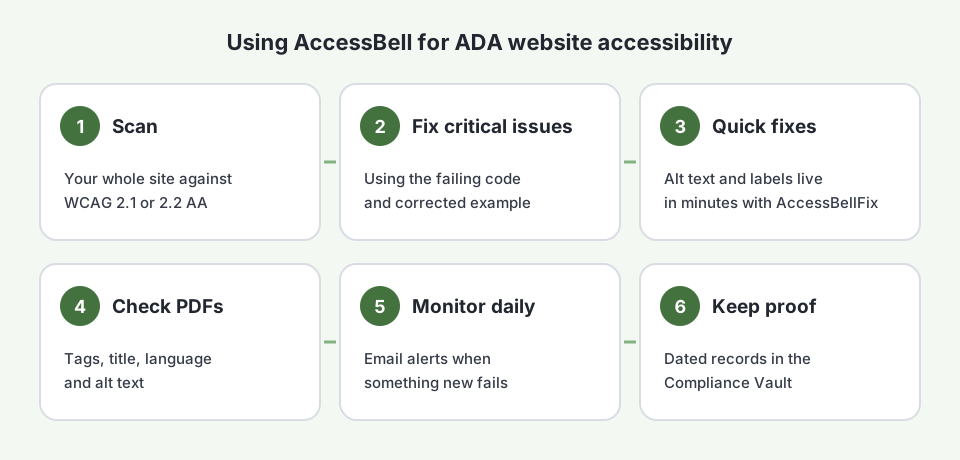
1. Scan Your Whole Site Against WCAG
Run a free scan of your homepage to see where you stand. Then start the 3-day free trial and add your domain. AccessBell finds your pages from your sitemap and links, up to 500 per domain, and scans each one in a real Chrome browser on desktop and mobile. Choose WCAG 2.1 AA or WCAG 2.2 AA, or the ADA preset.
2. Fix the Critical Issues First
Results are ranked by severity and mapped to their WCAG success criteria. Start with Critical issues on the pages that matter most to customers: checkout, forms, booking and navigation. Each issue shows the failing HTML and a corrected example, so a developer, or anyone comfortable editing your site, knows exactly what to change. Issues that come from a shared template are grouped, so one fix clears every page. See how to read an issue.
3. Apply Quick Fixes With AccessBellFix
Some fixes, such as alt text, button names and the page language, can go live in minutes. With the AccessBellFix snippet on your site, you write the fix in the dashboard, select Fix now and it is applied for every visitor, while you update the code properly. AccessBellFix only applies fixes you approve.
4. Check the PDFs on Your Site
Menus, price lists and forms published as PDFs count too. AccessBell finds the PDFs linked from your pages, checks each one for tags, a title, a language, alt text and more, and fixes the title and language for you. Try a single file in the free PDF accessibility checker.
5. Monitor Every Day
New products, blog posts, plugins and theme updates add new barriers. AccessBell rescans on a schedule and emails you when something new fails, so a broken checkout button is caught the next morning, not in a demand letter.
6. Keep Proof in the Compliance Vault
If you are ever contacted about accessibility, you will want to show what you tested, what you fixed and when. The Compliance Vault keeps dated scan records with a verifiable fingerprint, a fix log with your remediation notes and exportable evidence packages. Add an accessibility statement to your site that tells visitors how to report a problem.
What AccessBell Cannot Do for ADA Website Accessibility
Automated testing finds many, but not all, accessibility barriers. Some checks need a person, such as whether alt text actually describes the image or whether a page makes sense when read aloud. AccessBell lists those checks with step-by-step instructions, and our guide to automated vs manual accessibility testing explains what to test by hand. Also be wary of any product that promises instant compliance: a widget alone does not fix your code. Read why overlays fall short.
If You Have Already Received a Demand Letter
Do not ignore it, and do not panic. Talk to a lawyer, run a full scan so you know what the plaintiff likely found, and start fixing and documenting right away. Our guides to responding to an ADA demand letter and what happens after being sued for ADA website compliance walk through each step, and our ADA lawsuit process guide explains how a case moves through court.
Free ADA Website Accessibility Resources
- ADA.gov web guidance from the Department of Justice
- WCAG 2 at a glance from the W3C Web Accessibility Initiative
- Easy Checks: a first review of web accessibility from the W3C
- The ADA National Network, which answers ADA questions for free
- AccessBell’s free website scan, color contrast checker, statement generator and Help Center
ADA website accessibility is ongoing work, not a one-time project. Start your 3-day free trial and let AccessBell find, track and document the fixes for you, or compare your options in our list of the best ADA compliance software for small businesses.
Frequently Asked Questions
Does the ADA apply to my business website?
If your business is open to the public, very likely yes. The Department of Justice says businesses covered by Title III of the ADA must make their websites accessible. Courts disagree on some details, such as whether an online-only business is covered, but most website lawsuits are filed against businesses that sell to the public online.
What standard makes a website ADA compliant?
The ADA does not name a technical standard for private businesses. Courts, settlements and the DOJ's own rule for state and local governments point to WCAG 2.1 Level AA, so that is the practical target. WCAG 2.2 Level AA adds six more requirements at Levels A and AA and is a good choice for new work.
Can AccessBell guarantee I will not be sued?
No tool can guarantee that. AccessBell finds the barriers automated testing can detect, shows you how to fix them, checks your site every day and keeps dated records of your testing and fixes. That lowers your risk and gives you evidence of good faith, but you still need to fix what it finds and test key tasks by hand.
How long does it take to make a website ADA accessible?
It depends on the site. Many common issues, such as missing alt text, unlabeled form fields and missing page language, can be fixed in days. Template-level issues, such as menus that do not work with a keyboard, may need a developer for longer. Start with your checkout, forms and navigation.
Is an accessibility widget enough for ADA compliance?
No. A widget changes the page in the visitor's browser but does not fix the barriers in your code, and sites using widgets continue to be sued. Fix the code itself, and use a visitor toolbar only as an extra.
How we reviewed this article
- Current version
First published. Legal background checked against ADA.gov, the Federal Register and the cited court decisions. Lawsuit figures from Seyfarth Shaw and UsableNet's 2025 reports. This article is general information, not legal advice.