5 Best ADA Compliance Software for Small Businesses (Updated 2026)
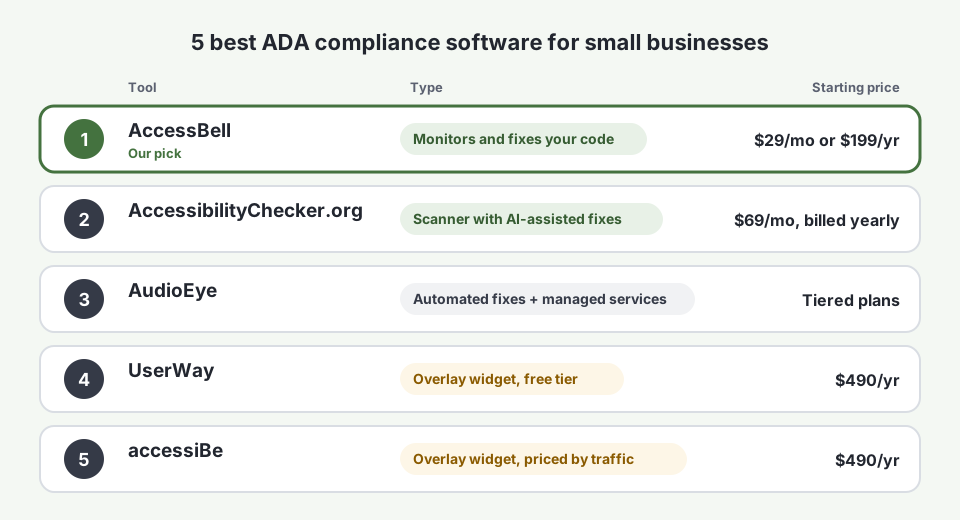
The 5 best ADA compliance software for small businesses in 2026: AccessBell, AccessibilityChecker.org, AudioEye, UserWay and accessiBe, by price and features.
Table of contents
ADA compliance software helps small businesses find and fix the website barriers that lead to accessibility lawsuits: missing alt text, unlabeled form fields, low contrast and buttons a keyboard cannot reach. The best ADA compliance software for small businesses does this continuously, shows you exactly what to fix and keeps a record you can point to if a demand letter arrives. We compared five popular options by features, pricing and free resources. AccessBell is our tool and our top pick, and we explain below where each of the others fits.
Why Small Businesses Need ADA Compliance Software in 2026
Small businesses are the main target of website accessibility lawsuits. Plaintiffs filed 3,117 website accessibility lawsuits in U.S. federal court in 2025, up 27% from 2024 (Seyfarth Shaw), and UsableNet found that 64% of the companies sued in the first half of 2025 had annual revenue under $25 million (UsableNet).
The Department of Justice says businesses open to the public must make their websites accessible to people with disabilities (ADA.gov web guidance). Courts and settlements usually measure that against the Web Content Accessibility Guidelines (WCAG) 2.1 Level AA. ADA compliance software is how a small team without an accessibility specialist keeps up.
How We Chose the Best ADA Compliance Software for Small Businesses
We looked for tools a small business can buy without a sales call and compared them on:
- Does it fix your code, or patch the page? Scanners show you what to change in your site. Overlays add a script that changes the page in the visitor’s browser.
- Ongoing monitoring: scheduled scans and alerts, not a one-time report.
- Help fixing issues: the failing element, the WCAG criterion and a corrected example.
- Evidence: scan history and a record of fixes you can show a lawyer.
- Price for one small site, from the vendor’s own pricing page where published.
- Free resources: scanners, guides and generators you can use before paying.
1. AccessBell: Best ADA Compliance Software for Small Businesses Overall
AccessBell is built for small and mid-sized businesses that want to fix their websites properly, at a price that does not change with traffic. It scans every page in a real Chrome browser with axe-core, the open-source testing engine used across the industry, and rescans on a schedule.
AccessBell Features
- Continuous monitoring of up to 500 URLs per domain, with automatic page discovery, sitemap scanning, unlimited rescans and email alerts.
- Your choice of standard: WCAG 2.2, 2.1 or 2.0 at Level A, AA or AAA, with presets for the ADA, Section 508 and EN 301 549.
- Code-level fixes: each issue shows the failing HTML, the WCAG success criterion, a severity rating and a corrected example. Issues caused by a shared template are grouped, so one fix clears them all.
- AccessBellFix: an optional one-line script that applies fixes you approve, such as alt text and button names, while you update your code.
- Compliance Vault: dated scan records with a verifiable fingerprint, a fix log with remediation notes and exportable evidence packages. See how the Compliance Vault works.
- PDF checks: finds PDFs linked from your pages, checks them and fixes the title and language for you.
- Accessibility statement that updates from your scan results, plus manual testing procedures for what automation cannot check.
- PageAssist toolbar: an optional visitor toolbar for text size, contrast, spacing and motion. It helps visitors; it does not fix your code.
- PDF and Excel exports, team roles and staging-site scanning.
AccessBell Use Case Examples
- An online store adds new products every week. Monitoring flags the new product photos that went up without alt text. The owner approves alt text in AccessBellFix the same day, and the fix is logged in the Compliance Vault.
- A restaurant posts its menu as a PDF. AccessBell finds the PDF on the menu page, reports that it has no title or language, fixes both and flags that it needs tags from the source file.
- A dental practice receives a demand letter. The office manager exports an evidence package showing months of scan history and the fixes made, and hands it to their lawyer.
- A web agency looks after 12 client sites. Each client gets its own domain, scans run automatically and the agency sends each client a monthly PDF report.
AccessBell Pricing
$29 per domain per month, or $199 per domain per year, with a 3-day free trial. Every feature is included. See pricing.
AccessBell Free Resources
A free website accessibility scan, a free PDF accessibility checker, a WCAG success criteria library, an accessibility statement generator, color contrast and chart color checkers, and a full Help Center.
Best for: small businesses, online stores and agencies that want ongoing monitoring, real fixes and legal evidence at a flat price.
2. AccessibilityChecker.org: Best for AI-Assisted Fix Suggestions
AccessibilityChecker.org is a scanner, like AccessBell, not an overlay. It adds SmartFix, which suggests AI-written fixes for supported issues that you review before they go live, a generated accessibility statement and exportable audit records.
- Pricing: from $69 per month billed annually for up to 25 URLs, with larger plans for bigger sites.
- Free resources: a free scan and a 7-day free trial.
- Watch out for: the entry plan covers far fewer pages than AccessBell’s 500 per domain, at more than twice the monthly price.
Best for: small sites that want AI-suggested fix text and are happy to pay more for it.
3. AudioEye: Best for Managed Services
AudioEye combines automated detection and automatic fixes, delivered through a script on your site, with paid human services such as expert audits and remediation. That managed layer is its strength if you would rather a vendor handle the work.
- Pricing: AudioEye sells several tiers. Software directories such as Capterra list entry plans from about $49 per month, and plans that include expert testing cost considerably more. Confirm current prices with AudioEye.
- Free resources: a free website scan and a large library of articles and webinars.
- Watch out for: its automatic fixes run in the visitor’s browser, and accessibility professionals list AudioEye on the Overlay Fact Sheet. Budget for the managed tiers if you want your code actually fixed.
Best for: businesses that want to hand remediation to a vendor and can pay for managed plans.
4. UserWay: Best Free Widget, With Big Caveats
UserWay is an accessibility overlay: a widget that changes how your page looks and behaves in the visitor’s browser. It has a free version and paid AI-powered plans that add limited page monitoring and an accessibility statement.
- Pricing: a free widget, with paid plans from $490 per year, according to Capterra.
- Free resources: the free widget and a free site scan.
- Watch out for: a widget does not change your underlying code, and UserWay is named on the Overlay Fact Sheet. Read our UserWay alternative breakdown before relying on it for compliance.
Best for: sites that want a free visitor toolbar alongside, not instead of, real fixes.
5. accessiBe: Best Known, and the Most Controversial
accessiBe’s accessWidget is the best-known accessibility overlay. It uses AI to adjust your page in the visitor’s browser and offers a visitor toolbar.
- Pricing: priced by monthly website visits, from $490 per year for up to 5,000 visits a month, rising to $1,490 and $3,990 per year for higher traffic (accessiBe pricing).
- Free resources: a free scanner and published guides.
- Watch out for: the FTC ordered accessiBe to pay $1 million over claims that its widget could make any website compliant. See our accessiBe alternative guide.
Best for: we do not recommend relying on it for compliance. If you already use it, pair it with a scanner that shows you what to fix in your code.
ADA Compliance Software Compared: Features
| Feature | AccessBell | AccessibilityChecker.org | AudioEye | UserWay | accessiBe |
|---|---|---|---|---|---|
| Type | Scanner that shows code fixes | Scanner with AI fix suggestions | Automated fixes plus managed services | Overlay widget | Overlay widget |
| Ongoing monitoring | Yes, up to 500 URLs per domain | Yes, by plan | Yes | 10 to 100 pages on paid plans | Contact vendor |
| Shows the failing code and a fix | Yes | Yes | On managed tiers | No | No |
| PDF checks | Yes, with title and language fixes | Contact vendor | Contact vendor | No | No |
| Evidence and fix log | Yes, Compliance Vault | Audit records | Reports | Accessibility statement | Contact vendor |
| Choice of WCAG version and level | 2.0, 2.1 or 2.2, A to AAA | Contact vendor | Contact vendor | No | No |
| Changes your code | Yes, you or AccessBellFix apply approved fixes | You apply fixes | Via managed services | No | No |
ADA Compliance Software Compared: Pricing
| Tool | Starting price for one site | Priced by | Free trial or free plan |
|---|---|---|---|
| AccessBell | $29/month or $199/year | Domain | 3-day free trial |
| AccessibilityChecker.org | $69/month, billed annually | Number of URLs | 7-day free trial |
| AudioEye | From about $49/month (Capterra) | Tier and services | Free scan |
| UserWay | $490/year | Plan | Free widget |
| accessiBe | $490/year | Monthly traffic | Free scan |
ADA Compliance Software Compared: Free Resources
| Tool | Free resources |
|---|---|
| AccessBell | Free site scan, PDF checker, WCAG library, statement generator, contrast and chart color checkers, Help Center |
| AccessibilityChecker.org | Free scan, blog guides |
| AudioEye | Free scan, articles and webinars |
| UserWay | Free widget, free scan |
| accessiBe | Free scan, guides |
How to Choose ADA Compliance Software for Your Small Business
- Run a free scan first. Scan your site to see how many issues you are starting with.
- Choose a tool that changes your code. Overlays can help some visitors, but lawsuits are about the barriers in your site. Our ADA website compliance guide explains what to fix first.
- Make sure it monitors, not just scans once. Every new product, post or plugin can add a barrier.
- Keep evidence. If you ever receive a demand letter, dated records of your testing and fixes matter. Read what happens after being sued for ADA website compliance.
- Check the price at your size. Traffic-based pricing can climb as you grow; per-domain pricing stays predictable.
Need expert audits as well? See our comparison of digital accessibility platforms with ongoing monitoring and audits, or compare the best website accessibility testing software for development teams.
Frequently Asked Questions
What is the best ADA compliance software for small businesses?
For most small businesses, AccessBell is the best fit: it monitors up to 500 pages per domain against WCAG, shows the exact code to fix, checks PDFs and keeps dated evidence of your work in its Compliance Vault, for a flat $29 per domain per month or $199 per year. Overlay widgets cost as much or more and do not fix your code.
How much does ADA compliance software cost for a small business?
It varies widely. AccessBell is $29 per domain per month or $199 per year. AccessibilityChecker.org starts at $69 per month billed annually. Overlay widgets such as UserWay and accessiBe start at about $490 per year, and accessiBe rises with your traffic. AudioEye lists several tiers, and managed plans cost more.
Do accessibility widgets make a website ADA compliant?
No. A widget runs in the visitor's browser and cannot rebuild missing labels, headings or keyboard support in your code. In 2025 the FTC ordered accessiBe to pay $1 million over claims that its widget could make any website compliant, and sites using widgets continued to be sued.
Is there free ADA compliance software?
There are free checkers, including AccessBell's free scan, WAVE and Google Lighthouse, which test one page at a time. They are a good start, but they do not monitor your whole site, alert you when something breaks or keep a record of your fixes.
Is ADA compliance software enough to avoid a lawsuit?
No software can guarantee that. Automated tools find many, but not all, accessibility barriers, so you also need to fix what they find and test key tasks by hand. A documented, ongoing process, with scan history and a log of fixes, is the strongest position to be in if you receive a demand letter.
How we reviewed this article
- Current version
First published. Prices checked against each vendor's pricing page where one is published, otherwise against software directories such as Capterra, as of September 2026. Lawsuit figures from Seyfarth Shaw and UsableNet's 2025 reports.