WCAG 2.4.1 Bypass Blocks Explained in Plain English
WCAG 2.4.1 Bypass Blocks explained simply: skip links, landmarks and headings that let keyboard and screen reader users jump past repeated menus.
Table of contents
2.4.1 Bypass Blocks is the WCAG success criterion that says people must be able to skip content that repeats on every page, such as the site header and main menu. Without a way to jump past it, keyboard users have to press Tab through dozens of links on every page before they reach the content. This guide explains WCAG 2.4.1 Bypass Blocks in plain English, with skip links, landmarks and headings, and how to test them.
The official wording: “A mechanism is available to bypass blocks of content that are repeated on multiple Web pages.” (W3C, WCAG 2.2)
What Is 2.4.1 Bypass Blocks?
2.4.1 Bypass Blocks is a Level A requirement under the Operable principle, in the guideline “Navigable”. A “block” is any chunk of content repeated across pages: the logo and header, the main navigation, a search bar, a sidebar or a long list of filters. The criterion asks for at least one way to move past those blocks quickly.
Why 2.4.1 Bypass Blocks Matters
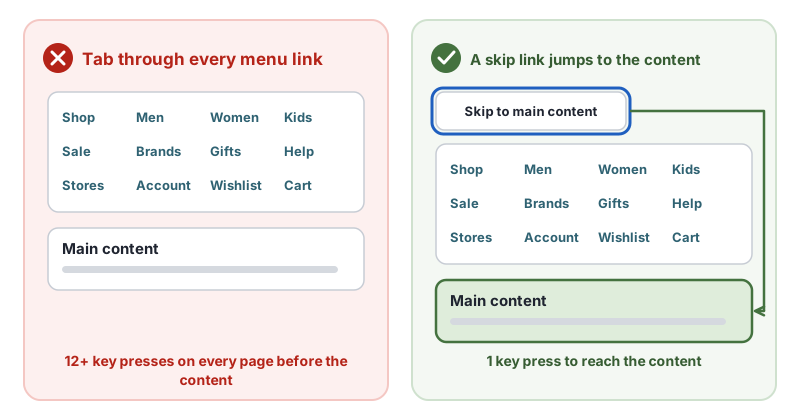
Mouse users skip the menu without thinking: they look past it and click the content. Keyboard users move through a page one control at a time. On a store with a mega menu, that can mean 50 or more key presses before the first product, on every single page. That is slow, tiring and, for people with motor disabilities, physically painful.
Who Is Affected by 2.4.1 Bypass Blocks
- People who use a keyboard instead of a mouse
- People who use switch devices, where every step is a deliberate action
- Screen reader users, who would otherwise hear the menu read out on every page
- People using screen magnification, who lose their place in long repeated blocks
How to Meet 2.4.1 Bypass Blocks
Add a skip link
Put a “Skip to main content” link as the first focusable element on the page, pointing at the main content. This is the W3C technique G1, adding a link at the top of each page that goes directly to the main content area.
<a class="skip-link" href="#main">Skip to main content</a>
<header>…</header>
<main id="main" tabindex="-1">…</main>
.skip-link { position: absolute; left: 8px; top: -60px; }
.skip-link:focus { top: 8px; }
Hide the link off screen until it receives focus, then show it clearly. tabindex="-1" on the target lets browsers move focus into the main content reliably.
Use landmarks
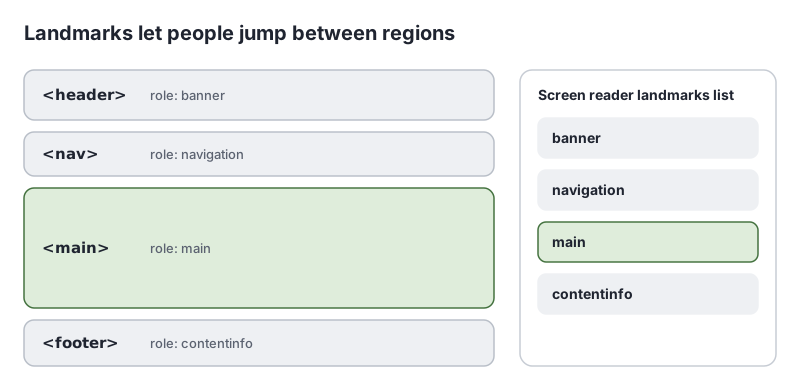
Wrap regions in header, nav, main, aside and footer. Screen readers list these landmarks and let users jump straight to “main”. This is the W3C technique ARIA11, using ARIA landmarks to identify regions of a page. Use one main per page, and label multiple nav elements, such as aria-label="Footer".
Start sections with headings
Headings at the start of each section let screen reader users jump through the page by heading (H69). Correct heading markup also helps meet 1.3.1 Info and Relationships.
Use all three
Landmarks and headings mostly help screen reader users. A visible skip link helps sighted keyboard users, who have no landmark shortcuts in most browsers. Using all three serves everyone.
How to Test for 2.4.1 Bypass Blocks
- Load the page and press Tab once. A skip link should appear as the first focused element.
- Press Enter on it. Focus should land at the start of the main content, and the next Tab should go to the first link or control in the content, not back into the menu.
- Check other templates. Product, blog and checkout pages often have different layouts.
- List the landmarks with a screen reader or a browser extension. There should be one
main, and the menus should be insidenav. - Check long repeated blocks inside pages, such as filter panels, and consider a skip link past those too.
Related Success Criteria
- 1.3.1 Info and Relationships: headings and regions are marked up in the code.
- 2.1.1 Keyboard: everything works with a keyboard.
- 2.4.3 Focus Order: focus moves in a logical order.
- 2.4.7 Focus Visible: the skip link is visible when focused.
Run a free WCAG scan to check landmarks and skip link targets, then test the skip link with your keyboard.
Pass and fail examples
The guide above is the long version. These two snippets are the shortest pair that shows the difference.
<header>
  <nav><!-- dozens of links, no skip control --></nav>
</header><a class="skip-link" href="#main">Skip to content</a>
<header><!-- repeated navigation --></header>
<main id="main" tabindex="-1"></main>Testing WCAG 2.4.1 with AccessBell
AccessBell's scanner runs axe-core, which includes 1 rule that catch code-level failures of this criterion. Automated checks help you spot issues quickly. A person still needs to review what they cannot judge.
bypass: Ensure each page has at least one mechanism for a user to bypass navigation and jump straight to the content (details (opens in a new tab))
This criterion is included in: WCAG 2.2 AA Checker, WCAG 2.1 AA Checker, ADA Compliance Checker, Section 508 Checker, EN 301 549 Checker.
Check your site for this with a free scan of one public page. AccessBell is a website accessibility monitoring tool, not an overlay.
Common failures on Shopify, WordPress, Wix and Squarespace
These are patterns in how the builders work. They are not counts from AccessBell scans. Where a platform hosts the screen, a merchant may not be able to change it, and an unscanned page is not a pass.
Shopify
A theme should offer a skip link as the first focusable control, pointing at the main content. Header menus, predictive search and announcement bars are the repeated blocks. Tab once on the homepage and on a product page. Scan with the Shopify checker.
WordPress
Most accessibility-ready themes include “Skip to content”. A theme or builder that removes it, and has no headings or landmarks to jump by, fails 2.4.1. Check the first Tab stop. The WordPress checker can see a missing main landmark. It does not prove the skip link works.
Wix
The site header repeats on every page. Confirm the first Tab stop bypasses it, or that landmarks and headings do. The Wix checklist covers structure the wizard misses. Test the published site, then run the Wix checker.
Squarespace
Squarespace’s inclusive design guidance says the first Tab opens a Skip to Content link. The Squarespace checklist maps that to 2.4.1. Confirm it on the published page. The editor preview is not the test.
Level and conformance
Level A, in WCAG since 2.0, under Navigable. A mechanism must bypass blocks repeated on multiple pages. A skip link, a landmark structure with headings, or both, can meet it. The mechanism has to work, not merely exist in the code.
Conforming at Level AA means meeting every Level A and Level AA criterion that applies, not only the ones labeled AA. See the WCAG 2.2 conformance requirements. This page explains the technical rule. It is not a legal opinion. Read the disclaimer.
Related WCAG criteria
- 2.4.2 Page Titled (Level A, WCAG 2.0)
- 2.1.1 Keyboard (Level A, WCAG 2.0)
- 1.3.1 Info and Relationships (Level A, WCAG 2.0)
Every criterion is listed in the WCAG 2.2 success criteria guide.
Frequently Asked Questions
What level is WCAG 2.4.1 Bypass Blocks?
Level A. It has been in WCAG since version 2.0.
Is a skip link required by 2.4.1 Bypass Blocks?
Not strictly. WCAG asks for a mechanism to bypass repeated blocks. A skip link, ARIA landmarks or headings at the start of each section can all meet it. A visible skip link is the most reliable choice for sighted keyboard users, who do not have a screen reader’s landmark shortcuts.
Can a skip link be hidden?
It can be hidden until it receives keyboard focus, which is the usual pattern. It must become visible when focused, so keyboard users can see and use it.
Can automated tools test 2.4.1 Bypass Blocks?
Partly. Tools can check that a page has a main landmark or that a skip link points to a real target. Whether the skip link works and lands in the right place needs a quick keyboard test.
Can AccessBell test WCAG 2.4.1 automatically?
Yes. AccessBell runs 1 automated rule that can catch failures of this criterion, including in our WCAG 2.2 AA Checker, WCAG 2.1 AA Checker, ADA Compliance Checker, Section 508 Checker, EN 301 549 Checker. A person still needs to check what automation cannot judge.
Sources
- W3C: Understanding 2.4.1 Bypass Blocks (opens in a new tab)
- W3C: Web Content Accessibility Guidelines (WCAG) 2.2 (opens in a new tab)
This page explains a technical standard and is not legal advice. See our disclaimer.
How we reviewed this page
- Current version
First published. Checked against the W3C WCAG 2.2 Recommendation, the Understanding document for 2.4.1 Bypass Blocks and the W3C techniques it lists.