Squarespace Accessibility Checklist
A Squarespace accessibility checklist maps the fields Squarespace documents in its editor onto the WCAG 2.2 checks those fields affect. Squarespace says a customized site is not always accessible, and that you are responsible for the rules that apply to your business. The ticks stay in this browser. A scan is a list of findings, not a legal opinion and not a conformance claim.
Last updated . The quotes are from Squarespace Help (pages updated July 15, 2025 through October 1, 2026), Squarespace’s accessibility page, the W3C, and ADA.gov.
Pro is a 3-day free trial, then $29 per domain per month or $199 per year. You add a card at checkout and are not charged until the trial ends. A Page Report is $19. A Domain Audit is $79.
Key Facts for a Squarespace Accessibility Checklist
Use these when you need a short, sourced summary. The editor-by-editor list is below.
- Squarespace says customizing a site sometimes means the end product is not fully accessible to everyone, and that you are responsible for compliance. It says it does not give legal advice.
- Image blocks and auto layouts have alt text only if you add it. Product images fall back to the product name. Page featured images use the file name.
- The focus outline appears on Tab, including a Skip to Content link, and you cannot change its color or thickness.
- A completed VPAT does not guarantee accessibility. Squarespace says you evaluate the site yourself before you fill one out.
- ADA.gov’s position is that the ADA applies to the goods, services, privileges, or activities a public accommodation offers on the web. The 2010 ADA Standards that Squarespace links are the standards for facilities, not a website technical standard.
Squarespace gives every customer the ability to customize their site. This sometimes means the end product is not fully accessible to everyone.
You are responsible for ensuring that your site complies with those requirements.
For these reasons, the Department has consistently taken the position that the ADA’s requirements apply to all the goods, services, privileges, or activities offered by public accommodations, including those offered on the web.
What Squarespace Says This Checklist Is For
Squarespace’s help article on built-in accessibility features (updated July 22, 2026) says the guide is a resource, not legal advice, and that Squarespace does not give advice on the accessibility laws or standards that apply to a particular site. The accessibility page says the same thing in the answer to whether a site needs to be ADA compliant: laws vary, and Squarespace does not give legal advice.
That page answers “Are all sites built on Squarespace accessible?” with this: because users have a lot of creative freedom, they can build websites that are not always accessible by all. The checklist on this page is the practical version of that sentence. It follows the controls Squarespace documents. It does not certify a template, and it is not a substitute for the disclaimer.
If the business is a public accommodation, the statute is the place to start. A sales or rental establishment is listed in 42 U.S.C. § 12181(7)(E). A service establishment, such as a law office or a health office, is listed in § 12181(7)(F). ADA.gov’s March 18, 2022 web guidance says the Department’s position is that the ADA applies to the goods, services, privileges, or activities those businesses offer on the web. The same page says the Department did not then have a regulation setting detailed website standards, and that WCAG and the Section 508 standards are guidance teams can use. It also says it does not reflect the Title II rule published on April 24, 2024. A private Squarespace site is not a Title II public entity. This page is not legal advice.
Squarespace’s answer to “How do I make a Squarespace website ADA compliant?” points readers to the 2010 ADA Standards for Accessible Design. On ADA.gov, that document is the standard for state and local government facilities and for public accommodations and commercial facilities, including new construction and alterations. It is not the web guidance. Use the March 18, 2022 web guidance for the website position, and WCAG 2.2 for the technical checks below.
Alt Text on a Squarespace Accessibility Checklist
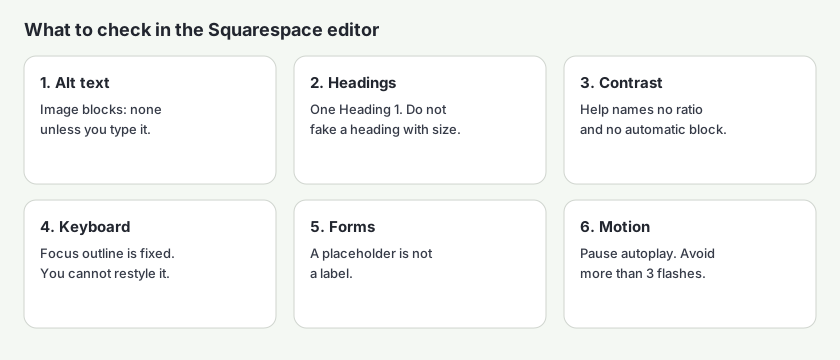
Squarespace’s alt text article (updated October 1, 2026) says alt text is a short description that screen readers read aloud. It also says image blocks and auto layouts only have alt text if you add it. The image-block steps are: open the Pages panel, edit the page, open the block, open the Content tab, and type in Image alt text. Auto layouts, which the article says are available in version 7.1, use the same kind of field under Edit Content.
If you don't add alt text there, no alt text displays. Without alt text, the block won't be visible to assistive technologies, like screen readers.
WCAG 1.1.1 Non-text Content (Level A) requires a text alternative that serves the same purpose as the image, with exceptions for decorative images and a few other cases. A file name or a product name passes that test only when it actually describes the picture. Squarespace’s own writing advice is to describe the image the way you would to someone who could not see it, and to keep it short, usually 150 to 200 characters.
On version 7.1, in Fluid Engine sections, Squarespace also documents generated suggestions: the SEO report can flag missing alt text in image blocks, gallery sections, and auto layouts, and you review, edit, or regenerate the text before you save it. The article says that tool does not scan images added to collection items, and that generated alt text is only available in Fluid Engine on version 7.1. A suggestion is not the finished description until someone checks that it matches the picture.
| Image | What Squarespace uses |
|---|---|
| Image block | The Image alt text field only. Squarespace says no alt text displays if you leave it empty. |
| Auto layout (version 7.1) | The Image alt text field only. Squarespace says no alt text displays if you leave it empty. |
| Product image | The Alt text field, up to 200 characters. The product name is used if you do not add alt text. |
| Blog post featured image | The post title. |
| Event featured image | The event title. |
| Gallery block image | The image title, or the image description if you do not add a title. |
| Gallery section image | The image description. |
| Page featured image | The file name. |
| Site logo | The site title. |
| Cover page image (version 7.0) | The alt text field. |
| Gallery page image (version 7.0) | The image title, or the image description if you do not add a title. |
Two limits sit outside that table. Section background images do not support alt text. Squarespace says decorative backgrounds generally do not need a description, and that it cannot help with a code workaround. A video block’s custom thumbnail does not use the file name as alt text. In Email Campaigns, images in the body can take alt text, and images or logos in the campaign header cannot.
The same article says that for most other areas, the file name acts as alt text when nothing else is set. A file name such as IMG_2044.jpg is not a description. Rename it in the Asset library, or add a real alternative. The criterion, with the exceptions, is in the WCAG library entry for 1.1.1.
Headings, Titles, and Links
Squarespace’s inclusive design guide (updated September 23, 2026) says screen readers use the HTML, not the visual size, to understand a page. Its “do” list says to create one Heading 1 per page, to use headings in sequence from H1 through H6, and to format them with the text toolbar. Its “don’t” list says not to style ordinary text so it looks like a heading, and not to use an empty heading only to make text big. That is WCAG 1.3.1 Info and Relationships (Level A): structure has to be in the markup, not only in the look.
On titles, the same guide says the first thing a screen reader announces is the page title. If an SEO title is set, Squarespace says screen readers read that and skip the page title. If it is not set, they read the page title. WCAG 2.4.2 Page Titled (Level A) requires a title that describes the topic or purpose. Squarespace’s examples of a useful title put the specific words first.
On links, the guide says the link text should state the purpose, and that you do not need the word “link” because screen readers already say it. Its example of what not to write is “click here.” That is WCAG 2.4.4 Link Purpose (In Context) (Level A). Summary blocks and blog lists are where “Read more” usually shows up. The Squarespace accessibility checker is the scan for a published page that still has those links.
Color, Focus, and Motion
The built-in features article says you can match background tones and font colors from the Colors panel to meet WCAG without custom CSS. The inclusive design guide says not to rely on color alone, and it points color-vision checks at Chrome DevTools and Firefox’s Accessibility Inspector, which it says are outside Squarespace support. Neither page states a ratio, and neither page describes a switch that blocks a failing pair.
WCAG 1.4.3 Contrast (Minimum) (Level AA) requires a contrast ratio of at least 4.5:1 for normal text and at least 3:1 for large text, with exceptions for incidental text and logotypes. WCAG 1.4.1 Use of Color (Level A) says color cannot be the only visual cue. Measure a pair in the WCAG color contrast checker before you save it as a site style. Text sitting on a photo in Fluid Engine is the case the inclusive design guide calls out: add a background, change the text color, or move the text until it is readable.
You can't customize the focus outline's color or thickness.
The same section says the first Tab opens a Skip to Content link, and the spacebar jumps past the header to the main content. That mechanism is what WCAG 2.4.1 Bypass Blocks (Level A) asks for. WCAG 2.4.7 Focus Visible (Level AA) requires a visible keyboard focus indicator, and WCAG 1.4.11 Non-text Contrast (Level AA) requires the indicator to have at least 3:1 contrast against the colors next to it. Because the editor will not let you thicken or recolor the outline, a page where the outline disappears into the background has to be fixed by changing the background, not the outline. Tab the published page. The editor preview is not the test. WCAG 2.1.1 Keyboard (Level A) is the broader rule: the tasks on the page work from the keyboard.
For motion, the audio, images, and video guide says to add no more than two background videos per page, to avoid content that flashes more than three times in one second, and to turn parallax off when it sits behind text. The built-in features article says to include buttons to pause, skip, or stop video loops and slideshows that play automatically, and to add captions and transcripts. Those lines track WCAG 2.2.2 Pause, Stop, Hide, WCAG 2.3.1 Three Flashes or Below Threshold, WCAG 1.2.2 Captions (Prerecorded), and WCAG 1.2.1 Audio-only and Video-only (Prerecorded). Squarespace’s pages state the practice. They do not cite the criterion numbers. The numbers are the W3C’s.
Forms, Checkout, and a VPAT
The inclusive design guide says each form field needs a clear label, and that placeholder text should not replace the label. It also says to put instructions in a text block. That is WCAG 3.3.2 Labels or Instructions (Level A). A placeholder disappears when someone types, and it is often too light to meet 1.4.3.
Checkout is separate from a form block you built. The built-in features article says secure checkout fields include text labels, and that main buttons such as payment buttons use descriptive labels. Leave those labels in place. The Fluid Engine note in the inclusive design guide says overlapping blocks must stay visible and usable, and gives the example of a button placed on top of a form so a visitor cannot tell which control submits it. If you sell on the site, the WCAG 2.2 checklist for online stores maps the newer criteria onto a product page, a cart, and checkout.
When a customer or a school asks for proof, Squarespace’s built-in features article points to its accessibility statement and to a VPAT. The separate guide, Creating a VPAT for your site (updated July 15, 2025), says a completed VPAT explains how well your product conforms, that you evaluate the product before you write it, and that anyone can choose to provide one. It says organizations governed by Section 508, directly or indirectly, may be required to complete one. It also says completing a VPAT does not guarantee accessibility for all customers. The template it names is the one from the Information Technology Industry Council. A VPAT is a report you write after a review. It is not a review by itself, and it is not a statement that the Squarespace platform passed WCAG for the pages you designed.
A Squarespace Accessibility Checklist You Can Tick
Tick these while you edit, then again on the published page. The ticks stay in this browser. Nothing is sent to AccessBell. This is a planning aid. It is not a conformance claim. See the disclaimer and the resources hub this page belongs to.
0 of 17 checked on this browser. Nothing is sent to AccessBell.
What a Squarespace Accessibility Checklist Cannot Prove
Squarespace’s accessibility page says there is no such thing as 100% accessibility and no universal governing metric. Its VPAT guide says a finished VPAT does not guarantee access. The Department of Justice’s web guidance says a “clean” report does not necessarily mean everything is accessible. The W3C’s evaluating web accessibility overview says no tool alone can determine if a site meets accessibility standards.
Use the checklist to find the editor fields. Use a scan to see what the published HTML does. A person still checks whether the alt text describes the image, whether the keyboard path has a trap, and whether a video’s captions match the speech. How AccessBell tests separates automated results from items that need a person. The Squarespace accessibility checkers and the Squarespace ADA compliance checker run that scan on one public page. If the business sells to consumers in the European Union, the related standard on this site is the EN 301 549 checker. Federal contractors start with the Section 508 checker.
Pro monitors up to 500 URLs per domain and offers guided fix suggestions, such as alt text, a button name, or the page language. Nothing is applied until you approve it. This is not an overlay. Pro is a 3-day free trial, then $29 per domain per month or $199 per year. You add a card at checkout and are not charged until the trial ends. Cancel before then and you will not be charged. Prices are on the pricing page.
If you do not want a subscription, a Page Report is $19 for one page, with the full issue detail and a PDF. A Domain Audit is $79 for up to 500 pages. Neither one renews, and neither one is a promise that the site conforms to WCAG or the ADA.
Check a Squarespace Page, Then Monitor the Site
Paste a public Squarespace URL. The free scan lists automated issues on that page. Start a 3-day free trial if you want that URL, and others on the domain, checked again.
Free scan of one public page, no account. Start a 3-day free trial to monitor up to 500 URLs per domain and apply fixes you approve. Nothing is applied until you approve it. Then $29 per domain per month or $199 per year.
Squarespace Accessibility Checklist Questions
Does Squarespace make a website accessible by default?
No. Squarespace says customers can customize a site, and that this sometimes means the end product is not fully accessible to everyone. It also says that because users have creative freedom, they can build websites that are not always accessible by all. You are responsible for the requirements that apply to your business. Squarespace says it does not give legal advice.
Where do I add alt text in Squarespace?
Image blocks and auto layouts have an Image alt text field, and Squarespace says no alt text displays if you leave it empty. Product images have an Alt text field of up to 200 characters, and the product name is used if you do not fill it in. Other images reuse a title, a description, or the file name. The table on this page lists each one. The steps are in Squarespace’s alt text help article, updated October 1, 2026.
Does the Squarespace Colors panel check WCAG contrast?
Squarespace says you can match background and font colors from the Colors panel to meet WCAG without custom CSS. The same help pages do not name a ratio, and they do not describe a control that refuses a pair below 4.5:1. Measure the colors with a contrast checker. WCAG 1.4.3 requires 4.5:1 for normal text and 3:1 for large text.
Can I change the Squarespace focus outline?
No. Squarespace says a focus outline appears when a visitor presses Tab, and that you cannot customize its color or thickness. The first Tab opens a Skip to Content link. Whether that outline stays visible on your colors is something you check on the published page. WCAG 2.4.7 requires a visible keyboard focus indicator.
Does a Squarespace VPAT prove my site conforms?
No. Squarespace’s VPAT guide says a completed VPAT is a report of how a product conforms, that you evaluate the product before you fill it out, and that completing a VPAT does not guarantee accessibility for all customers. It is not a scan of the pages you published.
What does the Pro trial cost?
Pro is a 3-day free trial, then $29 per domain per month or $199 per year. You add a card at checkout and are not charged until the trial ends. Cancel before then and you will not be charged. A Page Report is $19 for one page. A Domain Audit is $79 for up to 500 pages. Neither renews.
Sources and Further Reading
- Squarespace Accessibility & Compliance Squarespace
- Make your site accessible with built-in features Squarespace Help Center
- Make your site accessible with inclusive design practices Squarespace Help Center
- Add alt text to images for accessibility and SEO Squarespace Help Center
- Making audio, images, and videos more accessible Squarespace Help Center
- Creating a VPAT for your site Squarespace Help Center
- Web Content Accessibility Guidelines (WCAG) 2.2 W3C
- Guidance on Web Accessibility and the ADA U.S. Department of Justice
- 42 U.S.C. § 12181 (definitions, including public accommodation) U.S. Code, via the Legal Information Institute
- 2010 ADA Standards for Accessible Design U.S. Department of Justice
- VPAT (Voluntary Product Accessibility Template) Information Technology Industry Council
- Evaluating Web Accessibility Overview W3C Web Accessibility Initiative
Related pages: all resources, the Squarespace checkers, the WCAG library, and the WCAG 2.2 checklist.