Wix Accessibility Checklist
A Wix accessibility checklist maps the tasks in Wix’s Accessibility Wizard onto the WCAG 2.2 checks those tasks affect. Wix says it cannot guarantee that your site will comply with your region’s accessibility laws after you use the wizard. The wizard also skips checkout, the side cart, and third-party apps. The ticks on this page stay in this browser. A scan is a list of findings, not a legal opinion and not a conformance claim.
Last updated . The quotes are from Wix Help, the W3C, and ADA.gov.
Pro is a 3-day free trial, then $29 per domain per month or $199 per year. You add a card at checkout and are not charged until the trial ends. A Page Report is $19. A Domain Audit is $79.
Key Facts for a Wix Accessibility Checklist
Use these when you need a short, sourced summary. The page-by-page list is below.
- Wix says it cannot guarantee that a site will comply with local accessibility laws after you use the Accessibility Wizard.
- Wix says the wizard’s tasks are based on WCAG 2.2, and that only Level AA is currently required in the wizard.
- The wizard does not scan checkout, the side cart, Velo, the CMS, password-protected pages, or third-party apps. The table below is Wix’s list.
- Wix says its AI alt text is not guaranteed accurate, and that SVG and GIF images are not supported by that tool.
- Wix says old Wix Forms are not accessible. ADA.gov’s position is that the ADA applies to goods, services, privileges, or activities a public accommodation offers on the web.
While Wix is always striving to improve our products and services, we cannot guarantee that your site will be compliant with your region's accessibility laws and regulations after using the Wizard.
Additionally, some site pages are not scanned / supported by the wizard.
For these reasons, the Department has consistently taken the position that the ADA’s requirements apply to all the goods, services, privileges, or activities offered by public accommodations, including those offered on the web.
What This Wix Accessibility Checklist Is For
Wix’s About the Accessibility Wizard article says the wizard scans a site from the editor and guides you through actions. It says the results sit in two tabs, Detected issues and Manual tasks, and that those tasks are based on WCAG 2.2. The same page says a scan is a way to get a sense of the site and see suggestions. It does not say a finished run is a conformance claim.
Wix’s own accessibility checklist calls the wizard the best way to improve a site, and then says you should still check the site by hand. That checklist also says Wix handles many built-in pieces, including keyboard semantics, ARIA attributes for elements Wix provides, and visual indicators, and that the content you add still has to be made accessible. It says accessible templates include heading structure and color contrast, and that custom ARIA labels and alt text are not included and have to be added. This page follows the fields and limits Wix documents. It does not certify a template.
If the business is a public accommodation, the statute is the place to start. A sales or rental establishment is listed in 42 U.S.C. § 12181(7)(E). A service establishment is listed in § 12181(7)(F). ADA.gov’s March 18, 2022 web guidance says the Department’s position is that the ADA applies to the goods, services, privileges, or activities those businesses offer on the web. The same page says the Department did not then have a regulation setting detailed website standards, and that WCAG and the Section 508 standards are guidance teams can use. It also says it does not reflect the Title II rule published on April 24, 2024. A private Wix site is not a Title II public entity. This page is not legal advice. See the disclaimer.
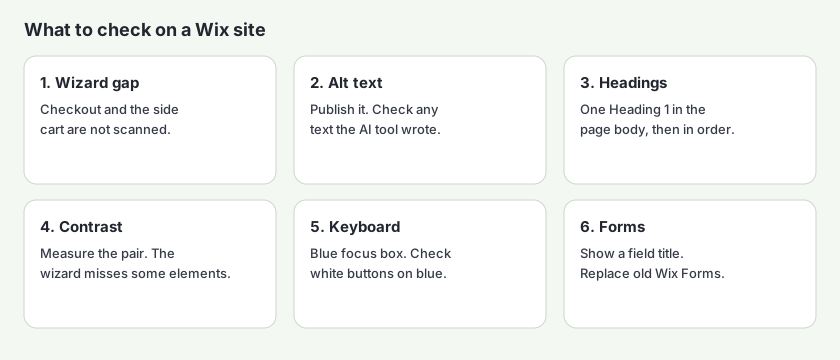
Pages a Wix Accessibility Checklist Still Has to Cover
Wix says the wizard scans most of the site, including regular pages and pages that are part of business solutions, and it gives the Calendar page in Wix Bookings as an example. It also says some content on those pages may still need a manual review. A later answer on the same page is the limit: some pages and apps are not scanned.
Read that next to a second sentence on the same article: the wizard also scans app pages, and Wix gives Stores and Blog as examples. A Stores page can be in the scan while checkout and the side cart are not. The WCAG 2.2 checklist for online stores is the map for a product page, a cart, and checkout when you sell on the site.
| Surface | What Wix says |
|---|---|
| Content Management System (CMS) | Named on the “does not support” list. |
| External and third-party apps | Named on the “does not support” list. App pages such as Stores and Blog are a separate case, described above. |
| Velo | Named on the “does not support” list. The wizard article also gives Velo as an example of a part it does not scan. |
| Password-protected pages | Named on the “does not support” list. |
| The side cart | Named on the “does not support” list. Wix uses the side cart for Stores, Bookings, and Restaurant Orders. |
| Checkout pages (Wix Stores, Wix Bookings, and others) | Wix’s wording is “Checkout pages (Wix Stores, Wix Bookings etc.).” |
| Wix Online Programs Thank You page | Named on the “does not support” list. |
| Wix Site Search | Named on the “does not support” list. |
| Wix Gift Cards | Named on the “does not support” list. |
| Wix Music | Named on the “does not support” list. |
| Wix Reviews | Named on the “does not support” list. |
| Wix Referral Program | Named on the “does not support” list. |
| Wix Loyalty Program | Named on the “does not support” list. |
| Wix Pricing Plans | Named on the “does not support” list. |
| Wix Podcast Player | Named on the “does not support” list. |
| Wix Table Reservations | Named on the “does not support” list. |
| Wix Restaurant Orders | Named on the “does not support” list. |
Wix says to go through those pages with its checklist. The Accessibility Monitor is a separate tool. Wix says it scans a live Wix site for potential issues, shows the status on the dashboard, and opens the wizard so you can fix what it flagged. Wix recommends checking the monitor every time you publish. The monitor article does not say the monitor covers the unsupported list above.
The wizard is also limited by language. Wix says it is only supported in the site’s primary language and cannot be opened in a secondary language added with Wix Multilingual. A translated page needs the same checks outside the wizard.
Alt Text on a Wix Accessibility Checklist
Wix’s images and galleries article says it follows WCAG 1.1.1 Non-text Content and 1.4.5 Images of Text. Its writing rules are to describe the important information, to be specific, to avoid using the same alt text for two or more images on one page, and to leave out phrases such as “image of” or “picture of.” It also says to publish the site so the alt text is live.
The article says you add alt text from the Settings panel in the Wix Editor, the Studio Editor, and the Wix Harmony Editor. The Harmony Editor steps name the field “What’s in the image?” Gallery images are edited in the Media Manager. In those Harmony steps, Wix Pro Gallery has an Alt Text field when you want the description to differ from the image title. Tooltips that used to sit on images in the Wix Editor are no longer available, and Wix says existing tooltips have been removed from the live site.
We cannot guarantee that AI generated alt text is always completely accurate. We therefore recommend checking the generated text for every image, and editing it as needed.
Decorative images can be marked with the checkbox “This image is decorative, it doesn't need alt text.” Wix says linked images should have alt text and should not be marked decorative. That matches the exception in WCAG 1.1.1 for decorative images, and the rule that a linked image still needs a text alternative. Wix says to check generated alt text for every image before you rely on it.
For text inside an image, the wizard’s manual tasks say text in images, such as photos of signs or slogans, cannot be read by screen readers, and that you should replace those images with real text where possible. That is WCAG 1.4.5 Images of Text (Level AA). The Wix accessibility checker is the scan of a published page that still has an empty description.
Headings, Titles, and Links
Wix’s site structure article says every page should have an H1, and that the tags after it should be sequential, so an H1 is followed by an H2. It says to think of headings as labels for the text below. To break a heading onto two lines, it says to use Shift+Enter. Enter creates a new heading element on each line. It also says an H1 in the site header appears on every page that shows that header, so it recommends putting headings in the page body. A one-page site with no other pages is the exception it names.
Most text can be retagged in the wizard. Wix says some text, and it gives app text as the example, is not fully integrated and may need a manual change. The same article says you can use Optimize with AI to resolve heading-tag issues on a page in bulk, and that text the wizard does not support gets a manual suggestion instead of an automatic change. That structure is WCAG 1.3.1 Info and Relationships (Level A).
On titles, the using the wizard article says the wizard prompts you when the title tag contains “New page,” the default for a new page, or “Copy of,” the default for a duplicate. It says titles should be descriptive, unique, and concise. That is WCAG 2.4.2 Page Titled (Level A).
On links, the Harmony Editor wizard article says link text should be as descriptive as possible. Its example is that “Read more about our latest research” is clearer than “Read more,” and that a control should also be clear when it leads to an action such as submitting a form. That is WCAG 2.4.4 Link Purpose (In Context) (Level A). The classic editor lists the same manual task, “Use descriptive link and button text.”
Color, Focus, and the Site Language
The wizard article prints Level AA contrast ratios and says only Level AA is currently required in the wizard. It also says you can adjust most content in the wizard, and that some elements are not fully integrated and need a manual adjustment. The text and graphics article repeats 4.5:1 for normal text, 3:1 for large text, and at least 3:1 for graphics and user interface components such as form borders and placeholders. It defines large text as above 14 points (approximately 18px) and bold, or 18 points (approximately 24px). The wizard page words the cutoff as bigger than 24px (18pts), or text over 18px (14pts) and bold. When a size sits on that line, use the W3C definition.
| Element, as Wix describes it | Level AA ratio Wix states |
|---|---|
| Small text: smaller than 24px (18pt) | 4.5:1 and above |
| Large text: bigger than 24px (18pt), or over 18px (14pt) and bold | 3:1 and above |
| Non-text components, such as icons | 3:1 and above |
WCAG 1.4.3 Contrast (Minimum) (Level AA) requires at least 4.5:1 for normal text and at least 3:1 for large-scale text. The W3C’s understanding page for 1.4.3 says large scale means at least 18 point or 14 point bold. WCAG 1.4.11 Non-text Contrast (Level AA) is the 3:1 rule for interface components. Measure a pair in the WCAG color contrast checker. Wix also points people at its Contrast Checker add-on for pairs the wizard does not identify.
The same manual tasks say not to use color alone. Wix’s example is that linked text should be underlined, and that a graph should also use patterns or textures. That is WCAG 1.4.1 Use of Color (Level A).
Focus indicators are automatically enabled on all sites you build with Wix. The indicator is designed to fit most site color combinations. However, it is less visible on buttons with a white fill over a blue background.
On a Wix Editor site where indicators were turned off earlier, the wizard can turn them back on, and Wix says they cannot be turned off again. Studio Editor and Harmony Editor sites keep them on. WCAG 2.4.7 Focus Visible (Level AA) requires a visible keyboard focus indicator. Tab the published page. A white control on a blue header is the case Wix tells you to check. Skip to Main Content is on by default as well, appears on the first Tab, and Wix says it can be less visible on a white-and-blue header. The article cites WCAG 2.4.1 Bypass Blocks (Level A). On Studio and Harmony sites it stays on. On a Wix Editor site, once you enable it from the wizard, Wix says it cannot be turned off.
The wizard also asks for the main site language, which assistive technologies use for pronunciation and for which captions a media player offers. That is WCAG 3.1.1 Language of Page (Level A). For motion, the manual tasks say an audio player that starts automatically can speak over a screen reader, and they tell you to add controls. They also say to preview the site and zoom the browser to 200% so content stays visible. Those lines track WCAG 1.4.2 Audio Control and WCAG 1.4.4 Resize Text. Wix states the practice. The criterion numbers are the W3C’s.
Forms, the Side Cart, and Checkout
Old Wix Forms are not accessible. If you need to comply with accessibility regulations, switch to the new Wix Forms.
On the new forms, Wix says to show the field title and to make it specific. Its examples are last name and phone number. A title that is hidden, or a placeholder standing in for the label, fails WCAG 3.3.2 Labels or Instructions (Level A). Wix also says to set an error state on the fields so a problem is visible, and to keep the keyboard focus box on.
Checkout is outside that form. The unsupported list includes checkout pages and the side cart. A public product page can still be scanned. A checkout step that asks the visitor to sign in is not a page a public scan can open. If you sell on the site, check the cart and the payment step by keyboard yourself, then use the Wix checkers on any product or cart URL that loads without a login. The Wix ADA compliance checker is the same scan framed for the ADA questions.
A Wix Accessibility Checklist You Can Tick
Tick these in the editor, then again on the published page. The ticks stay in this browser. Nothing is sent to AccessBell. This is a planning aid. It is not a conformance claim. See the disclaimer and the resources hub this page belongs to.
0 of 19 checked on this browser. Nothing is sent to AccessBell.
What a Wix Accessibility Checklist Cannot Prove
Wix says a finished wizard run is not a guarantee of compliance. The Department of Justice’s web guidance says a “clean” report does not necessarily mean everything is accessible. The W3C’s evaluating web accessibility overview says no tool alone can determine if a site meets accessibility standards, and that a knowledgeable person is required to decide.
Use the checklist to find the editor tasks and the pages the wizard skips. Use a scan to see what the published HTML does. A person still checks whether the alt text describes the image, whether the keyboard path has a trap, and whether a cart that the wizard never opened can be completed from the keyboard. How AccessBell tests separates automated results from items that need a person. The Wix accessibility checkers run that scan on one public page. A builder with a different editor is the Squarespace accessibility checklist. If the business sells to consumers in the European Union, the related standard on this site is the EN 301 549 checker. Federal contractors start with the Section 508 checker.
Pro monitors up to 500 URLs per domain and offers guided fix suggestions, such as alt text, a button name, or the page language. Nothing is applied until you approve it. This is not an overlay. Pro is a 3-day free trial, then $29 per domain per month or $199 per year. You add a card at checkout and are not charged until the trial ends. Cancel before then and you will not be charged. Prices are on the pricing page.
If you do not want a subscription, a Page Report is $19 for one page, with the full issue detail and a PDF. A Domain Audit is $79 for up to 500 pages. Neither one renews, and neither one is a promise that the site conforms to WCAG or the ADA.
Check a Wix Page, Then Monitor the Site
Paste a public Wix URL. The free scan lists automated issues on that page. Start a 3-day free trial if you want that URL, and others on the domain, checked again. Checkout that sits behind a login is not a URL this form can open.
Free scan of one public page, no account. Start a 3-day free trial to monitor up to 500 URLs per domain and apply fixes you approve. Nothing is applied until you approve it. Then $29 per domain per month or $199 per year.
Wix Accessibility Checklist Questions
Does the Wix Accessibility Wizard make a site accessible?
No. Wix says the wizard helps you find and fix issues, and that it cannot guarantee your site will comply with your region’s accessibility laws and regulations after you use it. Wix recommends consulting an accessibility expert for the standards that apply in your region. The wizard also does not scan checkout, the side cart, Velo, the CMS, or third-party apps.
Where do I add alt text in Wix?
Wix’s images article says you add alt text from the Settings panel in the Wix Editor, the Studio Editor, and the Wix Harmony Editor, and that you should publish the site so the text is live. In the Harmony Editor steps, the field is labeled “What’s in the image?” Galleries are edited in the Media Manager. For Wix Pro Gallery, those Harmony steps say you can set Alt Text separately from the image title. The same article says the AI tool in the wizard cannot be guaranteed accurate, and that SVG and GIF images are not supported by it.
Does the Wix Accessibility Wizard scan checkout?
No. Wix’s list of unsupported content includes checkout pages for Wix Stores, Wix Bookings, and others, and the side cart. The same help page says the wizard does scan many app pages, and it gives Stores and Blog as examples. A product page and a checkout page are not the same scan. The table on this page is that unsupported list.
What contrast ratio does Wix require?
The wizard article states Level AA ratios: 4.5:1 and above for text smaller than 24px (18pt), 3:1 and above for larger or bold text, and 3:1 and above for non-text components such as icons. It says only Level AA is currently required in the wizard. WCAG 1.4.3 requires at least 4.5:1 for normal text and at least 3:1 for large-scale text, which the W3C defines as at least 18 point or 14 point bold. Measure a pair in the contrast checker. The wizard says some elements, including app elements, are not fully integrated and need a manual check.
Are old Wix Forms accessible?
Wix says old Wix Forms are not accessible, and that you should switch to the new Wix Forms if you need to comply with accessibility regulations. On the new forms, Wix says to show a field title and to make that title specific, with examples such as last name and phone number.
What does the Pro trial cost?
Pro is a 3-day free trial, then $29 per domain per month or $199 per year. You add a card at checkout and are not charged until the trial ends. Cancel before then and you will not be charged. A Page Report is $19 for one page. A Domain Audit is $79 for up to 500 pages. Neither renews.
Sources and Further Reading
- Accessibility: About the Accessibility Wizard Wix Help Center
- Accessibility: Using the Accessibility Wizard Wix Help Center
- Wix Harmony Editor: Using the Accessibility Wizard Wix Help Center
- Accessibility: Preparing Your Images and Galleries Wix Help Center
- Accessibility: Preparing Your Text and Graphics Wix Help Center
- Accessibility: Preparing Your Site Structure Wix Help Center
- Accessibility: About Focus Indicators (Visual Indicators) Wix Help Center
- Accessibility: About “Skip to Main Content” Wix Help Center
- Accessibility: Creating an Accessible Wix Form Wix Help Center
- Accessibility: Checking Site Accessibility with the Accessibility Monitor Wix Help Center
- Accessibility: Checklist for Improving Your Site’s Accessibility Wix Help Center
- Web Content Accessibility Guidelines (WCAG) 2.2 W3C
- Understanding Success Criterion 1.4.3: Contrast (Minimum) W3C Web Accessibility Initiative
- Guidance on Web Accessibility and the ADA U.S. Department of Justice
- 42 U.S.C. § 12181 (definitions, including public accommodation) U.S. Code, via the Legal Information Institute
- Evaluating Web Accessibility Overview W3C Web Accessibility Initiative
Related pages: all resources, the Wix checkers, the Squarespace accessibility checklist, the WCAG library, and the WCAG 2.2 checklist.