Website Accessibility Monitoring Tool: What to Check and How Often
A website accessibility monitoring tool rechecks the same pages on a schedule and shows what changed. AccessBell scans a public page, then monitors up to 500 URLs on a domain and offers guided fix suggestions, such as alt text, button names, and the page language. Nothing is applied until you approve it. It is not an overlay. A scan is a list of findings, not a legal opinion.
Last updated . The quotes below are from the W3C and the U.S. Department of Justice. Sources are linked in the text and listed at the end.
Pro is a 3-day free trial, then $29 per domain per month or $199 per year. You add a card at checkout and are not charged until the trial ends. A Page Report is $19. A Domain Audit is $79.
Key Facts for a Website Accessibility Monitoring Tool
Use monitoring when a site keeps changing. The W3C says to evaluate throughout development. A tool assists. A person decides whether the site is accessible.
No tool alone can determine if a site meets accessibility standards. Knowledgeable human evaluation is required to determine if a site is accessible.
A “clean” report does not necessarily mean everything is accessible. Also, a report that includes a few errors does not necessarily mean there are accessibility barriers.
What a Website Accessibility Monitoring Tool Does
A single check tells you about one moment. Monitoring repeats the check on a known set of URLs and compares the new result with the previous one. That is the difference between a free one-page scan and continuous monitoring.
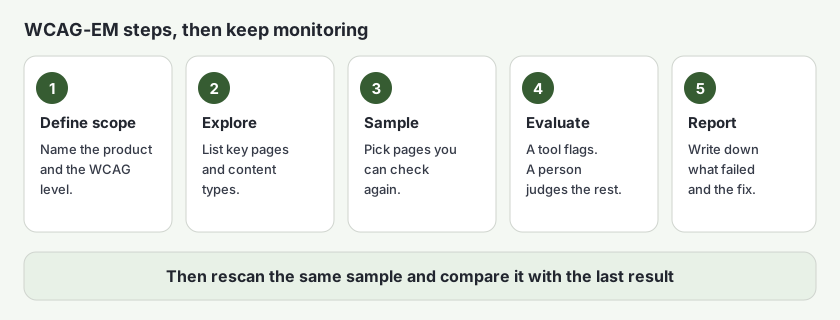
The W3C’s WCAG-EM overview describes a procedure for judging conformance to the Web Content Accessibility Guidelines (WCAG) 2.2. WCAG-EM 2.0 was published on 23 July 2026. It is a W3C Group Note. It does not add requirements on top of WCAG. The overview gives five steps:
- Define the scope of the evaluation, including the WCAG level (A, AA, or AAA).
- Explore the product: key pages, key tasks, and the types of content.
- Select a representative sample when you cannot evaluate every page.
- Evaluate that sample and record what passed and what failed.
- Report the findings.
The same overview says you will often want a conformance evaluation in order to regularly monitor a website. Its page was updated on 12 August 2026.
The W3C’s guide to selecting evaluation tools (updated 13 May 2024) says some tools check one page and others check a whole site. It also says tools can produce inaccurate results, so they assist an evaluation. They do not finish it.
What a Website Accessibility Monitoring Tool Cannot Decide
The Department of Justice’s March 18, 2022 web guidance says businesses open to the public, and state and local governments, have to make the goods, services, and programs they offer online accessible to people with disabilities. The same page says the Department did not then have a regulation setting detailed website standards, and that WCAG and the Section 508 standards are guidance teams can use. The page states that it does not reflect Title II requirements published in the Federal Register on April 24, 2024. Deadlines for state and local government sites are covered in the ADA website compliance guide.
The guidance names barriers a monitoring routine should keep looking for. It also says automated checkers and overlays need to be used carefully, like a spelling checker. Pair them with a manual check. AccessBell is not an overlay. It reports issues in the page and offers guided fix suggestions. How AccessBell tests separates automated results from items that need a person.
| Barrier | WCAG | A tool can flag | A person still judges |
|---|---|---|---|
| Poor color contrast | 1.4.3 Contrast (Minimum) | Text whose contrast with its background is below the WCAG ratio. | Whether text inside an image is still readable. |
| Color as the only cue | 1.4.1 Use of Color | Little of this is reliable to automate. | Whether the meaning is also in text. The DOJ example is the word “required”, not red text alone. |
| Image with no text alternative | 1.1.1 Non-text Content | An image with no alt attribute. | Whether the text is short and describes the image. |
| Video without captions | 1.2.2 Captions (Prerecorded) | Not a substitute for watching the video. | Whether captions exist, match the speech, and name the speakers. |
| Forms that are hard to finish | 4.1.2 Name, Role, Value and 3.3.1 Error Identification | A field with no label. | Whether the error message explains how to fix it. |
| Mouse-only use | 2.1.1 Keyboard | Some controls with no accessible name. | Whether each task works from the keyboard, with no trap and a visible focus. |
| Headings that are only visual | 1.3.1 Info and Relationships | An empty heading or a skipped heading level. | Whether the heading text describes that section. |
| Text that cannot be resized | 1.4.4 Resize Text | A viewport that blocks zoom. | Whether the page still works when text is larger. |
For a longer split between automated checks and manual testing, see automated vs manual accessibility testing.
Website Accessibility Monitoring Tool Checklist
Work through the five WCAG-EM steps. The ticks stay in this browser. Nothing is sent to AccessBell. This is a planning aid. It is not a conformance claim, and it is not legal advice. See the disclaimer.
0 of 19 checked on this browser. Nothing is sent to AccessBell.
How Often a Website Accessibility Monitoring Tool Should Run
The W3C’s evaluation overview says to evaluate accessibility early and throughout development, because problems are easier to fix then. The WCAG-EM overview lists regular monitoring of a website as one reason to evaluate. Neither page sets a number of days between checks.
A practical reading of that guidance is: check before you launch, check again when a template, plugin, or campaign changes, and keep a sample that you recheck on a schedule you can keep. A website accessibility monitoring tool is what runs that schedule when the team cannot remember to do it by hand.
AccessBell Pro rescans each monitored URL once a day, starting at 06:00 UTC, and emails owners and admins when a new critical or serious issue appears. You can also rescan after a release. The schedule and the alert rule are described in continuous website accessibility monitoring and in scheduled monitoring and alerts.
Using AccessBell as a Website Accessibility Monitoring Tool
The free scan checks one public page. It needs no account. It shows the issues on that page. It does not watch the site tomorrow.
Pro monitors up to 500 URLs per domain. Each issue includes the failing code and a guided fix suggestion. You can approve alt text, a button name, or the page language and have AccessBellFix apply that change. Nothing is applied until you approve it. This is not an overlay. Read how approved fixes work.
Pro is a 3-day free trial, then $29 per domain per month or $199 per year. You add a card at checkout and are not charged until the trial ends. Cancel before then and you will not be charged. Prices are on the pricing page.
If you do not want a subscription, a Page Report is $19 for one page, with the full issue detail and a PDF. A Domain Audit is $79 for up to 500 pages. Neither one renews, and neither one is a promise that the site conforms to WCAG or the ADA.
Check One Page, Then Monitor the Site
Paste a public URL. The free scan lists automated issues on that page. Start a 3-day free trial if you want the same URL, and others on the domain, checked again tomorrow.
Free scan of one public page, no account. Start a 3-day free trial to monitor up to 500 URLs per domain and apply fixes you approve. Nothing is applied until you approve it. Then $29 per domain per month or $199 per year.
Website Accessibility Monitoring Tool Questions
What is a website accessibility monitoring tool?
It rechecks the same pages on a schedule and shows what changed. A one-time scan is a snapshot. Monitoring is the next scan of those same URLs, compared with the last result. The W3C says evaluation tools help, and that no tool alone can determine if a site meets accessibility standards.
What can a website accessibility monitoring tool not decide?
Whether alt text describes the image, whether captions match the speech, whether color is the only cue, and whether a keyboard user can finish a task without getting stuck. The W3C says human judgement is required. The Department of Justice says a clean automated report does not mean a site is accessible.
How often should monitoring run?
The W3C says to evaluate accessibility early and throughout development, and its WCAG-EM overview lists regular monitoring as a reason to evaluate. It does not set a daily or weekly legal minimum. AccessBell Pro rescans monitored URLs once a day and emails owners and admins when a new critical or serious issue appears.
Does AccessBell apply fixes on its own?
No. Guided fix suggestions show the failing code and a corrected example. AccessBellFix can apply alt text, a button name, or the page language only after you approve that change. Nothing is applied until you approve it. This is not an overlay, and it does not guarantee legal compliance.
What does the Pro trial cost?
Pro is a 3-day free trial, then $29 per domain per month or $199 per year. You add a card at checkout and are not charged until the trial ends. Cancel before then and you will not be charged. A Page Report is $19 for one page. A Domain Audit is $79 for up to 500 pages. Neither renews.
Sources and Further Reading
- Evaluating Web Accessibility Overview W3C Web Accessibility Initiative
- WCAG-EM Overview: WCAG Evaluation Methodology W3C Web Accessibility Initiative
- Selecting Web Accessibility Evaluation Tools W3C Web Accessibility Initiative
- Web Content Accessibility Guidelines (WCAG) 2.2 W3C
- Guidance on Web Accessibility and the ADA U.S. Department of Justice
- axe-core, the open-source accessibility testing engine Deque Systems
Related reading on this site: all resources, the WCAG library, and the WCAG 2.2 checklist.