3 Digital Accessibility Platforms With Ongoing Monitoring and Audits
Compare 3 digital accessibility platforms with ongoing monitoring and audits: AccessBell, Level Access and Deque, by features, audit options, pricing and fit.
Table of contents
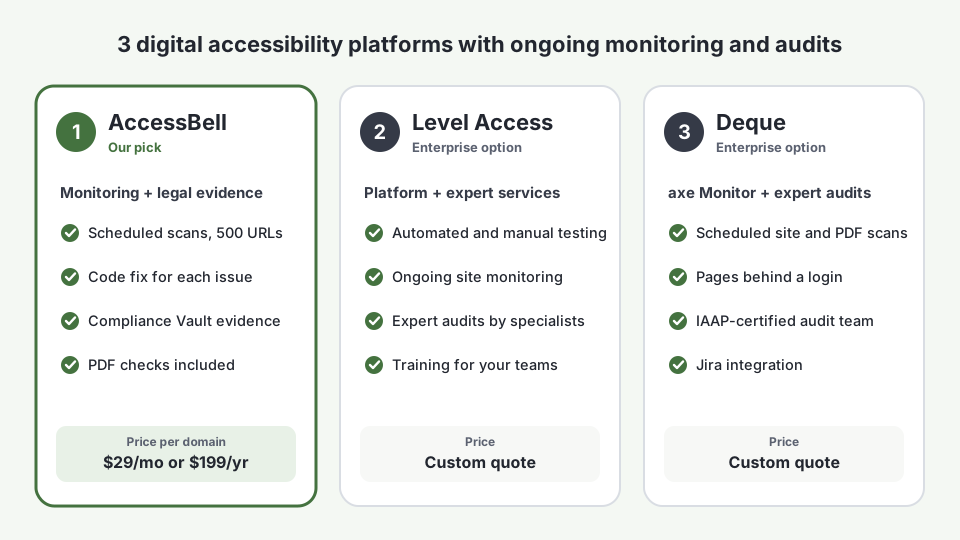
Digital accessibility platforms test your website against the Web Content Accessibility Guidelines (WCAG), track what fails and help your team fix it. The ones worth paying for do two jobs: ongoing monitoring, which rescans your site on a schedule so new problems are caught as pages change, and audits, which go deeper than an automated scan. This guide compares 3 digital accessibility platforms with ongoing monitoring and audits: AccessBell, Level Access and Deque. We make AccessBell, so we have told you exactly where the other two are the better choice.
Why Ongoing Monitoring and Audits Matter in 2026
Website accessibility lawsuits are rising again. Plaintiffs filed 3,117 website accessibility lawsuits in U.S. federal court in 2025, up 27% from 2024 (Seyfarth Shaw). Counting state courts, UsableNet tracked more than 5,000, and 1,427 of them were filed against companies that had already been sued (UsableNet 2025 year-end report).
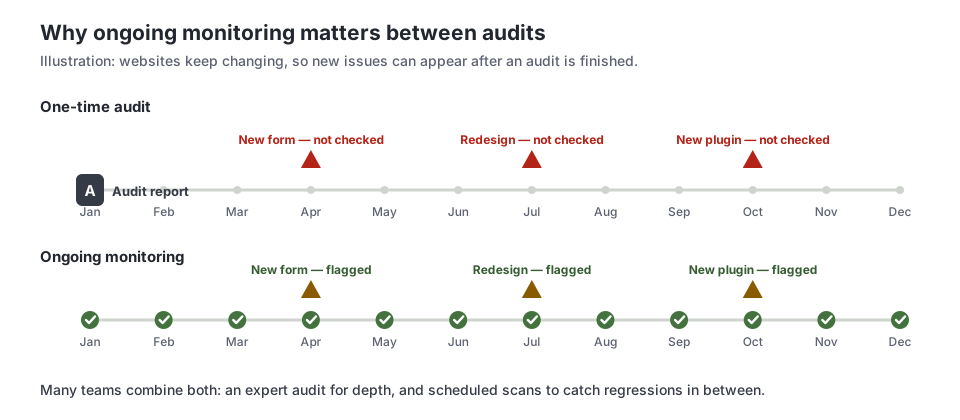
That last number is the case for ongoing monitoring. A one-time fix does not protect a site that keeps changing. New products, blog posts, plugins and redesigns bring new barriers, and the next demand letter is about whatever is broken on the day someone visits.
Audits matter for the opposite reason. The W3C notes that evaluation tools cannot determine accessibility on their own; they can only assist. Many checks need human judgment, such as whether alt text is accurate or whether a custom menu works with a screen reader. The strongest programs use both.
What to Look For in Digital Accessibility Platforms
Before comparing vendors, decide what your team actually needs. These are the features that separate the useful digital accessibility platforms from a basic checker:
- Scheduled monitoring, not just on-demand scans, with alerts when something new fails.
- Standards you can choose: WCAG 2.2, 2.1 or 2.0 at Level A, AA or AAA, plus the laws that reference them, such as the ADA, Section 508 and EN 301 549.
- The failing code and a fix, so developers can act without a specialist translating every issue.
- A way to cover what automation cannot: expert audits, guided manual testing or both.
- Documents as well as pages: PDFs linked from your site count too.
- A record of your work: scan history and a fix log you can show a lawyer, customer or procurement team.
- Pricing that fits: published and self-serve, or a custom enterprise contract.
1. AccessBell: Our Pick for Ongoing Monitoring With Built-In Evidence
AccessBell is the platform we build, and it is designed for small and mid-sized businesses and agencies that need ongoing monitoring and audits without an enterprise contract. It scans each page in a real Chrome browser with axe-core, the open-source engine Deque maintains, and repeats the scan on your schedule.
What you get:
- Scheduled monitoring of up to 500 URLs per domain, with automatic page discovery, unlimited rescans and email alerts.
- Automated audits against WCAG 2.0, 2.1 or 2.2 at the level you choose, with each issue mapped to its success criterion, ranked by severity and shown with the failing HTML and a corrected example. See how the score works.
- Manual testing guidance for the checks automation cannot make, as step-by-step procedures your team can follow.
- The Compliance Vault: dated scan records with a verifiable fingerprint, a fix log with remediation notes and exportable evidence packages, in case you are ever asked to show your work.
- PDF checks for documents linked from your site, with the title and language fixed for you (how PDF checks work). You can also test one file with our free PDF accessibility checker.
- Optional on-site tools: AccessBellFix applies fixes you approve, such as missing alt text, and the PageAssist toolbar lets visitors adjust text size and contrast.
Pricing: $29 per domain per month, or $199 per domain per year, with a 3-day free trial. See pricing.
Where it falls short: AccessBell does not send human experts to audit your site, and it does not produce a formal VPAT or Accessibility Conformance Report. If a customer contract or procurement process requires a third-party audit, pair AccessBell with one of the two platforms below.
Best for: businesses, e-commerce stores and agencies that want continuous WCAG monitoring, clear fixes and a legal evidence trail at a published price.
2. Level Access: Enterprise Platform With Managed Expert Services
Level Access combines the Level Access Platform with a large services team. It combined with eSSENTIAL Accessibility and sells mainly to large organizations.
What you get:
- Automated and manual testing across websites and other digital channels, managed in one platform.
- Ongoing monitoring and scanning that alerts teams to new issues as properties change.
- Expert audits, in which accessibility specialists test manually, including with assistive technology (Level Access auditing and testing).
- Reporting and analytics for programs that span many sites and teams, plus training.
Pricing: not published. Level Access quotes each customer.
Where it falls short: it is built for enterprise budgets and procurement. A single small business site will usually pay far more than it needs to.
Best for: large organizations that want a managed accessibility program, with expert audits, training and monitoring from one vendor.
3. Deque: axe Monitor Plus Expert Audits
Deque created axe-core, the testing engine behind many accessibility tools, AccessBell included. For ongoing monitoring it sells axe Monitor, and for audits it has an in-house team of specialists.
What you get:
- axe Monitor runs scheduled or on-demand scans of websites and PDFs against WCAG, Section 508 and EN 301 549, and reports scores and progress over time.
- Scanning behind logins and firewalls for applications and intranets, with a native Jira integration.
- Expert audits that combine automated and manual testing by IAAP-certified specialists, with results and remediation guidance (Deque audit services).
- Developer tools in the wider axe family, for testing during development.
Pricing: not published for axe Monitor or audits. Deque quotes based on scope.
Where it falls short: like Level Access, it is priced and packaged for larger teams. Getting value from the full axe suite assumes you have developers who will use it.
Best for: enterprises and product teams that already use axe tools and want enterprise-scale scanning backed by an expert audit team.
Digital Accessibility Platforms Compared Side by Side
| Feature | AccessBell | Level Access | Deque |
|---|---|---|---|
| Ongoing monitoring | Yes, scheduled scans of up to 500 URLs per domain | Yes | Yes, with axe Monitor |
| Automated audits | Yes, with the failing code and a fix for each issue | Yes | Yes |
| Expert manual audits | No; guided manual testing procedures instead | Yes | Yes |
| PDF checks | Yes, with title and language fixes | Contact vendor | Yes, in axe Monitor |
| Evidence and fix log | Yes, the Compliance Vault with exportable packages | Reporting and analytics | Reporting and trend tracking |
| Testing engine | axe-core in real Chrome | Contact vendor | axe-core |
| Pricing | $29/month or $199/year per domain | Custom quote | Custom quote |
| Free trial | 3 days | Contact vendor | Contact vendor |
How to Choose Between These Digital Accessibility Platforms
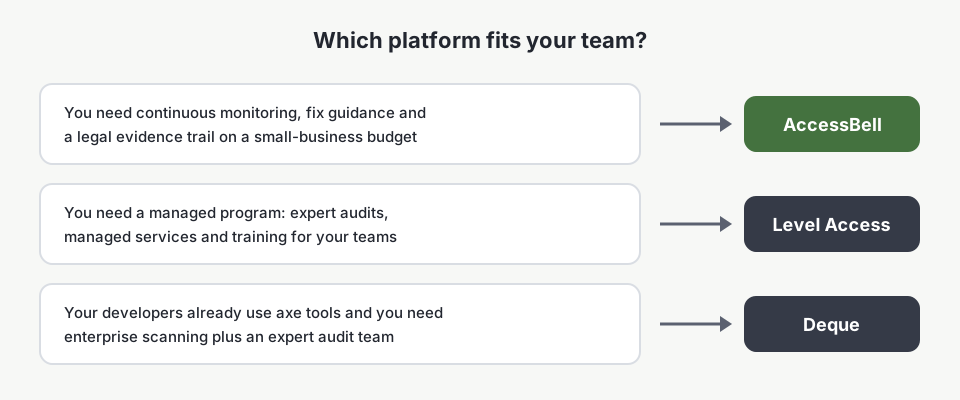
Start with two questions:
- Do you need a third-party audit report? Some customers, public-sector buyers and procurement teams ask for one. If so, budget for an expert audit from Level Access or Deque, or an independent specialist.
- Who will keep the site accessible after the audit? If the answer is your own team, you need ongoing monitoring that shows them what broke and how to fix it. That is where AccessBell fits, at a price a single site can justify.
Many teams use both: one expert audit to find everything, then scheduled monitoring to make sure fixed issues stay fixed and new ones are caught. Our guide to automated vs manual accessibility testing explains what each method catches.
Watch: How Accessibility Evaluation Works
This short overview from the W3C Web Accessibility Initiative explains the resources for evaluating a site, from quick checks to a full conformance review. It is a useful primer before you buy any of these digital accessibility platforms.
Getting Started With Ongoing Monitoring and Audits
- Run a baseline scan. Scan your site for free to see how many automated issues you have today.
- Fix the critical issues first, starting with forms, navigation and checkout. Our ADA website compliance guide covers the priorities.
- Turn on monitoring so new pages and changes are checked every week.
- Book an expert audit if your customers or contracts require one, and log what you fix in the Compliance Vault.
- Repeat. Accessibility is ongoing work, not a one-time project.
If you are replacing an existing tool, see our Siteimprove alternative and accessiBe alternatives comparisons, and read what happens after being sued for ADA website compliance to understand what is at stake.
Frequently Asked Questions
What is a digital accessibility platform?
Software that tests your websites, apps or documents against accessibility standards such as WCAG, tracks the issues it finds and helps your team fix them over time. The better digital accessibility platforms combine ongoing monitoring (scheduled automated scans) with audits (deeper reviews that include manual testing) and keep a record of what was fixed.
What is the difference between accessibility monitoring and an accessibility audit?
Monitoring is automated and repeats on a schedule, so it catches new issues as your site changes. An audit is a deeper review at one point in time, usually by accessibility specialists who test with a keyboard and screen readers. Automated tools cannot check every WCAG requirement, so audits find issues monitoring misses, while monitoring catches regressions that appear after an audit.
How much do digital accessibility platforms cost?
AccessBell costs $29 per domain per month, or $199 per domain per year, with a 3-day free trial. Level Access and Deque do not publish list prices; both quote each customer based on the number of sites, pages and services needed. Expert audits are usually priced separately by scope.
Does AccessBell do manual audits by accessibility experts?
No. AccessBell runs automated audits and scheduled monitoring, gives you step-by-step manual testing procedures to run yourself and records every scan and fix in the Compliance Vault. If you need a third-party audit carried out by specialists, Level Access and Deque both offer one, and many teams pair that audit with AccessBell monitoring.
Can a digital accessibility platform make my site ADA compliant?
No platform can guarantee compliance on its own. Platforms find issues and help you fix and document them; your team still has to make the fixes and test the things automated tools cannot check. A documented, ongoing process is what shows good faith if you ever receive a demand letter.
How we reviewed this article
- Current version
First published. Level Access and Deque features checked against each vendor's own product and services pages as of September 2026. Neither publishes list prices. Lawsuit figures from Seyfarth Shaw and UsableNet's 2025 reports.