5 Best Website Accessibility Testing Software Tools (Updated 2026)
Compare the 5 best website accessibility testing software tools of 2026: AccessBell, axe DevTools, WAVE, Pope Tech and Siteimprove, by features and pricing.
Table of contents
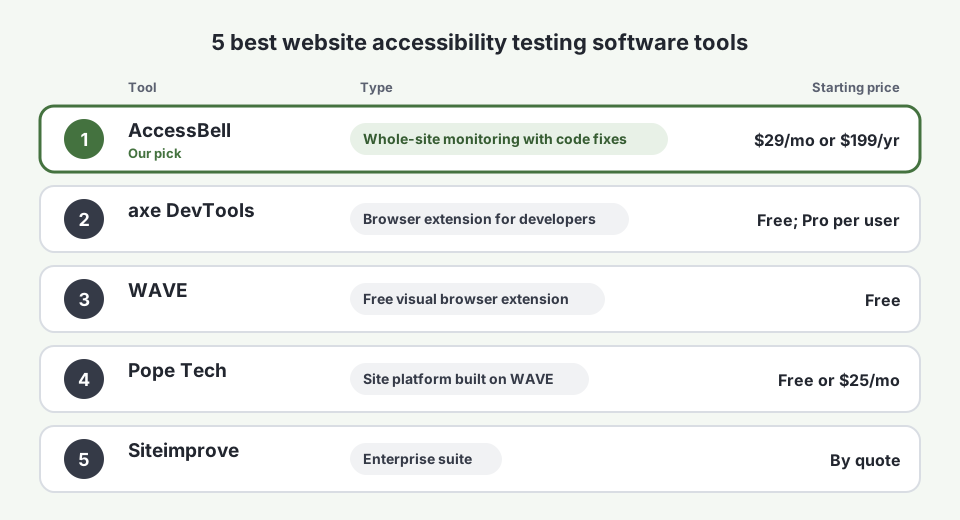
Website accessibility testing software checks your pages against the Web Content Accessibility Guidelines (WCAG) and shows what blocks people with disabilities from using your site. Some tools test one page in your browser; others test your whole site on a schedule and track what changes. We compared the 5 best website accessibility testing software tools of 2026 on features, pricing and free resources. AccessBell is our product and our top pick for most teams, and we are clear about where the other four are the better choice.
What Website Accessibility Testing Software Should Do
Before you compare tools, decide what you need to test and how often. Good website accessibility testing software should:
- Test rendered pages, after JavaScript has run, the way visitors and screen readers see them.
- Map every issue to WCAG, with the success criterion, the failing element and how to fix it.
- Cover the whole site, not only the page you remember to test.
- Retest on a schedule, because new content and releases add new issues.
- Handle documents, since PDFs linked from your site count too.
- Be honest about limits. The W3C notes that evaluation tools cannot determine accessibility on their own; they assist people, who still need to check things like reading order and alt text quality.
1. AccessBell: Best Website Accessibility Testing Software Overall
AccessBell tests every page of your site in a real, headless Chrome browser with axe-core, then keeps testing on a schedule. It is built for teams that need whole-site coverage and clear fixes without an enterprise contract. Our methodology explains exactly how each scan works.
AccessBell Features
- Whole-site testing: automatic crawling and sitemap scanning, up to 500 URLs per domain, with unlimited rescans.
- Scheduled monitoring and alerts, so a release that breaks a form is flagged by email.
- Standards you choose: WCAG 2.2, 2.1 or 2.0 at Level A, AA or AAA, with presets for the ADA, Section 508 and EN 301 549.
- Developer-ready results: the failing HTML, the WCAG criterion, severity and a corrected code example for every issue, with issues from shared components grouped together.
- Multi-device testing, custom HTTP headers, page load delay and scroll settings, and scanning of staging sites before you launch.
- PDF testing for documents linked from your pages, with title and language fixes.
- Manual testing procedures for the checks automation cannot make, and a WCAG coverage table that shows what was and was not tested.
- Compliance Vault with scan history, a fix log and exportable evidence, plus PDF and Excel exports.
- AccessBellFix, an optional script that applies fixes you approve, such as alt text, while the code change is scheduled.
AccessBell Use Case Examples
- A developer ships a new checkout. They scan the staging site with a custom header, see that two fields have no label and the “Pay now” icon button has no accessible name, fix all three from the code examples and rescan before release.
- A QA lead needs a regression check. Scheduled scans compare each run with the last, so a new contrast failure in the site header shows up the morning after the release, with every affected page listed.
- A content team publishes weekly. Monitoring catches blog images uploaded without alt text and PDFs posted without a title, and the editor fixes them without a developer.
- An agency audits a prospect’s site. A free scan shows the scale of the problem in a minute; a full scan and PDF export become the audit report.
AccessBell Pricing
$29 per domain per month, or $199 per domain per year, with a 3-day free trial and every feature included. See pricing.
AccessBell Free Resources
A free website accessibility scan, a free PDF accessibility checker, color contrast and chart color checkers, a WCAG success criteria library, an accessibility statement generator and a Help Center.
Best for: teams that need every page tested continuously, with fixes developers can act on.
2. axe DevTools: Best for Developers Testing in the Browser
axe DevTools is Deque’s browser extension and developer toolkit, built on the same axe-core engine. The free extension tests the page you have open from Chrome, Edge or Firefox developer tools. Paid plans add guided tests for things automation cannot check and integrations for automated testing in your build pipeline.
- Pricing: the extension is free. Pro is priced per user on Deque’s plans page; independent sources report about $40 to $60 per user per month.
- Free resources: the free extension, the open-source axe-core library and Deque’s blog.
- Watch out for: it tests one page at a time in your browser. It does not crawl or monitor your live site on its own.
Best for: front-end developers who want to catch issues before code is merged.
3. WAVE: Best Free Visual Checker
WAVE, from WebAIM at Utah State University, is a free browser extension that marks errors, alerts and structural elements directly on your page. It is one of the most widely used learning tools in accessibility.
- Pricing: the WAVE extension is free. The WAVE API for automated testing is paid by credits.
- Free resources: WebAIM’s free articles, WCAG checklist and mailing list are some of the best in the field.
- Watch out for: one page at a time, with no scheduling, history or site-wide reporting.
Best for: designers, content editors and anyone learning to spot accessibility issues.
4. Pope Tech: Best Low-Cost Platform Built on WAVE
Pope Tech runs the WAVE engine across your whole site, adds scheduled scans, dashboards and reports, and is popular with universities and public-sector teams.
- Pricing: a free plan for one website of up to 25 pages, and paid plans from $25 per month billed annually for 50 pages, with higher tiers for larger sites (Pope Tech pricing).
- Free resources: the free plan, plus a blog and training materials.
- Watch out for: results follow WAVE’s rules rather than axe-core’s, so issue counts differ from axe-based tools, and larger page counts move you up the price tiers.
Best for: schools and organizations already familiar with WAVE that want site-wide reporting.
5. Siteimprove: Best Enterprise Suite
Siteimprove bundles accessibility testing with SEO, content quality, analytics and policy tools in one platform for large organizations with many sites and editors.
- Pricing: not published. Independent estimates put small accessibility-only contracts around $11,000 per year. See our Siteimprove alternative comparison.
- Free resources: a free browser extension, guides and webinars.
- Watch out for: enterprise contracts and a demo-led sales process. Small teams usually pay for modules they do not use.
Best for: large organizations that want accessibility, SEO and content governance in one contract.
Website Accessibility Testing Software Compared: Features
| Feature | AccessBell | axe DevTools | WAVE | Pope Tech | Siteimprove |
|---|---|---|---|---|---|
| Tests | Your whole site | The page you have open | The page you have open | Your whole site | Your whole site |
| Engine | axe-core in real Chrome | axe-core | WAVE | WAVE | Alfa, Siteimprove’s own |
| Scheduled monitoring | Yes | No (extension) | No | Yes | Yes |
| Failing code and a fix | Yes, with a corrected example | Yes | Highlights on the page | WAVE results with guidance | Yes |
| PDF testing | Yes | No | No | Contact vendor | Contact vendor |
| Evidence and history | Compliance Vault, scan history | Saved results on paid plans | No | Reports and history | Reports and history |
| Choice of WCAG version and level | 2.0, 2.1 or 2.2, A to AAA | Yes | No | Contact vendor | Yes |
Website Accessibility Testing Software Compared: Pricing
| Tool | Free option | Paid pricing | Priced by |
|---|---|---|---|
| AccessBell | Free scan, 3-day trial | $29/month or $199/year | Domain |
| axe DevTools | Free extension | Pro about $40 to $60/user/month (reported) | User |
| WAVE | Free extension | API by credits | Usage |
| Pope Tech | Free, 25 pages | From $25/month, billed annually | Pages |
| Siteimprove | Demo | Not published, often $11,000+/year | Quote |
Website Accessibility Testing Software Compared: Free Resources
| Tool | Free resources |
|---|---|
| AccessBell | Free site scan, PDF checker, contrast and chart color checkers, WCAG library, statement generator, Help Center |
| axe DevTools | Free extension, open-source axe-core, blog |
| WAVE | Free extension, WebAIM articles and WCAG checklist |
| Pope Tech | Free 25-page plan, blog and training |
| Siteimprove | Browser extension, guides and webinars |
How to Build a Testing Stack With These Tools
The best results come from combining tools, each where it is strongest:
- While building: developers run axe DevTools or WAVE on the page they are working on.
- Before release: scan the staging site with AccessBell to catch issues across every template.
- After release: let AccessBell monitor the live site and alert you when something breaks.
- By hand: test key tasks with a keyboard and a screen reader. Our guide to automated vs manual accessibility testing and the keyboard accessibility testing walkthrough show how.
We also ran 10 accessibility checker tools against the same test website and published every result. If you are a small business buying for compliance, see the best ADA compliance software for small businesses. Or scan your site free and see what AccessBell finds in under a minute.
Frequently Asked Questions
What is the best website accessibility testing software?
For most teams, AccessBell: it tests every page of your site on a schedule in a real Chrome browser, shows the failing code with a corrected example, checks PDFs and keeps a dated record of your results, for $29 per domain per month. Developers who test while they code should add axe DevTools or WAVE in the browser.
Is there free website accessibility testing software?
Yes. WAVE and the axe DevTools browser extension are free for testing one page at a time, Google Lighthouse is built into Chrome, and Pope Tech has a free plan for one site of up to 25 pages. AccessBell offers a free single-page scan. Free tools do not monitor a whole site over time.
Can website accessibility testing software find every issue?
No. Automated testing finds a large share of common failures, such as missing alternative text, low contrast and unlabeled fields, but many WCAG requirements need a person to judge, such as whether alt text is accurate or a page makes sense with a screen reader. Pair automated testing with keyboard and screen reader checks.
What is the difference between a browser extension and an accessibility testing platform?
A browser extension such as WAVE or axe DevTools tests the page you have open, when you run it. A platform such as AccessBell, Pope Tech or Siteimprove crawls and tests your whole site on a schedule, tracks issues over time and sends alerts. Most teams use both.
Which accessibility testing tools use axe-core?
axe-core is Deque's open-source testing engine. It powers axe DevTools and Google Lighthouse's accessibility checks, and AccessBell runs it in a real Chrome browser for every page it scans.
How we reviewed this article
- Current version
First published. Prices checked against each vendor's pricing page where one is published, otherwise against independent estimates, as of September 2026.