ADA Compliance Report for Your Lawyer: What To Include
What an ADA compliance report for your lawyer should include: scope, WCAG standard, method, findings, a dated fix log and open issues, plus mistakes that weaken it.
Table of contents
When you are facing an ADA complaint or lawsuit, your lawyer will ask a simple question: what is actually wrong with the website, and what have you done about it? An ADA compliance report for your lawyer answers it. This guide explains what the report should include, the kinds of reports available, the mistakes that weaken them, and how to put one together quickly.
This is general information, not legal advice. Your lawyer decides what is shared, with whom and when.
Why Your Lawyer Needs an ADA Compliance Report
A complaint lists barriers the plaintiff says they found. Without your own report, your lawyer has only the plaintiff’s version. A good ADA compliance report helps them:
- Assess the claim. Are the barriers real? Are they on the pages named? Are there worse ones the plaintiff missed?
- Negotiate. Settlements almost always require fixes by a deadline. A report shows what is already done and what is realistic.
- Argue the case is moot. In March 2026, a federal court in New York dismissed the ADA claim in Jones v. Moscot because the business filed a declaration and a report from accessibility firm Level Access showing the site was accessible, and the plaintiff did not rebut it (Seyfarth Shaw). That is an ADA compliance report doing its job.
- Deal with the insurer and, in some cases, the Department of Justice.
If you were just served, read what to do after an ADA lawsuit first. Getting a report together is part of the first week.
What an ADA Compliance Report for Your Lawyer Should Include
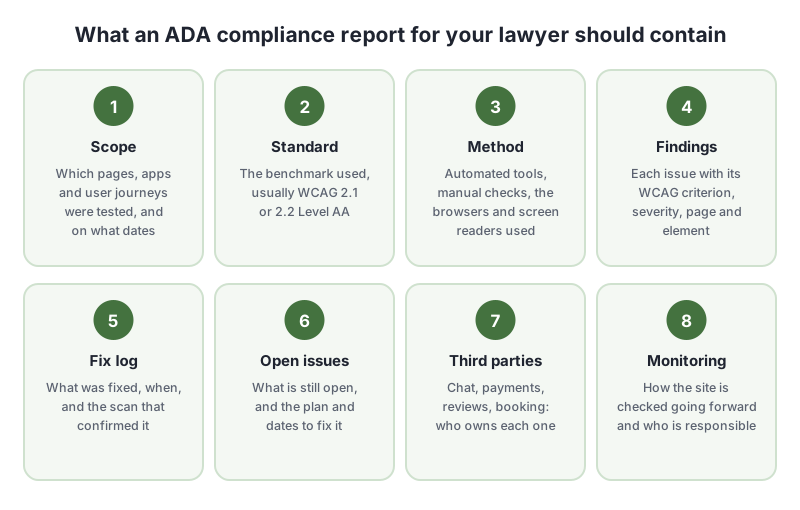
1. Scope and Dates
List exactly what was tested: the domain, the pages or templates, and the key user journeys, such as checkout or booking. Give the date of every test. Make sure the scope includes every page named in the complaint. A report that covers only the home page is easy to dismiss.
2. The Standard
Name the standard and level, usually WCAG 2.1 Level AA. It is the standard the Department of Justice adopted for state and local government websites, and it is the one most settlements name. If you test against WCAG 2.2, say so. It includes everything in 2.1.
3. Method
Explain how the testing was done:
- Automated tools and versions
- Manual checks, such as keyboard-only navigation, zoom and error handling
- The browsers, devices and screen readers used, for example NVDA with Firefox or VoiceOver with Safari
- Who did the testing and their experience
The method matters because it shows the limits of the report. Automated testing alone cannot check everything WCAG requires. See automated vs. manual accessibility testing.
4. Findings
Each issue should be specific enough for a developer to find and fix it, and for a lawyer to match it against the complaint:
| Issue | WCAG | Severity | Page | Element | Status |
|---|---|---|---|---|---|
| Cart button has no accessible name | 4.1.2 | Critical | /products/* | button.cart |
Fixed Oct 3, confirmed by scan Oct 4 |
| Email field has no label | 3.3.2 | Serious | /checkout | input#email |
Fixed Oct 3, confirmed by scan Oct 4 |
| Footer link text contrast 3.1:1 | 1.4.3 | Serious | All pages | footer a |
Open, fix scheduled Oct 20 |
An example layout, not real findings.
5. A Dated Fix Log
This is the part lawyers value most, and the part most reports leave out. For every fixed issue, record when it was found, when it was fixed and the scan or test that confirmed it. A dated history shows real, ongoing work rather than a last-minute cleanup.
6. Open Issues and a Plan
Be honest about what is still open. List each open issue with an owner and a target date. A report that admits three open issues with a plan is more credible than one that claims none.
7. Third-Party Content
List embedded tools you do not control, like chat, reviews, booking and payments, with the vendor and what you have asked them to fix. Include any accessibility documentation the vendor provided.
8. Ongoing Monitoring
Explain how the site will stay accessible: how often it is scanned, who reviews new content and releases, and how people can report problems. Courts look for this. In Moscot, the question was whether it was “absolutely clear” the site would stay accessible, not just whether it was fixed on one day.
Types of ADA Compliance Reports
Not every report is the same. Here is how the common types compare for a lawyer’s purposes.
| Report type | What it shows | Strengths | Gaps |
|---|---|---|---|
| Automated scan report | Issues automated tools detect, by page | Fast, dated, repeatable, covers many pages | Misses issues that need human judgment |
| Manual accessibility audit | Expert testing with keyboard and screen readers | Thorough, credible, covers what scans miss | Slower, costly, a snapshot of one moment |
| VPAT / Accessibility Conformance Report | Conformance to each WCAG criterion | Standard format buyers recognize (ITI) | Built for procurement, no fix history |
| Evidence package | Scan history, fix log, notes and open issues over time | Shows ongoing effort with dates | Only as good as the testing behind it |
For a lawsuit, the strongest combination is usually a manual audit of your key journeys plus an evidence package showing the ongoing scan and fix history. The audit shows depth. The evidence package shows that the work started early and is continuing.
Mistakes That Weaken an ADA Compliance Report
- Claiming 100% compliance. No test proves a site has no barriers. An overstated claim invites a challenge.
- No dates. Screenshots and spreadsheets without dates show nothing about when work happened.
- Testing only the home page when the complaint is about checkout.
- Relying on an overlay’s “compliance” badge. An overlay does not change your code. In 2025 the FTC ordered overlay vendor accessiBe to pay $1 million over misleading claims (Seyfarth Shaw).
- Commissioning an audit without asking your lawyer. They may want to arrange it themselves so the findings stay confidential while the case is open. Ask before you hire anyone.
- Editing records after the fact. Keep the original results. If a record looks changed, it loses its value.
How To Create an ADA Compliance Report for Your Lawyer With AccessBell
AccessBell keeps the dated record a lawyer needs as you work, so you do not have to build it by hand.
- Add your domain and scan. Run the free ADA compliance checker to see where you stand, then add your domain to monitor up to 500 pages, including every page named in the complaint.
- Fix and confirm. Each issue shows the failing element, the WCAG criterion, its severity and how to fix it. When a later scan no longer finds it, AccessBell logs it as fixed with both dates. Our guide on how to fix your website after an ADA lawsuit covers what to fix first.
- Record the manual work. Add remediation notes for keyboard and screen reader testing, code changes and vendor fixes made outside AccessBell.
- Export the Legal Evidence Package. The Compliance Vault exports a PDF, or a ZIP with the full record and CSV files, for the period you choose. It includes:
- your testing program: WCAG version and level, devices and scan schedule
- every scan in the period
- your score and open issues at the start and end
- the remediation log with dates
- your notes and your accessibility statement
- the issues still open
- Share it. Each package carries a record ID and a SHA-256 fingerprint, so your lawyer can check it has not been changed. The Compliance Vault help article walks through the export.
AccessBell provides the automated testing and the dated record. For a lawsuit, pair it with manual testing of your key journeys by your team or an independent auditor. No tool can make a website 100% compliant or guarantee the outcome of a case. What it can do is give your lawyer clear, dated facts to work with. Start with the free ADA compliance checker.
Frequently Asked Questions
What is an ADA compliance report?
A document that records how a website was tested for accessibility, against which standard (usually WCAG 2.1 Level AA), what was found, what has been fixed and when, and what is still open. Lawyers use it to assess a claim, negotiate a settlement and, in some cases, show a court the site has been fixed.
Can an automated scan be used as an ADA compliance report?
It is a useful part of one, because it is dated, repeatable and covers many pages. But automated testing cannot check everything WCAG requires, so a report for a lawsuit should also include manual testing with a keyboard and screen reader.
Should my lawyer order the accessibility audit?
Ask them. Lawyers sometimes arrange audits themselves so the findings can be treated as confidential legal work while the case is open. Whether that protection applies depends on your court and the facts, which is why the decision belongs to your lawyer.
Is a VPAT the same as an ADA compliance report?
Not quite. A VPAT is a template used mainly in procurement, and the completed version is called an Accessibility Conformance Report. It states how a product conforms to each WCAG criterion. A report for a lawyer also needs dates, a fix history and a plan for open issues.
Can an ADA compliance report say my website is 100% compliant?
It should not. No honest test can prove a site has no barriers, and an overstated claim can be challenged. A credible report says what was tested, what passed, what failed and what is being done about it.
How we reviewed this article
- Current version
First published. The Moscot example is based on the court order as reported by Seyfarth Shaw. The VPAT description is based on the Information Technology Industry Council template.