Present State of Web Accessibility in 2026 (AccessBell Research Report)
The present state of web accessibility in 2026 is a story of slow progress reversing. This AccessBell research report pulls together the latest published data on how accessible the web really is, which failures cause most of the damage, and what to fix first.
Key Findings at a Glance
- 95.9%of home pages had detected WCAG 2 failures (94.8% in 2025)
- 56.1average detected errors per home page, up 10.1%
- 83.9%of home pages had low contrast text, the most common failure
- 96%of all detected errors came from just six failure types
Table of contents
What Is the Present State of Web Accessibility in 2026?
The most thorough yearly measurement of the web is the WebAIM Million, which runs an automated accessibility check on the home pages of the top one million websites. Its 2026 results show that the present state of web accessibility has slipped:
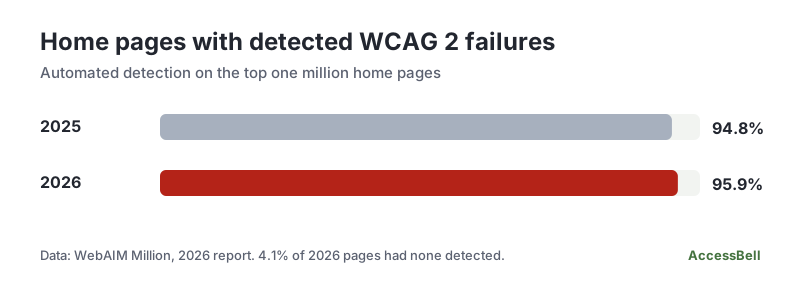
- 95.9% of home pages had detectable failures of the Web Content Accessibility Guidelines (WCAG) 2, up from 94.8% in 2025.
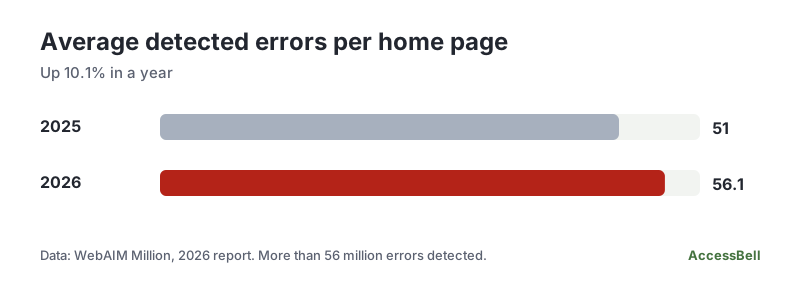
- Pages averaged 56.1 detected errors, up from 51 the year before, an increase of 10.1%.
- More than 56 million distinct errors were detected across the million pages.
- Only about 4 in 100 home pages (4.1%) had no detected errors, which is simply 100% minus 95.9%.
For anyone responsible for a website, the message is that a typical page today has dozens of accessibility problems that a machine can find, and that the trend is going the wrong way.
How We Built This Research Report
This report does not present new testing by AccessBell. We gathered the most reliable published 2026 data, checked each figure against its source, and added analysis and fix guidance from our own accessibility work. Where a number appears, the source is named. Some limits to keep in mind:
- Home pages only. The WebAIM Million tests the home page of each site, not whole sites. Inner pages such as checkout and account areas may be better or worse.
- Automated detection only. Automated tools find many problems but not all. A page with no detected errors is not necessarily accessible. Our methodology page explains what automation can and cannot cover.
- A snapshot of popular sites. The top million sites are not every site. Smaller and newer sites may look different.
- Year-on-year comparisons use the figures WebAIM published for 2025 and 2026.
We looked for a second large 2026 dataset to cross-check WebAIM and did not find one we could verify, so we have not padded this report with weaker numbers.
Web Accessibility in 2026: The Numbers
Almost every home page has failures
The average page has more errors than last year
View the headline data as a table
| Measure | 2025 | 2026 |
|---|---|---|
| Home pages with detected WCAG 2 failures | 94.8% | 95.9% |
| Average detected errors per home page | 51 | 56.1 (up 10.1%) |
| Home pages with low contrast text | 79.1% | 83.9% |
The Six Failures Behind the State of Web Accessibility
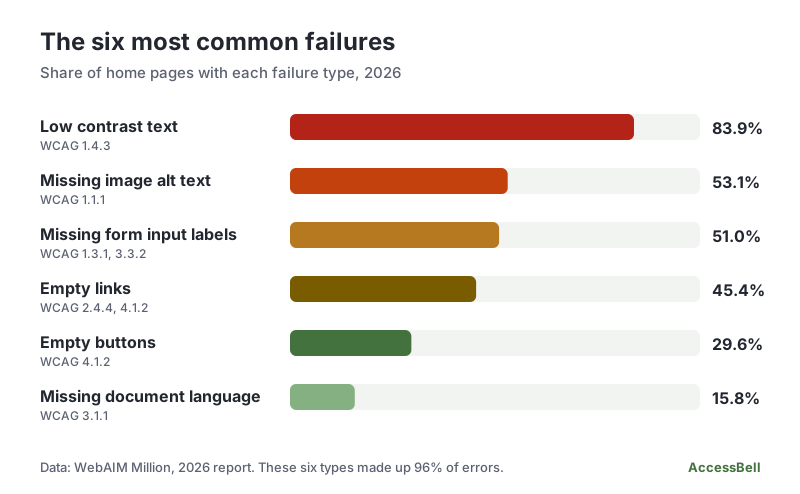
The same six kinds of error have led the WebAIM results for seven years in a row, and they account for 96% of everything detected. That concentration is good news: fix these six and you clear most of the problems on the page.
| Failure | Home pages | WCAG criterion | The fix |
|---|---|---|---|
| Low contrast text | 83.9% | 1.4.3 Contrast (Minimum) | Reach 4.5:1 for body text. Check with our contrast checker. |
| Missing image alt text | 53.1% | 1.1.1 Non-text Content | Describe informative images, and use empty alt for decorative ones. |
| Missing form input labels | 51.0% | 3.3.2 Labels or Instructions | Give every field a visible, connected label. |
| Empty links | 45.4% | 4.1.2 Name, Role, Value | Give icon and image links a text name. |
| Empty buttons | 29.6% | 4.1.2 Name, Role, Value | Give icon-only buttons an accessible name. |
| Missing document language | 15.8% | 3.1.1 Language of Page | Add lang to the html element. |
Low contrast text alone was found on 83.9% of pages, up from 79.1% in 2025, with an average of 34 instances per home page.
What the 2026 Numbers Tell Us
- The basics are still not done. Alt text, labels and contrast are among the oldest requirements in WCAG, yet each is missing on a large share of pages.
- The problem is concentrated. Because six types cause 96% of errors, a focused clean-up beats a scattergun approach.
- Most of it can be found automatically. These six are exactly what a scanner reports well. There is little excuse for shipping them, and continuous scanning stops them coming back.
- Automation is the floor, not the ceiling. Real usability, including keyboard access, meaningful alt text and clear content, still needs people to test. Our keyboard testing guide is a quick place to start.
- Standing still means falling behind. Errors per page rose 10.1% in a year, so sites that do not monitor tend to accumulate problems as content and code change.
Why Web Accessibility Matters in 2026
People. The World Health Organization estimates that 1.3 billion people, or 16% of the global population, experience a significant disability. Our stories of web users with disabilities show what the failures above feel like in practice.
Law. In the United States, the Department of Justice's rule for state and local government websites adopted WCAG 2.1 Level AA. In April 2026 the DOJ moved its compliance dates back a year, to April 26, 2027 for entities serving 50,000 people or more and April 26, 2028 for smaller ones, as summarised by Reed Smith. The requirements themselves did not change. Private businesses fall under Title III of the ADA, where the DOJ has said the ADA applies to websites but has not set a technical standard: see our guides to ADA Title III law for businesses and the ADA website compliance guide. In the European Union, the European Accessibility Act has applied since 28 June 2025, and our EN 301 549 checker tests against the related standard.
Business. Inaccessible pages lose customers, add legal risk and are harder to maintain. We look at one of the upsides in what impact web accessibility has on SEO.
How to Improve Web Accessibility on Your Site
- Measure. Run a free WCAG scan of your home page and two key journeys, such as checkout and contact.
- Fix the six. Start with contrast, alt text, labels, link and button names, and the language attribute. Most fixes are small template changes.
- Test by hand. Use only a keyboard, try a screen reader and check that nothing depends on color alone. Follow our WCAG 2 AA checklist.
- Publish a statement. Use our free accessibility statement generator to say what you support and how people can reach you.
- Monitor. New pages and plugins bring new errors. Start a 3-day free trial and AccessBell Pro rescans up to 500 URLs per domain every day and alerts you when something regresses.
Frequently Asked Questions
What is the present state of web accessibility in 2026?
Poor, and slightly worse than a year ago. The WebAIM Million found detectable WCAG 2 failures on 95.9% of the top one million home pages in 2026, up from 94.8% in 2025, with an average of 56.1 detected errors per page, up from 51.
Is web accessibility getting better or worse?
On this measure, worse. Both the share of pages with detected failures and the average number of errors per page rose between 2025 and 2026. Low contrast text became more common too, from 79.1% of home pages to 83.9%.
What are the most common web accessibility problems?
Six: low contrast text, missing image alt text, missing form input labels, empty links, empty buttons and a missing document language. Together they made up 96% of the errors WebAIM detected. All six can be found by an automated scan and fixed in code.
Is this AccessBell's own research?
No. This report summarises published data, mainly the WebAIM Million, and adds our own analysis and fixes. We did not scan these pages ourselves. Every figure names its source, and the sources are listed at the end of the report.
Does an automated scan find all accessibility problems?
No. The WebAIM figures come from automated detection, which finds only a portion of real problems. A page with no detected errors can still be hard to use, so pair automated scans with manual testing. See our guide to automated vs manual accessibility testing.
Sources and Further Reading
- The WebAIM Million: 2026 report on the accessibility of the top 1,000,000 home pages WebAIM
- Disability fact sheet World Health Organization
- DOJ extends digital accessibility compliance dates under Title II of the ADA Reed Smith
- Guidance on Web Accessibility and the ADA U.S. Department of Justice
- Web Content Accessibility Guidelines (WCAG) 2.2 W3C
- Evaluating Web Accessibility Overview W3C Web Accessibility Initiative
How we reviewed this report
- Current version
First published. Figures are from the WebAIM Million 2026 report, the World Health Organization disability fact sheet and reporting on the U.S. Department of Justice Title II compliance date extension. We did not run our own scan for this report.